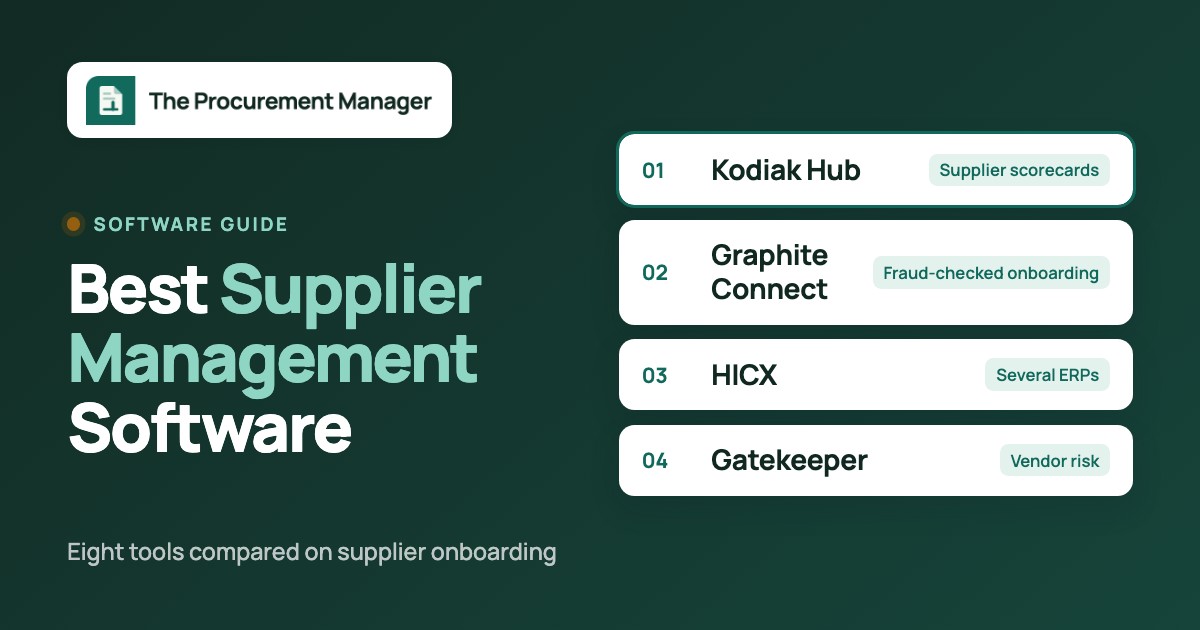
The best supplier management software depends on which problem you're fixing. If you need supplier scorecards and assessments on top of your ERP, look at Kodiak Hub. If fake or changed bank details are the risk, Graphite Connect validates supplier data before it reaches the vendor master. HICX fits enterprises that keep the same supplier in several ERPs, Gatekeeper fits teams that manage vendor risk and contracts together, and Precoro and Procurify add supplier approval to purchasing at mid-market scale. Coupa and SAP Ariba are the choice when supplier management is one module of a full source-to-pay rollout.
Supplier management software (often called vendor management software in the US) keeps one record per supplier, controls how new suppliers get approved, collects their tax, bank and compliance documents, and tracks performance and risk once they're live. We compared eight tools on the part that decides most purchases: how a new supplier gets from "we want to buy from them" to an approved, accurate record in your vendor master, and how that record stays current afterwards.
- Pick the scope first: supplier data control, strategic SRM and AP-side onboarding are different jobs, and most tools are strong at one of them.
- Kodiak Hub, Graphite Connect and HICX are specialist supplier tools. Precoro and Procurify add supplier approval to purchasing. Coupa and SAP Ariba are full suites.
- Only Precoro publishes a price. Graphite Connect has a starting price listed on Capterra, and the other six quote every customer.
- In every demo, change a supplier's bank details and watch what happens. That single test tells you more than the feature list.
Our picks by scope
Most teams shortlist the wrong tools because "supplier management" covers three different jobs. A finance team fighting duplicate vendors and payment fraud needs something different from a procurement team that scores 300 strategic suppliers every quarter. The picks below are grouped by the job each tool does best. Suppliers also answer your RFPs, and the tools for sending and answering them are covered in our RFP software comparison. Supplier lead times and minimum order quantities also feed the forecast, and the tools that use them are compared in our demand planning software guide.
 Best for supplier scorecards and assessmentsKodiak HubSelf-registration, assessment campaigns, risk screening and scorecards in one modular SRM layer.
 Best for fraud-checked onboardingGraphite ConnectSuppliers keep their own profile, and tax, bank and identity data is validated before it reaches the ERP.
 Best for one supplier record across several ERPsHICXDuplicate checks at request time and one governed master record fed to every ERP.
 Best for vendor risk tied to contractsGatekeeperOnboarding checks, a vendor portal and AI review agents in the same record as the contract.
 Best published price with supplier approvalPrecoroSupplier registration forms and approval workflows that block POs and invoices for unapproved suppliers.
 Best when new vendors arrive through purchase requestsProcurifyVendor requests start from the purchase request and run through their own approval routing.
 Best inside a Coupa source-to-pay rolloutCoupaSupplier portal, information requests and risk assessments next to buying and invoicing.
 Best for SAP-centric enterprisesSAP AribaRequest, registration and qualification questionnaires with an optional approval step in SAP MDG.
What is supplier management software?
Supplier management software centralizes supplier data, controls and automates supplier onboarding, and tracks supplier performance, risk and compliance across the supplier lifecycle. It replaces the spreadsheet, the shared inbox and the ERP vendor form that most companies start with.
Suppliers also need somewhere to log in, which is a separate product category. Our guide to the best vendor portal software compares what each tool lets suppliers do and what they pay.
Vendors in procurement are the businesses a company buys goods or services from, such as raw-material suppliers, contractors, software providers and service firms. In most US companies "vendor" and "supplier" mean the same thing, and the vendor master in the ERP holds one record per vendor with its tax ID, bank details and payment terms.
The software category splits into three scopes, though, and the right tool depends on which one hurts. Supplier information management, supplier relationship management and third-party risk management overlap, but each has a different owner and a different first problem:
| Scope | Problem it fixes | Usual owner | Tools here that lead with it |
|---|---|---|---|
| Supplier information management (SIM) | Duplicate suppliers, missing W-9s, unverified bank details, one supplier with different records in different systems | Finance, AP or master data team | HICX, Graphite Connect, Precoro, Procurify |
| Supplier relationship management (SRM) | Scorecards, assessments, sustainability and compliance questionnaires, corrective actions with strategic suppliers | Procurement, category managers, quality | Kodiak Hub, SAP Ariba, HICX |
| Third-party risk and vendor governance | Security and financial due diligence, certificates that expire, risk that changes after onboarding | Procurement with legal, IT security and compliance | Gatekeeper, Graphite Connect, Coupa |
Contingent workforce VMS tools such as SAP Fieldglass share the "vendor management" name but manage temporary staff and staffing agencies. They're clearly a different product class, and we haven't covered them here.
Supplier management software compared
The table shows each tool's job, what it hands off to the rest of your stack, price status and review rating as of October 21, 2026. Six of the eight don't publish a price, so the table says that instead of an estimate.
| Tool | Scope | What it hands off | Price status | Review rating |
|---|---|---|---|---|
| Kodiak Hub | Supplier relationship management (SRM) | Supplier self-registration, assessments, risk screening and scorecards on top of your ERP | Not published, quote only (modular SaaS licence) | 4.8 (Capterra, 14) |
| Graphite Connect | Supplier onboarding and data validation | Validated supplier profile, tax and bank data into the ERP | Not published by the vendor; Capterra lists a starting price of $25,000 per year, flat rate | 4.3 (Capterra, 26) |
| HICX | Supplier information management for multi-ERP enterprises | One governed supplier master record fed to every ERP | Not published, quote only | No reviews yet |
| Gatekeeper | Vendor and contract management | Hourly date triggers start a renewal review workflow, 90 days before the notice date by default | Not published, quote only, plans sized by number of third parties (Pro up to 250, Enterprise up to 750, Enterprise Plus 750+) | 4.5 (91) |
| Precoro | Procurement and AP for mid-sized teams | Requests, multi-step approvals with thresholds, POs and 3-way match | From $499 per month, billed annually (Core) | 4.8 (GetApp, 255) |
| Procurify | Mid-market procure-to-pay | Requests, threshold approvals, POs, receiving and bills | Custom quote, unlimited free Basic users | 4.6 (GetApp, 208) |
| Coupa | Enterprise spend management and procurement | Guided buying, prioritized approval chains, POs sent to suppliers | Custom quote, no public pricing | 7.2/10 (TrustRadius, 168) |
| SAP Ariba | Enterprise source-to-pay and sourcing | Sourcing events, buying and invoicing, SAP Business Network supplier collaboration | Price upon request, no public buyer rate | 3.8 (Capterra, 89) |
 The Procurement Manager Our product | Contract renewal decisions | Routes renewal reviews to the business owner, Finance and IT before the notice deadline | From $49 per month, flat, no per-seat fees (Starter, up to 50 contracts) | No reviews yet |
Ratings come from the review site we could read for each tool: Capterra for Kodiak Hub, Graphite Connect and SAP Ariba, G2 for Gatekeeper, GetApp for Precoro and Procurify, and TrustRadius (out of 10) for Coupa. Prices and ratings checked October 19 to 21, 2026.
Specialist supplier management and SRM platforms
Kodiak Hub, Graphite Connect and HICX do supplier management and nothing else. They sit next to your ERP or procurement suite, and the ERP stays the place where purchase orders and payments happen, which our guide to purchase order software covers. They're the strongest option when supplier data quality or supplier performance is the problem, but they're the weakest when you also need requisitions, POs and invoice matching in the same tool.
Kodiak Hub
Modular SRM platform that collects supplier data through self-registration and assessment campaigns and turns it into risk and performance scorecards.
Kodiak Hub is an SRM layer for procurement teams that want suppliers to register and assess themselves, and want that data to end up in risk and performance scorecards without a full source-to-pay project.
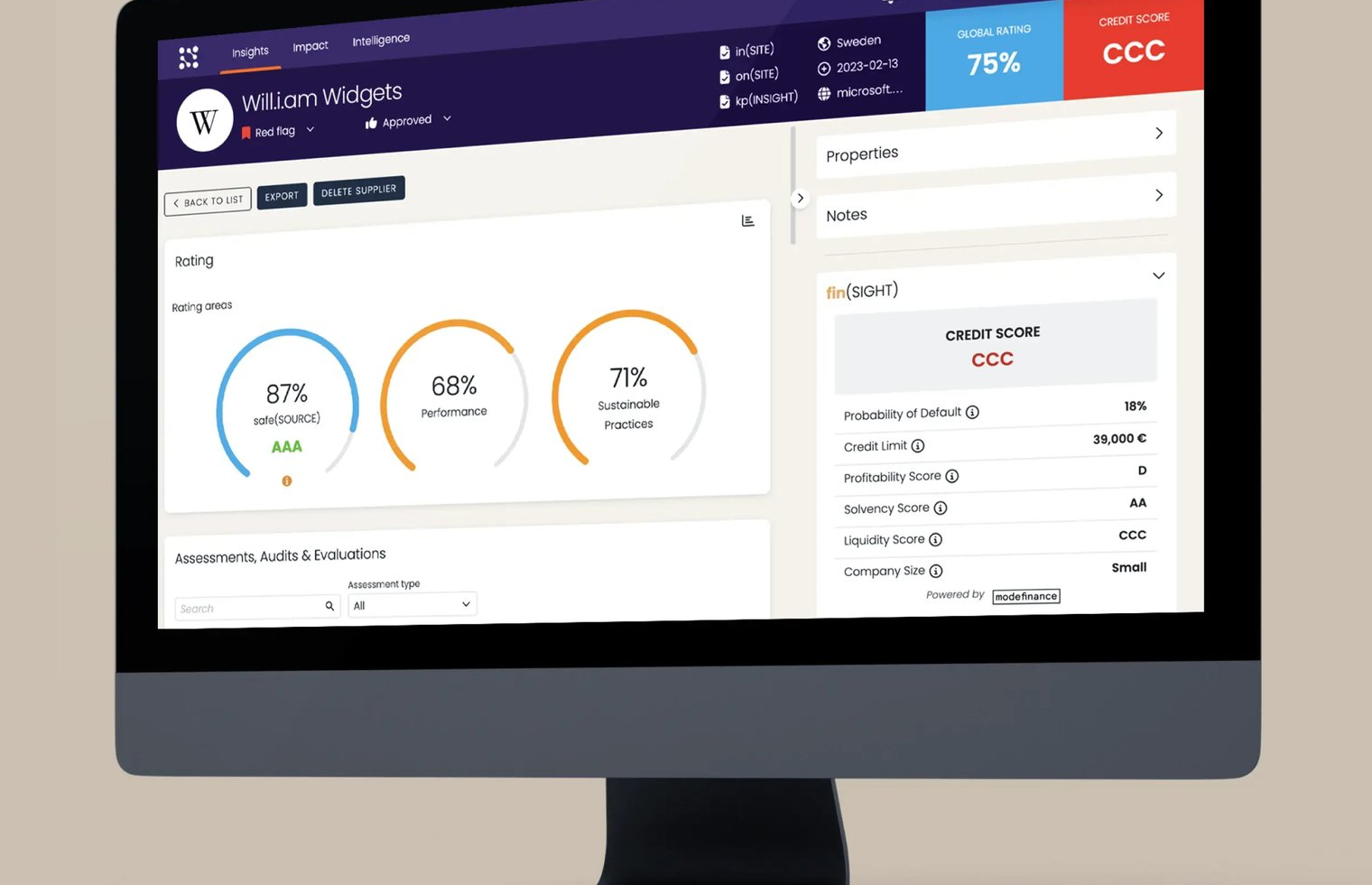
How a new supplier gets in. Onboarding runs through two modules. With sign(UP), you send a customizable self-registration form to a prospective supplier or embed it on your own website. The supplier enters company details, products or services, and uploads certificates and documents. Each submission creates a supplier record with its own scorecard, and the buyer gets a notification. The in(SITE) module then runs onboarding and self-assessment campaigns. You build the questionnaire with a template builder that includes a best-practice library, set your own KPIs and rating schemes, and Kodiak Hub rates the answers as they come in. The vendor says its assessments can cover 15 business and sustainability areas, including quality management, labor rights and product compliance.
What happens after approval. Risk screening runs in separate modules: macro and country risk, financial and credit ratings, sanctions and PEP screening, and adverse media. Contracts, SLAs and codes of conduct can be signed through a DocuSign-powered flow started from the supplier's scorecard. Performance is scored in kp(INSIGHT) on quality, delivery, commercial terms, collaboration, innovation and sustainability, with input from stakeholder evaluations, ERP data and the supplier itself.
- you want suppliers to register and answer assessments themselves, with sustainability and compliance questions built in
- your ERP or source-to-pay suite stays the system of record and you need an SRM layer for scorecards and risk on top
- you need a price before the first sales call: Kodiak Hub quotes a modular licence
- reporting is your main requirement, because several Capterra reviewers name it as the weakest part
- Users like
- Ease of use, all supplier data and documents in one place, and an easier ERP integration than older SRM platforms.
- Users dislike
- Reporting that isn't fully developed yet, module names some users find confusing, and, for one reviewer, a platform that's hard to customize.
- Source: Capterra, 14 reviews
Integrations and what reviewers say
Kodiak Hub says it pulls supplier data from ERP and source-to-pay systems, including Coupa and SAP Ariba, and pushes insights back. Its help center and training sit behind a login, so we couldn't check screen-level setup steps, and you'll want to see the ERP connector in the demo, not on a slide.
On Capterra, reviewers, including a food producer, say it was easier to integrate than their previous SRM platform and that it put all supplier data and documents in one place. One compared its flexibility favorably with SAP Ariba. The criticism is consistent but mild: reporting isn't fully developed yet, the module names confuse new users, and one reviewer found the platform hard to customize. On G2 it scores 4.4 out of 5 from 31 reviews.
- Starting price
- Not published, quote only (modular SaaS licence)
- Also on G2
- 4.4 out of 5 from 31 reviews
- Risk data
- Financial, sanctions and PEP, adverse media, country risk modules
Graphite Connect
Supplier onboarding network where suppliers maintain their own profile and Graphite validates tax, bank and identity data before it reaches the ERP.
Graphite Connect is built to check that a supplier asking to be paid really is the business it claims to be. It's the strongest pick here for AP and procurement teams with high new-vendor volume and real exposure to bank-detail fraud.
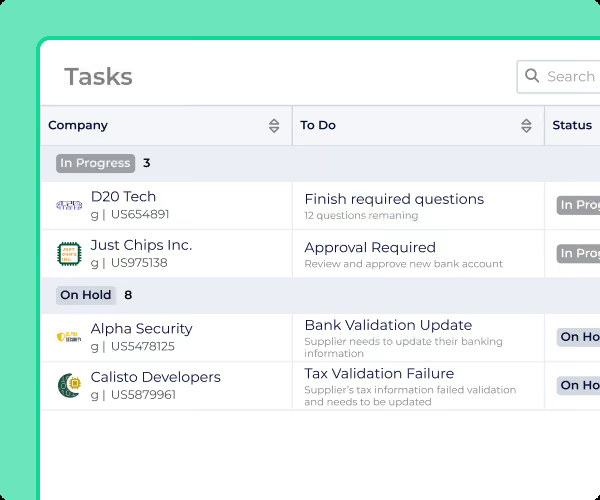
How a new supplier gets in. You build an onboarding flow from Graphite's question library and vary it by category (software, consultants, goods), supplier location, risk area and ESG requirements. The supplier gets an email invite, sets up a profile and can assign sections to the right people on its side, so the tax form doesn't wait for the person who knows the insurance details. Submissions run through identity, domain and phone verification, and AI with OCR compares uploaded documents with the entered TIN, EIN and company name. That catches W-8 and W-9 problems, a business name that doesn't match the DBA, and signs of payment diversion. Graphite also checks against OFAC lists and LexisNexis data. Your team gets an alert when a section is complete and can approve it or ask for more.
Where the record goes. Validated data moves into the ERP through Graphite's open API or its ERP connectors. Graphite says it has 50 or more ERP integrations, with dedicated pages for NetSuite, Oracle, SAP S/4HANA, SAP Ariba and Workday, and that ERP setup can take as little as two weeks.
- new-vendor volume is high and payment fraud through fake or changed bank details is a real risk
- AP and procurement both onboard vendors and you want one validated profile going into NetSuite, Oracle, SAP or Workday
- you want strategic SRM such as supplier development, audits or innovation programs
- your budget for onboarding software is well below the starting price Capterra lists
- Users like
- A registration flow suppliers find quick and easy, one place for every stakeholder in vendor onboarding, and responsive support.
- Users dislike
- Task statuses that don't make clear whose turn it is, and integration issues that can take a long time to resolve.
- Source: Capterra, 26 reviews
After onboarding and what reviewers say
Profiles don't go stale the moment they're approved. Graphite tracks outdated information and reminds suppliers, lets you ask legacy suppliers in bulk to update documents, and runs a risk scorecard with your own criteria. When a supplier crosses a threshold, an Action Plan assigns tasks internally and notifies the supplier. Suppliers already in the Graphite network can share their verified profile with a new buyer instead of starting over.
Capterra reviewers, mostly in AP and procurement operations at large companies, say suppliers find registration quick and that every stakeholder works in one place. The recurring complaints are task statuses that don't make clear whose turn it is, and integration problems that took a long time to fix. One reviewer said the contracts tab is confusing and there's no contract management layer, so plan on a separate contract tool.
- Starting price
- Not published by the vendor; Capterra lists a starting price of $25,000 per year, flat rate
- ERP connections
- NetSuite, Oracle, SAP S/4HANA, SAP Ariba, Workday, open API
- Users
- Unlimited
HICX
Enterprise supplier management platform built around one governed supplier master record that it feeds to several ERPs.
HICX is for large enterprises where the same supplier exists in several ERPs, business units or countries, each with its own record. It governs one supplier master record and feeds it to every system.
How a new supplier gets in. A requester starts a new-supplier request, and HICX checks for duplicates first, with duplicate rules you can set per supplier segment. That's the step that stops a second record for a supplier you already pay. The supplier is then invited to a self-service portal available in more than 100 languages. The questionnaire adapts to supplier type, category and country, so a small indirect supplier doesn't get the questions you'd ask a global manufacturer. Tax certificates, insurance and other documents are stored on the supplier and tracked to expiry. High-risk fields such as bank details, tax IDs, addresses and sanctions status can be checked against external sources with the HICX Origin add-on. Approvals route by supplier type, category, geography or legal entity through no-code workflows, and every check is logged.
Where the record goes. The approved record becomes the governed supplier master that HICX's Supplier Data Foundation keeps in sync across your ERPs and procurement systems.
- you run several ERPs or business units and the same supplier exists in each of them under different records
- duplicate suppliers and unverified bank details are the problem you need to fix first
- you're a small or mid-sized team that wants self-service setup and a price list
- you want peer reviews before you buy: G2 showed a single review when we checked

Performance, risk and reviews
After activation, performance scorecards use a standard KPI library with weighted pillars for quality, delivery, cost and sustainability. A scheduler creates scoring tasks, and a breached threshold opens a corrective action with an owner and a due date. Risk scores run continuously with alerts and can be enriched with Dun & Bradstreet, EcoVadis and sanctions data.
HICX doesn't publish documentation or a product tour with screen-level steps, so this description comes from its product pages. Public reviews are almost nonexistent: G2 showed one review at 3.5 out of 5 when we checked, which isn't enough to say anything about how it works in practice. Ask for two reference customers with your number of ERPs.
- Starting price
- Not published, quote only
- Data validation
- HICX Origin add-on: bank details, tax IDs, addresses, sanctions
- Supplier portal
- Self-service, 100+ languages
Vendor management tied to contracts and risk
Gatekeeper sits between the specialist tools and the procurement suites. It doesn't do purchase orders, but it keeps the vendor record, the risk checks and the contract in one place, which is why it also appears in our comparison of contract management software.
Gatekeeper
A platform that keeps vendor records, contracts, spend and renewals on one record, with date-based triggers that start a renewal review workflow with approvers and escalation.
Gatekeeper fits teams where onboarding a vendor means a risk review by several departments and the vendor record should stay attached to its contract and renewal.
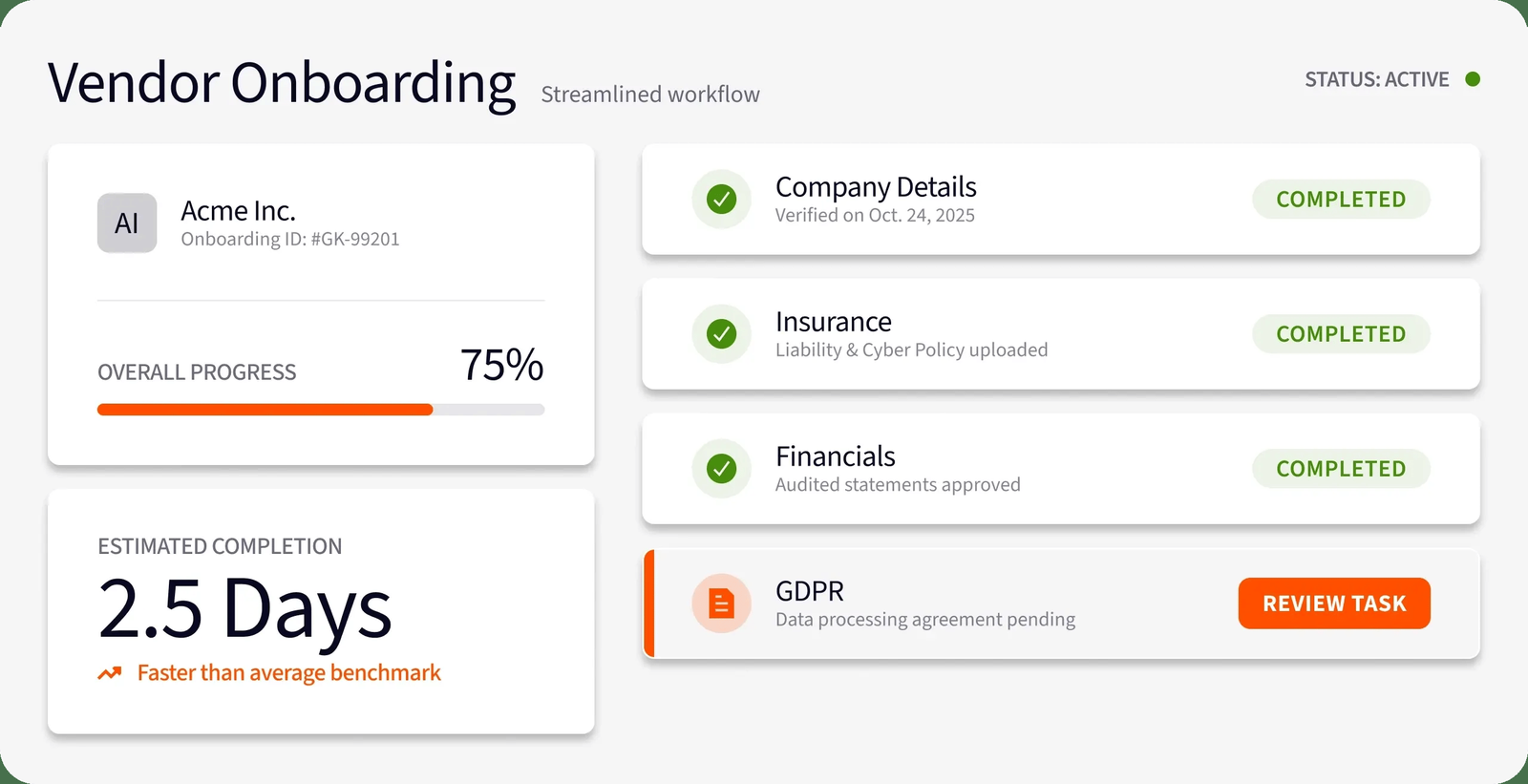
How a new supplier gets in. When a vendor enters Gatekeeper's onboarding queue, it runs identity verification, sanctions screening and duplicate detection against your existing vendors. Workflows route the vendor to the right teams by category and risk, with SLAs, reminders and escalations, and procurement, finance, legal and IT security each see only their own steps. The vendor works in a branded portal: guided tasks, forms, insurance certificates, certifications and policies, and structured questionnaires on topics such as data protection and financial stability. AI review agents for insurance certificates, due diligence questionnaires, SOC 2 reports and security policies chase missing items, score answers against your risk framework and flag inconsistencies, so your team reviews exceptions instead of every document. Each vendor gets a red, amber or green risk rating, and every check and approval is logged.
Where the record goes. Gatekeeper syncs vendor records, contracts and spend both ways with NetSuite and lists connections to Workday, Dynamics 365, Sage Intacct, QuickBooks, Xero and ServiceNow, among others.
- onboarding a vendor means security, legal and finance reviews, and you want them in one routed workflow
- the vendor record, its risk rating and its contract renewal should live in the same system
- you need purchase orders and invoice matching: Gatekeeper doesn't handle them
- you'll want scorecards on the entry plan: balanced scorecards start with Enterprise
- Users like
- a user-friendly interface and efficient contract processing, per G2's summary of reviews
- Users dislike
- limited customization and slowdowns with larger data sets, per the same summary
- Source: G2, 91 reviews
Plans, monitoring and what reviewers say
Plans are sized by the number of third parties you manage: Pro covers up to 250, Enterprise up to 750 and Enterprise Plus more than 750, all with unlimited users and contracts. After onboarding, a risk register and credit data (MarketIQ Lite) are included on every plan, while full financial-health and cyber-rating monitoring (MarketIQ Full) is billed by usage. Balanced scorecards collect stakeholder ratings through scheduled surveys.
G2 reviewers like the interface and how quickly contracts move through it. The complaints are limited customization and slowdowns with larger data sets.
- Starting price
- Not published, quote only, plans sized by number of third parties (Pro up to 250, Enterprise up to 750, Enterprise Plus 750+)
- Pricing
- Quote only, by third-party count
- Plan tiers
- Pro (250), Enterprise (750), Enterprise Plus (750+)
- Default renewal triggers
- 90 days before notice date and end date
Procurement suites with a supplier module
Precoro and Procurify are purchasing tools first. Their supplier features don't try to manage relationships. They're there to make sure nobody raises a PO or pays an invoice to a supplier that hasn't been approved. That's often all a mid-market company needs, and it comes with requisitions and approvals you'd otherwise buy separately. If purchasing is your bigger gap, our guide to purchase requisition software covers both tools from that side, and our procure-to-pay software comparison shows how they match invoices and pay suppliers.
Precoro
Procurement and AP automation for small and mid-sized companies, with published plan prices and per-approver amount thresholds.
Precoro gives mid-sized teams a supplier approval step that actually blocks spending, at a price that's published, as long as you're on the plan that includes supplier onboarding.
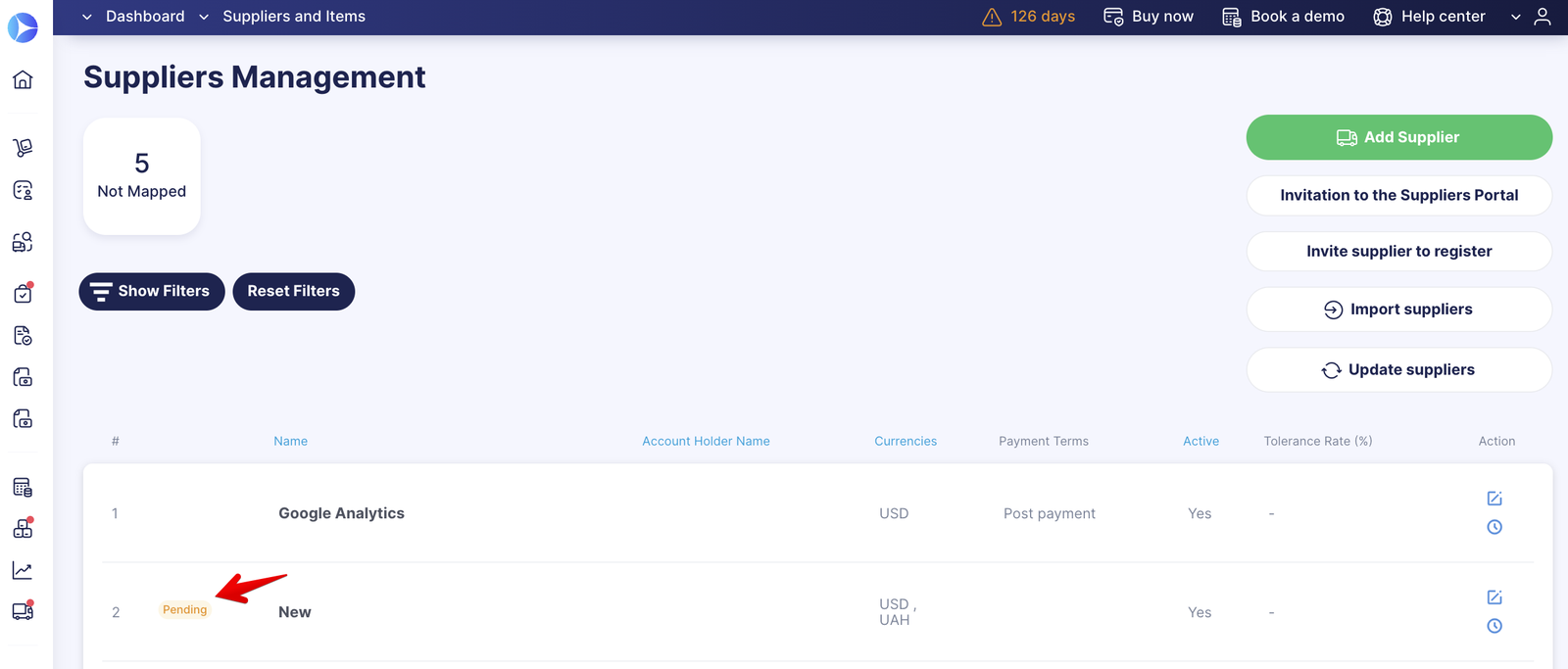
How a new supplier gets in. A buyer opens Supplier Management and sends the supplier an invitation to register. The supplier fills in a customizable registration form, where you decide which fields are mandatory (legal address and bank account number, for example), and attaches documents and notes. You approve it, reject it or send it back for changes, and both sides get email notifications. Admins build a supplier approval workflow with steps and approvers, and several workflows can run in parallel when legal or finance also have to sign off. A supplier is Pending, Approved or Rejected, and that status has teeth: requisitions, purchase orders and invoices can't be confirmed for a supplier that isn't approved. Editing the supplier's name, unique code or bank details sends it back for approval, which is the control that stops a quiet bank-detail change.
Where the record goes. Approved suppliers and their documents sync to QuickBooks Online, Xero or NetSuite. Unapproved ones don't.
- you want supplier approval to block POs and invoices for unapproved suppliers, without buying a separate tool
- a published price matters, and you're fine with the Automation plan that includes vendor onboarding and the supplier portal
- you need supplier scorecards or risk monitoring: Precoro doesn't describe a rating model
- you plan to stay on Core: the supplier portal and vendor onboarding and approval are listed under Automation
- Users like
- Fast approvals, remaining budget visible while requesting, and responsive support.
- Users dislike
- A thin inventory module and a mobile app that handles approvals well but little else.
- Source: GetApp, 255 reviews
Supplier portal, integrations and reviews
On the Automation plan, the supplier portal lets vendors upload documents, update catalogs, answer RFPs, receive purchase orders and submit invoices, and Precoro's supplier page mentions alerts for expiring certificates. The help-center screenshots of the approval feature date from 2023, so ask for a live walkthrough. Besides the accounting sync, Precoro lists BILL for payments, an API and PunchOut catalogs.
GetApp reviewers praise fast approvals, budget visibility while requesting and responsive support. Their complaints are about other parts of the product, mainly a thin inventory module and a mobile app that handles approvals well but little else.
- Starting price
- From $499 per month, billed annually (Core)
- Next tier
- Automation, from $999 per month billed annually
- Accounting sync
- QuickBooks Online, Xero, NetSuite, Sage Intacct, Business Central
Procurify
Procure-to-pay platform for mid-market teams, with unlimited requesters and approvals routed by department, account code or dollar value.
Procurify treats a new vendor as a by-product of buying: when a requester can't find the supplier they need, the vendor request starts from the purchase request and goes through its own approval.
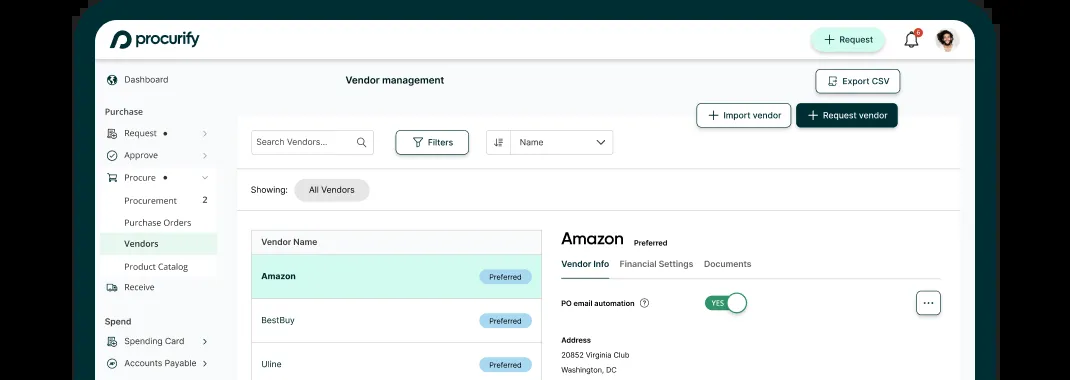
How a new supplier gets in. A requester who can't find a supplier picks OTHER as the vendor on the order request. A purchaser then clicks Request new vendor on that request, or goes to Procure, Vendors, Request vendor, enters the vendor details and a reason, and submits it for approval. Admins switch this on under Settings, Manage Approval Routing, Vendors tab, and set the approvers and levels. One detail matters for controls: vendors created by CSV import or through a direct integration skip approval and are added automatically, so lock down who can import.
Where the record goes. Vendor records hold contacts, payment methods and a preferred-vendor flag, and documents such as W-9s, service agreements and contracts are stored on the vendor. Records sync with QuickBooks, NetSuite, Sage Intacct or Microsoft Dynamics 365 Business Central.
- most new vendors appear because someone wants to buy from them, and you want that request to trigger the vendor approval
- many occasional requesters need access, because Basic users don't count toward the price
- you need a supplier self-service portal, expiry tracking or risk monitoring: we couldn't confirm any of them on Procurify's pages
- you need a published price before you talk to sales
- Users like
- An intuitive interface and mobile apps, and an easy path from a request to the person who has to approve it, plus temporary approver delegation.
- Users dislike
- Integration and customization limits, including requests for easier QuickBooks export and for switching requisition items to catalog items before the PO is cut.
- Source: GetApp, 208 reviews
Performance reporting and reviews
Procurify's vendor management page mentions vendor performance reports and customizable dashboards, but it doesn't describe a scorecard model, so treat performance as spend reporting rather than supplier ratings. Vendors are part of the base Purchasing product. Contracts is a paid add-on, and AP and Expense and Card are separate products.
GetApp reviewers like the interface and the mobile apps, and say requests reach the right approver easily. The complaints are integration and customization limits, including an easier QuickBooks export.
- Starting price
- Custom quote, unlimited free Basic users
- Request types
- Order, Expense, Travel, Funds
- Accounting sync
- QuickBooks, NetSuite, Sage Intacct, Business Central
Enterprise source-to-pay suites
Coupa and SAP Ariba include supplier management as part of a much larger source-to-pay suite. Buying them for supplier management alone rarely makes sense, though. If you already run one of them, their supplier modules are usually the first thing to switch on before you add a specialist tool. For supplier management, Coupa vs SAP Ariba comes down to where your vendor master lives and where your suppliers already work. Coupa puts onboarding tasks and information requests into the Coupa Supplier Portal that suppliers also use for POs and invoices. SAP Ariba runs a formal request, registration and qualification sequence and can hand supplier updates to SAP MDG for approval, which suits companies whose master data is governed in SAP. We've covered Coupa in more depth in our Coupa review and on Coupa pricing.
Coupa
Enterprise source-to-pay suite whose requisitions run through guided buying, punchout and prioritized approval chains with budget meters.
Coupa's supplier management works best when suppliers already use the Coupa Supplier Portal to receive POs and send invoices, because supplier updates then happen in the same place suppliers already work.
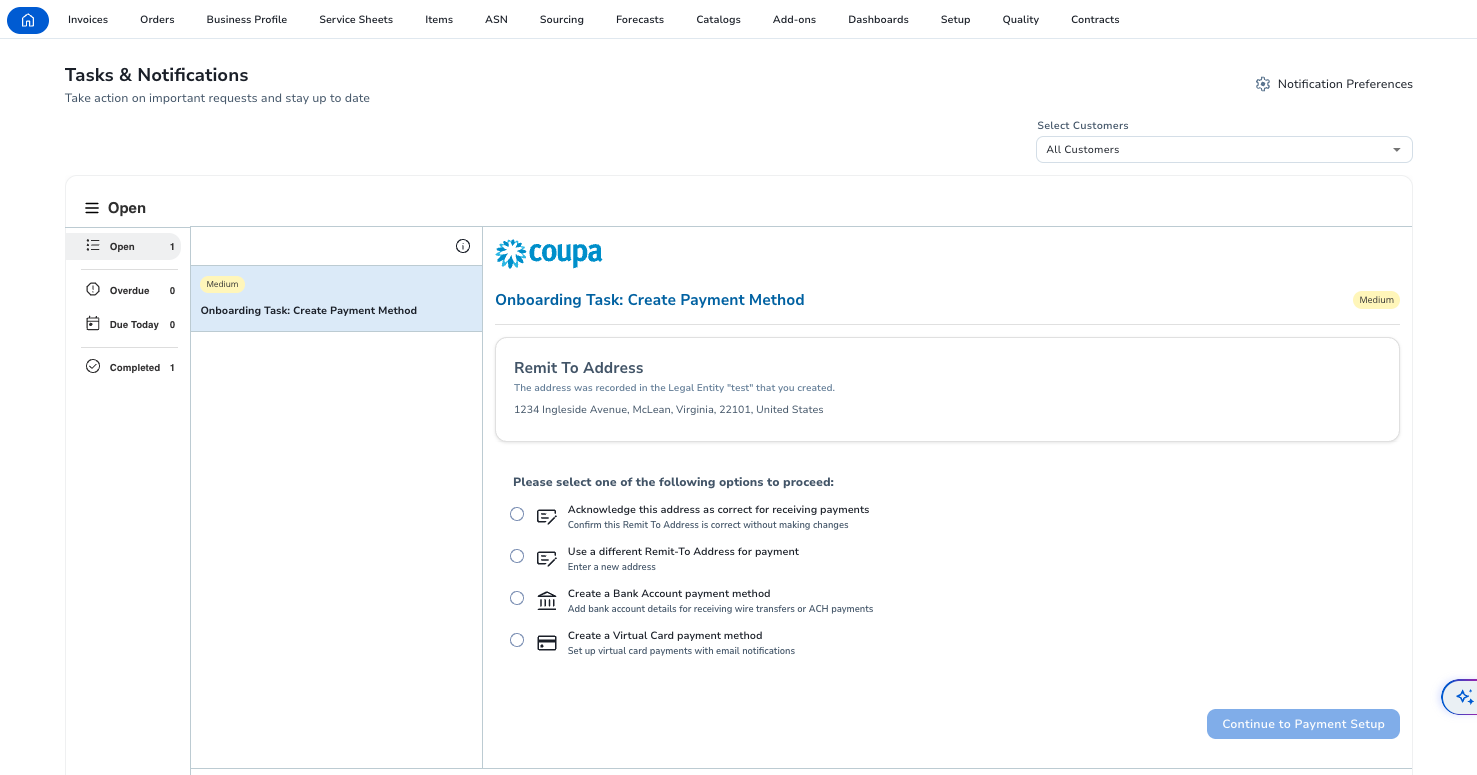
How a new supplier gets in. A buyer requests or registers a supplier through a Coupa form with configurable workflows. Before the request is submitted, the requester sees risk flags and potential duplicates from the supplier master, which stops many duplicate records at the source. The supplier gets an invitation email, creates an account in the Coupa Supplier Portal (CSP) and completes the onboarding screens with legal entity, payment details, tax ID and DUNS number. When you need more, you send an Information Request: the supplier opens it in the portal, completes the form and submits it for your approval, and the approved form updates the supplier record. Coupa's public pages don't describe how the approved record reaches your ERP's vendor master, so have the integration shown in the demo.
What happens after approval. Invoices with missing supplier information can trigger an automatic warning or be blocked until the supplier completes the missing fields. Coupa's Supplier Risk and Performance module runs risk assessments across domains such as information security, anti-bribery and anti-corruption and GDPR, and uses outside data sources and user feedback to flag changes, with recommended next steps such as putting a high-risk supplier on hold.
- you already run Coupa for buying and invoicing, and suppliers already use the Coupa Supplier Portal
- you want risk assessments and supplier updates enforced at invoice submission
- you only need supplier management: it's sold as a module of a quote-only suite
- your suppliers are small and won't log in to one more portal, a complaint that comes up in reviews
- Users like
- Approval routing and spend compliance for indirect buying, with clear purchase limits per person.
- Users dislike
- Heavy integration work with ERPs such as SAP, and a supplier portal that confuses vendors asked to create profiles.
- Source: TrustRadius, 168 ratings
Supplier diversity and reviews
The supplier module also gives access to a database of more than 2 million certified minority-, women-, veteran- and LGBT-owned suppliers and tracks spend with diverse suppliers.
TrustRadius reviewers like Coupa's approval routing and spend compliance for indirect buying. On the supplier side, they report heavy integration work with ERPs such as SAP and a supplier portal that confuses vendors who are asked to create profiles.
- Starting price
- Custom quote, no public pricing
- Standard supplier portal
- Free for suppliers
- Buyer-side platform
- No verified public universal USD rate
SAP Ariba
SAP's source-to-pay suite covering sourcing events with scoring and award simulation, buying and invoicing, contracts and supplier collaboration through SAP Business Network.
SAP Ariba Supplier Lifecycle and Performance (SLP) is the supplier module of SAP's source-to-pay suite, and it's at its best when the vendor master lives in SAP and master data governance already runs there.
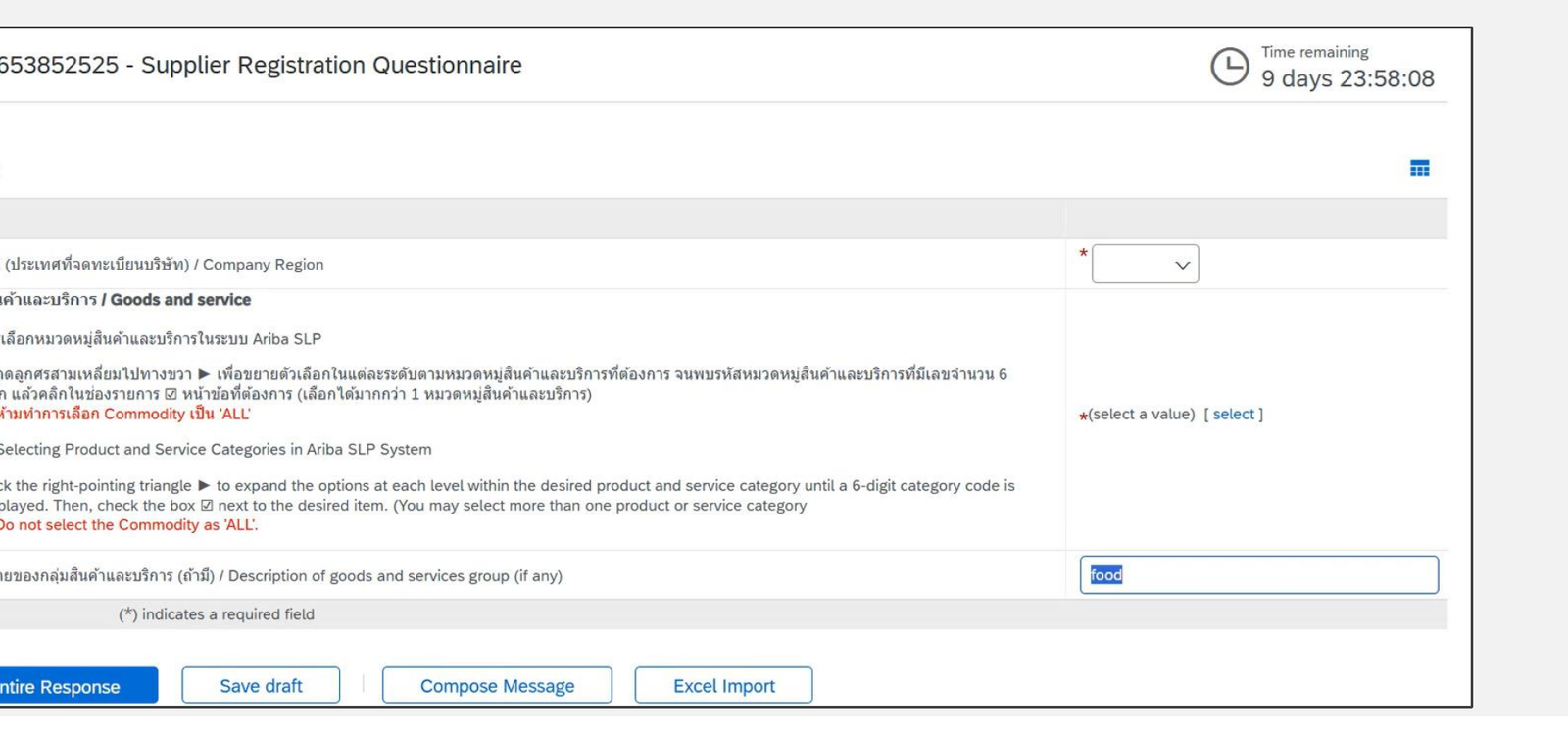
How a new supplier gets in. SLP splits onboarding into request, registration and qualification. A supplier request starts internally or, if you allow it, from a prospective supplier, and an approver signs it off. The supplier then gets an email invitation, logs in to SAP Ariba and completes the registration questionnaire. Mandatory questions are marked, and the supplier picks its product and service categories from a commodity tree. Customer guides show registration collecting company details, legal documents and tax identification numbers. The questionnaire moves to Pending Approval and then Approved, and a separate qualification questionnaire assesses the supplier for specific categories. A disqualification workflow covers suppliers you want to stop using.
Where the record goes. With external ERP approval switched on, supplier updates go from SLP to SAP Master Data Governance for Suppliers (MDG-S), where a vendor administrator accepts, changes or rejects them, and the current record is sent back to SLP.
- the vendor master lives in SAP and MDG-S already governs supplier data
- you need qualification by category and a formal disqualification process
- you want a published price or a quick rollout
- your ERP isn't SAP: SAP says SLP's integrations are strongest with SAP Ariba and other SAP systems
- Users like
- Deep integration with SAP ERP and supplier collaboration, sourcing and contracts in one suite.
- Users dislike
- An interface reviewers call dated and hard to learn, and high implementation, customization and maintenance costs.
- Source: Capterra, 89 reviews
Performance, monitoring and reviews
After onboarding, scorecards use weighted scoring per question and can be scoped to a business unit or region, with a benchmark view across suppliers. SAP adds AI-generated supplier summaries and monitors certificate and contract expiry dates, and the Supplier 360 profile shows risk and compliance in one view. SAP says integrations are strongest with other SAP Ariba and SAP systems.
Capterra reviewers like the integration with SAP ERP and having supplier collaboration, sourcing and contracts in one suite. The complaints are an interface that several call dated and hard to learn, and high implementation, customization and maintenance costs. Our strategic sourcing software comparison covers the sourcing side of suites like this one, from RFx events to the award.
- Starting price
- Price upon request, no public buyer rate
- Buying and Invoicing pricing
- Price upon request, priced on processed spend
- Standard supplier account
- Free on SAP Business Network
- Enterprise supplier account
- Fixed subscription fee plus transacted volume
Who does what when you onboard a new supplier
Each of the eight tools automates part of the same supplier onboarding sequence. The timeline shows who usually owns each step and when it happens, so you can check during a demo that the tool supports your owners and not just a generic flow. The timings are a typical pattern, not a rule.
- RequesterSubmits the new-supplier request with the reason, category and expected spend, after searching the vendor master for an existing record Day 0
- ProcurementChecks for duplicates and existing contracts, and picks the questionnaire by category, country and risk Day 0 to 1
- SupplierCompletes the registration in the portal: legal entity, tax ID with a W-9 (or W-8 for a foreign supplier), bank details, insurance and certificates Days 1 to 5
- Finance and APVerifies tax ID and bank details against the documents, and confirms bank details by calling a number you already have on file Before approval
- IT security and legalReview the security questionnaire or SOC 2 report and the data processing terms for suppliers that handle your data In parallel
- ProcurementApproves the supplier, the record syncs to the ERP vendor master, and document expiry dates and the review cycle are set At approval
- Business ownerRates the supplier on a schedule and flags problems before the contract's notice deadline Quarterly
How to choose supplier management software
To choose supplier management software, run one real supplier through each shortlisted tool, from request to an approved record in your ERP. Most selection mistakes happen when a team buys on scorecards and dashboards and only later finds out that onboarding still runs in email. On paper the eight tools look alike, but they differ on the six points below.
- Scope. Decide whether your problem is supplier data (SIM), supplier performance (SRM) or third-party risk. A suite that does all three at an average level can be worse than one specialist tool and your ERP.
- Duplicate prevention. Check where the tool looks for an existing supplier: at request time (HICX, Coupa), at onboarding (Gatekeeper) or not at all. Duplicates caught after approval are much harder to clean up.
- Bank and tax validation. Ask whether bank details and TINs are validated against an outside source or only collected. Graphite Connect and HICX (with Origin) validate. Most others store what the supplier types.
- Vendor master sync. Name your ERP and ask whether the connector is native, an API project or a file export, and whether only approved suppliers sync. Precoro syncs approved suppliers only, and Procurify adds imported vendors without approval.
- After onboarding. Look at what keeps the record current: expiry reminders, periodic re-assessment, risk feeds and scorecards. Kodiak Hub, HICX, Gatekeeper (Enterprise and up) and SAP Ariba have scorecards. Precoro and Procurify don't describe one.
- Pricing unit. Count your suppliers, users and modules before you ask for a quote. Gatekeeper prices by third parties, Procurify by Pro users, and Kodiak Hub, HICX and Coupa by modules.
How long does supplier management implementation take?
Supplier management implementation usually takes weeks for the ERP connection and months for the full rollout, because questionnaires, approval rules and supplier invitations take longer than the software setup. The few published figures come from vendors and review sites, and they're listed below.
- Graphite Connect says ERP setup can take as little as two weeks.
- Kodiak Hub says customers reach a first milestone in an average of 14 days, while G2 reviewers report an average implementation time of 3 months.
- Procurify reviewers on G2 report an average implementation time of 2 months.
- Gatekeeper says its best-practice workflows can be deployed in days, and every plan includes two of them.
HICX, Coupa and SAP Ariba don't publish a timeline on the pages we read. For those, ask for a project plan with named phases in writing, and count the time your suppliers need to complete registration, which no vendor controls.
What to test in a demo
- Request a supplier that already exists under a slightly different name and see whether the tool catches it
- Have a test supplier complete registration on a phone, including a W-9 upload
- Change the test supplier's bank details and check that it goes back to approval
- Show the approved record arriving in your ERP vendor master, live, not on a slide
- Let a certificate expire and see who gets told and what gets blocked
- Run one quarterly scorecard with three internal reviewers
- Export the full supplier list with status, documents and risk rating
- Ask what's included in the quote and what's an add-on: risk data, portal, scorecards, integrations
A supplier scorecard you can start with
Supplier performance management only works when every KPI has a data source you already own. Start with five to eight measures, and don't add more until someone acts on the ones you've got. The table below is a starting set for indirect and direct suppliers.
| KPI | How to measure it | Where the data comes from |
|---|---|---|
| On-time delivery | Share of PO lines received by the promised date | ERP purchase orders and goods receipts |
| Quality | Rejected or returned units divided by units received | Receiving and quality records |
| Invoice accuracy | Share of invoices that match the PO and receipt on the first pass | AP three-way match |
| Price compliance | Invoiced unit price compared with the contract price | Contract and invoices |
| Responsiveness | Days to answer questionnaires, quotes and corrective actions | Supplier portal |
| Document compliance | Share of required certificates and insurance that are current | Supplier record |
| Risk signals | Changes in financial, sanctions or cyber ratings since the last review | Risk data feed |
| Business owner rating | Quarterly 1 to 5 rating with a one-line reason | Stakeholder survey |
Put the scorecard review in the same calendar as your contract reviews. A supplier with a poor quality score and a contract that auto-renews next quarter is the most expensive combination on the list. Our contract renewal checklist shows how to line those dates up.
How much does supplier management software cost?
Supplier management software is mostly sold by quote, and only one of the eight tools here publishes a price. Precoro's Core plan starts at $499 per month billed annually, but vendor onboarding and approval and the supplier portal are listed on the Automation plan, which starts at $999 per month billed annually. Graphite Connect doesn't publish a price, while Capterra lists a starting price of $25,000 per year. Kodiak Hub, HICX, Gatekeeper, Procurify, Coupa and SAP Ariba all quote each customer, so you can't compare them until you've requested quotes for the same scope.
The pricing units differ more than the entry prices, and they decide the bill in year two:
- Number of suppliers or third parties. Gatekeeper's plans are sized at up to 250, up to 750 and more than 750 third parties.
- Modules. Kodiak Hub sells modules separately, HICX sells Origin data validation as an add-on, and Coupa sells Supplier Risk and Performance as its own module.
- Users. Procurify prices by Pro users and leaves Basic requesters free. Gatekeeper and Graphite Connect include unlimited users.
- Risk data. Gatekeeper's full financial-health and cyber-rating monitoring is billed by usage. Third-party data such as Dun & Bradstreet or EcoVadis usually needs its own subscription.
- Integration. ERP connectors and implementation services are often quoted separately from the licence.
Is there free supplier management software for a small business?
None of the eight tools in this comparison publishes a free plan. For a small business with a few dozen suppliers, a free setup usually means a shared spreadsheet or a low-code template, and Zoho Creator markets a vendor management app template as free. That works as a supplier list with contacts, documents and ratings, but it won't block a payment to an unapproved supplier or validate a bank account.
Small businesses that outgrow the spreadsheet usually get more from a purchasing tool with a supplier approval step than from a specialist SRM platform. Precoro (on its Automation plan) blocks POs and invoices for unapproved suppliers, Procurify routes new vendor requests through approval, and both sync to QuickBooks. The specialist platforms in this list are built for companies with hundreds or thousands of suppliers.
Supplier management vs third-party risk management
Third-party risk management (TPRM) assesses and monitors the risk a vendor brings, such as security, privacy, financial, compliance and reputational risk, while supplier management covers the whole supplier record, from onboarding and documents to performance. TPRM is a part of supplier management, and for software and service vendors it's often the biggest part.
The best TPRM tool depends on the risk you need to cover. For security and privacy due diligence on software vendors, Gatekeeper's review agents for SOC 2 reports, security policies and questionnaires come closest to a dedicated TPRM platform in this list. For payment fraud and identity risk, Graphite Connect's validation is stronger. Coupa and Kodiak Hub run risk assessments and screening inside a broader supplier module. If you assess hundreds of software vendors a year, it's still worth comparing a dedicated TPRM platform with these.
Supplier records don't decide renewals
Supplier management software tells you how a supplier performs and what risk it carries. It doesn't decide whether you renew its contract. That decision has a deadline, the contract's notice date, and it needs input from people who don't work in the supplier tool: the business owner who uses the service, Finance with the budget and IT with the security and overlap view. When nobody collects those answers in time, the contract renews by default, whatever the scorecard said.
The Procurement Manager handles only that step. It isn't a supplier management tool and doesn't run onboarding, a vendor portal or purchase orders. It routes each renewal to the business owner, Finance and IT before the notice deadline and records the decision to renew, renegotiate or cancel.
Supplier management software FAQ
What is the best supplier management software?
The best supplier management software depends on your scope. Kodiak Hub is strong for supplier scorecards and assessments, Graphite Connect for fraud-checked onboarding, HICX for one supplier record across several ERPs and Gatekeeper for vendor risk tied to contracts. Precoro and Procurify suit mid-market teams that want supplier approval inside purchasing, and Coupa and SAP Ariba suit companies already running those suites.
What is the difference between supplier management and vendor management software?
There's no real difference between supplier management and vendor management software in most US companies. Both terms describe tools that onboard, approve and monitor the businesses you buy from. The exception is contingent workforce VMS, such as SAP Fieldglass, which manages temporary staff and staffing agencies.
Is there free supplier management software?
None of the eight tools in this comparison publishes a free plan. Small businesses often start with a spreadsheet or a low-code template such as the vendor management app that Zoho Creator markets as free. Those keep a supplier list but don't block payments to unapproved suppliers or validate bank details.
What is the best supplier management software for a small business?
For a small business, a purchasing tool with a supplier approval step usually fits better than a specialist SRM platform. Precoro's Automation plan adds vendor onboarding, approval and a supplier portal, and Procurify routes new vendor requests through approval in its base product. Both sync to QuickBooks.
Does supplier management software integrate with my ERP?
Most supplier management software integrates with common ERPs, but the depth varies. Graphite Connect lists NetSuite, Oracle, SAP S/4HANA, SAP Ariba and Workday, Gatekeeper has a two-way NetSuite sync, Precoro syncs approved suppliers to NetSuite, QuickBooks Online and Xero, and SAP Ariba connects to SAP MDG for suppliers. Ask to see your own ERP connection in the demo.