The best contract management software depends on whether you're mostly tracking vendor contracts that are already signed or drafting and signing contracts inside the tool. For tracking, ContractSafe, ContractWorks and Gatekeeper put dates and alerts first. For drafting, Juro, SpotDraft, Concord and Contractbook are stronger, and Zoho Contracts is the budget pick with a published price.
Contract management software stores signed agreements in one searchable place, pulls out the dates and terms that matter, and alerts the right people before a renewal or notice deadline passes. Many tools add drafting, approvals and e-signature on top. This page compares eight of them on what procurement and operations leads ask before they buy: which prices are public, how each renewal reminder's really set, what reviewers complain about, and who shouldn't buy each tool. If you're after the heavier enterprise suites, our contract lifecycle management software comparison covers those.
- contract management tools compared
- 8
- publish a price you can budget with
- 3
- G2 and Capterra reviews behind the ratings
- 613
Best contract management software at a glance
Choose by the job first. If renewals slip because nobody sees the notice date, start with the repository tools. If your team writes the contracts, start with the drafting tools, but check how well their reminders cover vendor paper, because that's where they differ most.
 Best for AI-found renewal datesContractSafeThe AI suggests renewal and notice dates, you confirm them, and reminders can go to anyone, including people without a login.
 Best for vendor risk next to contractsGatekeeperDate triggers start a renewal review workflow with approvers, and vendor records, spend and contracts live on one record.
 Best for a low published priceZoho ContractsA free plan covers three users, and paid plans start at €25 per user per month.
 Best for drafting and signing at a US list priceConcordPlans run from $499 per month with five users, e-signature and a weekly deadline email included.
 Best if procurement runs on CoupaSpotDraftContracts can start in Coupa, and effective dates and renewal terms sync back.
 Best for multi-step reminders on templatesJuroEach date field takes up to five reminders, for example 90, 60 and 30 days before a renewal.
 Our product · for the renewal decisionThe Procurement ManagerIt isn't contract management software. It routes each renewal to the business owner, Finance and IT before the notice deadline.
Contract management software compared
Prices are as shown on each vendor's site on October 19, 2026. Three vendors publish an amount and the rest want you to ask for a quote, so the table shows each vendor's price status instead of our estimate.
| Tool | Category | Renewal handling | Price status | Review rating |
|---|---|---|---|---|
| ContractSafe | Contract repository with AI dates | AI-suggested renewal and notice dates, reminders to any email address, Autorenew roll-forward | Starts at $450 per month billed annually (Organize), $660 Finalize, $815 Maximize; priced by active contract volume, unlimited users | 4.7 (132) |
 ContractWorks ContractWorks | Contract repository with alerts | AI date tagging, milestone alerts and a notification calendar | Not published, three plans billed annually with unlimited users | 4.7 (Capterra, 100) |
| Gatekeeper | Vendor and contract management | Hourly date triggers start a renewal review workflow, 90 days before the notice date by default | Not published, quote only, plans sized by number of third parties (Pro up to 250, Enterprise up to 750, Enterprise Plus 750+) | 4.5 (91) |
| Zoho Contracts | Low-cost CLM in the Zoho suite | Renewal reminders, obligations tab and approval workflows per contract type | Free for up to 3 users. Paid plans from €25 per user per month billed annually on Zoho's site (Capterra lists US$25) | 4.5 (Capterra, 6) |
| Juro | Browser-based contract workflow | Date smartfields with up to five reminders each, such as 90, 60 and 30 days before | Not published, quote only, annual billing with unlimited users, workflows and templates | 4.8 (Capterra, 47) |
| SpotDraft | Contract management with Coupa sync | Reminders on obligation tasks (beta), scheduled renewal reports and Coupa sync of renewal terms | Not published, quote only, priced by users or contract volume, implementation included | 4.8 (Capterra, 26) |
| Concord | Contract management with e-signature | AI-filled termination-notice deadline, weekly Monday digest with a 120-day window | From $499 per month billed annually (Essentials, 5 users); Business $899, Enterprise $1,299; extra users $49 to $89 per month | 4.2 (133) |
 Contractbook Contractbook | Contract automation with AI import | AI-extracted renewal and expiry dates, tasks and reminders on obligation dates | Not published for US buyers, team plans by quote; a 14-day free trial and a limited free plan are offered | 4.7 (Capterra, 78) |
| The Procurement Manager Our product | Contract renewal decisions | Routes renewal reviews to the business owner, Finance and IT before the notice deadline | From $49 per month, flat, no per-seat fees (Starter, up to 50 contracts) | No reviews yet |
Ratings come from G2 for ContractSafe, Gatekeeper and Concord, and from Capterra for the other five, because G2 pages weren't readable when we checked. Checked October 19, 2026.
What contract management software does
Contract management software keeps every signed agreement in a searchable repository, reads the key dates and terms out of it, and reminds the right people before those dates arrive. The core's the same in every tool on this page: a repository, date and obligation tracking, alerts, reports and access permissions. What changes is how much happens before signature.
Three terms get mixed up, so here's how they differ:
- Contract management software covers the signed contract and what follows: storage, search, dates, alerts, and often approvals and e-signature.
- Contract lifecycle management (CLM) covers the whole path, including requests, drafting from clause libraries and negotiation. Most CLM tools do contract management too, so you'll often see the terms used interchangeably. Our CLM comparison looks at that heavier end.
- A CRM tracks customers and deals, not the agreements behind them. Several tools here connect to a CRM so deal data fills the contract, but a CRM doesn't send you a warning before a vendor's notice deadline.
Procurement teams mostly buy for the second half of the contract's life. The contract's signed, the person who negotiated it has moved on, and the notice date sits in a spreadsheet nobody opens. That's the problem the tools in the next sections are measured against.
What to look for in contract management software
What to look for in contract management software comes down to one question for a procurement team: which part of the contract record can the tool act on without someone retyping it? Most buyer's guides just list features. Six checks separated the tools we compared, and they apply whether you're a small business, a nonprofit, a legal department or a construction firm, because the dates behave the same way in all of them.
| Contract management criterion | What to check | Question to ask |
|---|---|---|
| Renewal and notice reminders | Who gets the alert, how many reminders each date can carry, and whether the notice date is calculated or typed | Can I set 90, 60 and 30 day reminders on one contract, and can an outside advisor receive them? |
| Date extraction | Whether AI reads dates from existing contracts and a person confirms them | What happens to a date the AI gets wrong? |
| Repository and search | Full-text search, saved views and custom fields | Can I filter by notice date and contract owner? |
| Approvals and e-signature | Whether they're included, and from which plan | Which plan adds approval workflows, and what's the price jump? |
| Integrations | CRM, storage, e-signature and procurement systems that are named | Is the connector for our system native or an add-on? |
| Price transparency | Whether an amount or plan limits are public, and what's excluded | What's in the first-year total besides the license? |
Best for vendor contracts and renewals
These four tools start from the repository and the dates. They suit teams that mainly need to know what's signed, when it ends and who gets told, and that don't draft in the same system.
ContractSafe
A contract repository where AI suggests renewal, termination and notice dates, you confirm them, and reminders go to anyone you choose, with unlimited users on every plan.
ContractSafe's the quickest route from a folder of PDFs to renewal reminders, because the AI proposes the dates and a person confirms them.
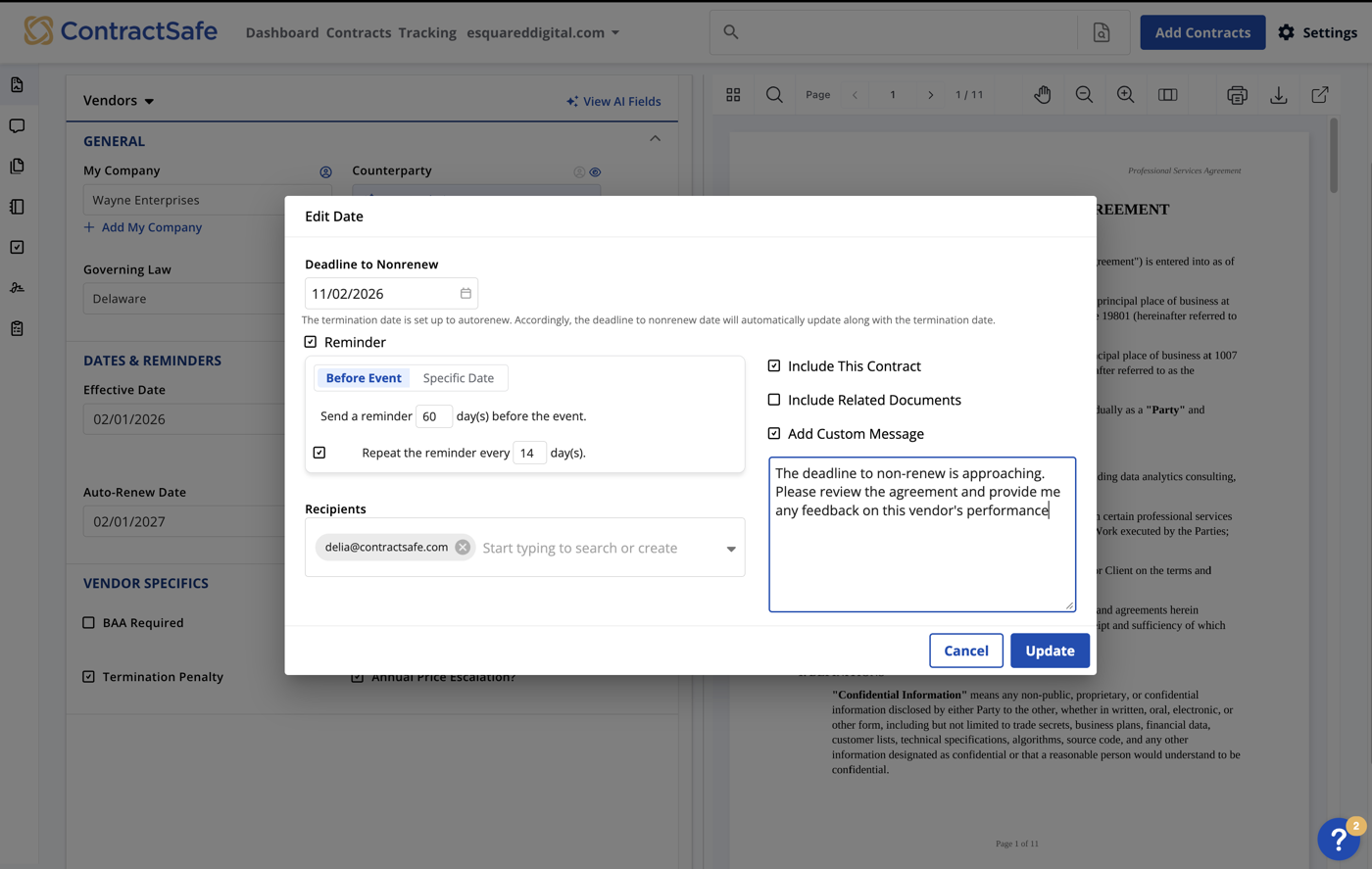
When you upload a contract, ContractSafe's AI reads it, including scanned copies, and suggests the renewal, termination, notice-period and expiration dates. Nothing saves until a user confirms or edits each one, so a misread notice period doesn't land in the calendar unchecked. Reminders can go to anyone, including a counterparty or outside counsel who doesn't have a login, with the lead time you choose and the contract attached. They belong to the contract and its recipient list rather than to one person's inbox, so when someone's role changes you can reassign them in one click. For auto-renewing contracts the Autorenew setting rolls the renewal date, the notice deadline and the reminders forward each term.
- you want a repository that pulls renewal and notice dates out of existing contracts and sends reminders to outside counsel or other non-users
- you want a published, volume-based price starting at $450 per month with unlimited users
- you need vendor risk, onboarding or spend tracking in the same system: ContractSafe's pages describe contract management only
- you need configurable enterprise workflows or ERP connectors: named integrations are DocuSign, SSO, Salesforce, Word, Zapier and an API, and the API and Salesforce sit on the top plan
- Users like
- ease of use and an intuitive interface, per G2's summary of reviews
- Users dislike
- missing bulk actions and trouble with search and reminders, per the same summary
- Source: G2, 132 reviews
How renewals work in practice
ContractSafe prices by feature tier and active contract volume. The three plans start at $450 per month (Organize, with unlimited reminders, AI extraction, custom fields and dashboards), $660 (Finalize, which adds DocuSign, Word, SSO, redlining, approval workflows and e-signature) and $815 (Maximize, which adds an API, Salesforce, intake forms and AI contract review). Every plan has unlimited users and unlimited date fields, so you won't pay per seat. ContractSafe's pricing page sets the final amount by contract volume, from 100 active contracts or fewer up to 10,000 or more, so confirm which tier your portfolio lands in before you compare it with anything else.
ContractSafe's security page names SOC 2 Type II, ISO 27001, HIPAA and GDPR compliance, with US, EU, Canada and Australia data residency. According to G2's summary of its reviews, users like the ease of use and the intuitive interface, and the recurring complaints are missing bulk actions and trouble with search and reminders.
- Starting price
- Starts at $450 per month billed annually (Organize), $660 Finalize, $815 Maximize; priced by active contract volume, unlimited users
- Starting price
- $450/month, annual prepay
- Users
- Unlimited on all plans
- Reminder recipients
- Any email address, no login needed
ContractWorks
A cloud contract repository with AI tagging of renewal and termination dates, milestone alerts, reporting and built-in e-signature, sold by Onit.
ContractWorks is a plain repository with date alerts, for teams that want their contracts organized and don't want a rollout project.
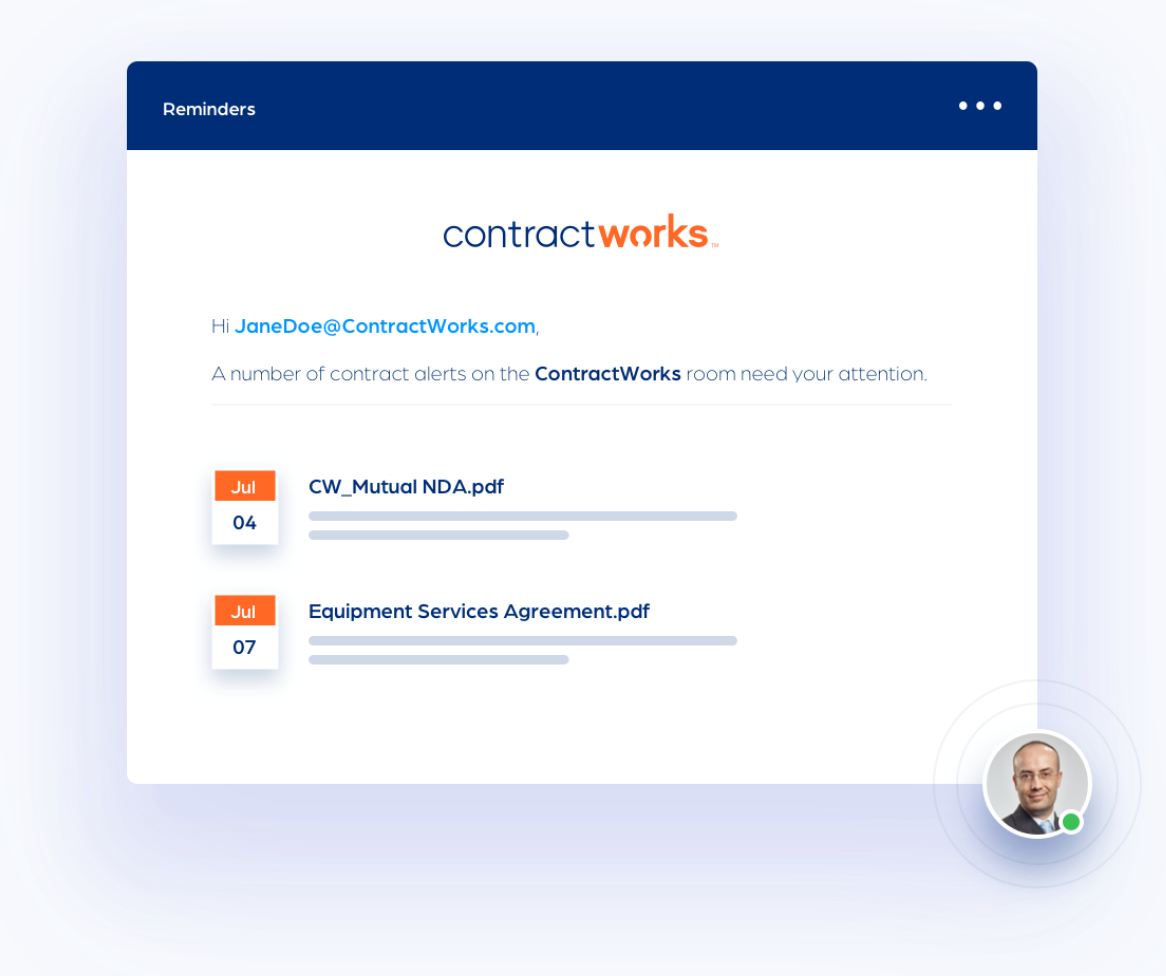
Contracts go in by drag and drop, by email or through a ScanSnap scanner. Smart Document Tagging then scans each file and tags the effective, renewal and termination dates, and custom tags hold anything else you report on, such as contract value or type. Milestone alerts email reminders ahead of key dates, and a notification calendar shows what's coming. The product page doesn't say how far ahead an alert can be set or how obligations are assigned, so you'll want to treat it as date tracking, not obligation management.
- you want a low-admin repository with renewal and notice-date alerts for a mixed contract portfolio
- you want unlimited users on every plan and e-signature in the same tool
- you need published pricing for budgeting: ContractWorks' pricing page shows plan limits but leaves the amounts blank
- you need deep obligation tracking or ERP connectors: obligations appear as tags and a calendar, and Salesforce is the only listed integration
- Users like
- ease of use, responsive support and automatic alerts for renewal dates
- Users dislike
- complex advanced workflow customization, and AI that sometimes misreads termination dates
- Source: Capterra, 100 reviews
How renewals work in practice
On the Premium plan, ContractWorks' approval flows use conditional triggers to send clauses, sections or whole contracts to any number of approvers, with notifications and an activity log. ContractWorks says onboarding takes about two weeks and doesn't cost extra.
The pricing page lists limits but no amounts: Standard allows 2,500 documents and five e-signature licenses, Professional 10,000 and ten, and Premium unlimited documents and 20. All plans have unlimited users, so you don't pay per seat. Capterra shows 4.7 from 100 reviews. One reviewer who manages supplier contracts says the alerts remove the risk of missing renewal dates, and another says the AI sometimes reads a contract as ending on signature, which they've had to fix by hand. Salesforce is the only integration listed, so don't expect ERP links. ContractWorks is now sold by Onit.
- Starting price
- Not published, three plans billed annually with unlimited users
- Plans
- Standard, Professional, Premium (approval workflows on Premium)
- Document limits
- 2,500, 10,000, unlimited
- E-signature licenses
- 5, 10, 20
Gatekeeper
A platform that keeps vendor records, contracts, spend and renewals on one record, with date-based triggers that start a renewal review workflow with approvers and escalation.
Gatekeeper treats the contract as one part of the vendor record, so a renewal can pull in risk, spend and approvers instead of just a reminder.
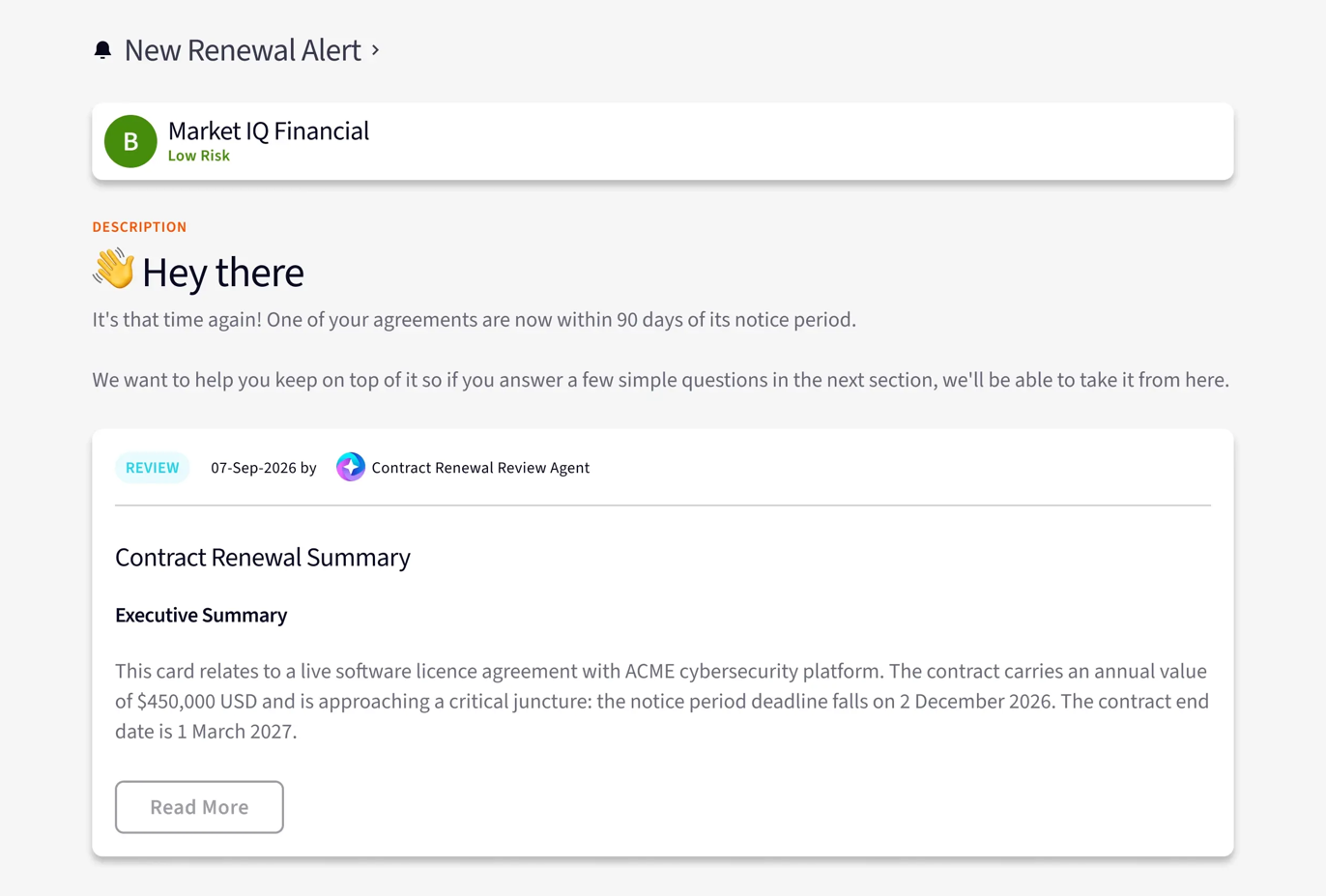
Each contract holds a start date, an end date or evergreen status, and either a notice period date or rolling days of notice. Dates arrive by manual entry, bulk import, API or extraction on import, but Gatekeeper can't set the notice period date automatically. Date-based triggers are checked hourly and pull a contract onto a workflow when the end date, notice date or a custom date is a set number of days away. The Contract Renewal Review template creates two triggers by default, 90 days before the notice date and 90 days before the end date, and admins can change them, though the docs' own example uses 45 days. Approvers, renewal owners and termination owners are assigned per phase, a team manager is the escalation for late responses, and reminder emails repeat at an interval you've set.
- you want vendor risk, onboarding, spend and contract renewals in one system with approval workflows and escalation to a team manager
- you run NetSuite or need many system connections and want unlimited contracts, users and e-signature licenses
- you want self-serve pricing: every plan is quote only and sized by third-party count
- you only need a simple repository with date reminders: the workflow setup is more configuration than a basic tracker needs, and notice dates cannot be set automatically
- Users like
- a user-friendly interface and efficient contract processing, per G2's summary of reviews
- Users dislike
- limited customization and slowdowns with larger data sets, per the same summary
- Source: G2, 91 reviews
How renewals work in practice
In the contract list, dates turn red inside four weeks and orange between four and eight. Gatekeeper's AI agents include one that flags auto-renewals nearing the notice deadline and surfaces renegotiation levers, and a risk register, spend module and vendor portal sit beside the contracts. The pricing page says contracts, users and e-signature licenses are unlimited on every plan, with plans sized by the number of third parties: up to 250, up to 750, and more than 750.
Gatekeeper's named integrations include a native NetSuite app with two-way sync, Jira, DocuSign and SSO providers. Gatekeeper says its Interconnect reaches more than 1,700 applications, which is the vendor's own figure. We couldn't read its trust center, so we couldn't verify security certifications, and you'll want to ask for them. G2 shows 4.5 from 91 reviews, and G2's summary praises the interface and flags limited customization and slowdowns with larger data sets.
- Starting price
- Not published, quote only, plans sized by number of third parties (Pro up to 250, Enterprise up to 750, Enterprise Plus 750+)
- Pricing
- Quote only, by third-party count
- Plan tiers
- Pro (250), Enterprise (750), Enterprise Plus (750+)
- Default renewal triggers
- 90 days before notice date and end date
Zoho Contracts
A per-user contract lifecycle tool with a repository, approval workflows, per-contract obligations and renewal reminders, sold standalone or inside Zoho One.
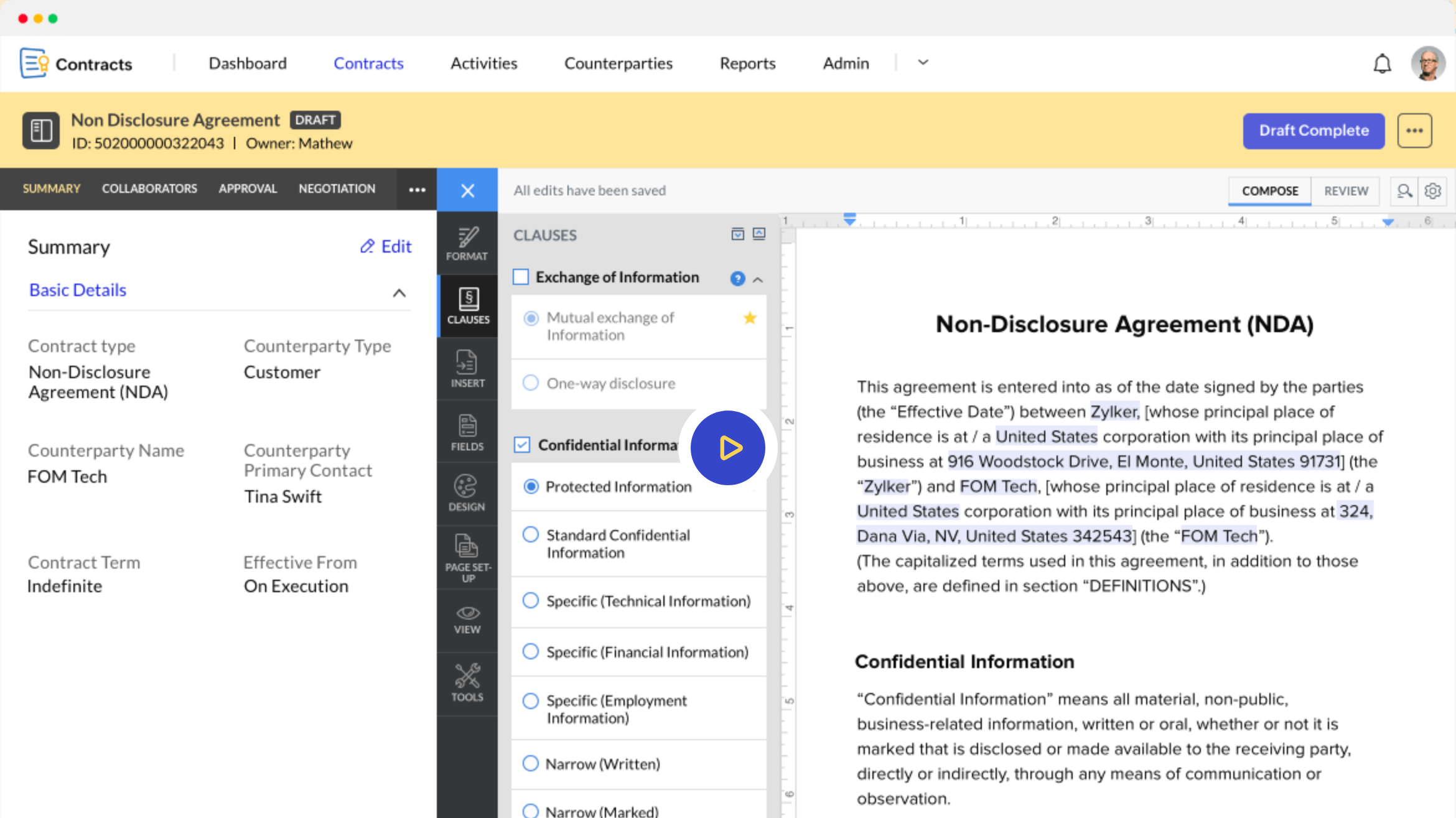
Zoho Contracts is the one tool in this group with a free plan and a real per-user price list, which makes it the easiest one to try before you've talked to anyone.
Each contract records whether it renews and how: manual means a person acts, evergreen means it rolls over on its own. Reminders go out by email and in-app notification, based on the expiration reminder days set on the contract. The Obligations tab lets the contract owner create one-time or recurring obligations, assign them to business owners and set reminders, and obligation reports show progress across contracts. Zoho only lets you change renewal details while the contract's still a draft.
- you already run Zoho CRM or Zoho One and want contracts connected at a low per-seat cost
- you want per-contract obligation owners with reminders and sequential or parallel approvals at a published price
- you need ERP or procurement-suite connectors: Zoho's pages name only Zoho apps
- you want deep independent review evidence: Capterra shows only 6 reviews, and reviewers say it's less compelling outside the Zoho suite
- Users like
- a complete contract workflow, templates and Zoho CRM integration
- Users dislike
- weaker value outside the Zoho suite, and formatting and signature-field quirks
- Source: Capterra, 6 reviews
How renewals work in practice
Admins build approval workflows per contract type, sequential or parallel, before a contract goes active. Zoho's lite licenses at €5 to €15 per user per month cover people who only approve, collaborate or fulfill obligations. The free plan allows three users, ten contracts and five counterparties, and that's enough for a real test. Zoho's e-signature tool, Zoho Sign, comes with every plan.
The pricing page redirected to Zoho's German site when we checked, so the €25 per user per month starting price is in euros, although Capterra lists it as US$25. Capterra shows only 6 reviews, so the 4.5 rating doesn't tell you much. Reviewers say the product's complete for contract workflows with Zoho CRM, and less compelling outside the Zoho suite.
- Starting price
- Free for up to 3 users. Paid plans from €25 per user per month billed annually on Zoho's site (Capterra lists US$25)
- Free plan
- Up to 3 users, 10 contracts
- Renewal types
- Manual or Evergreen
- Lite users
- €5 to €15 per user per month for approvers and obligation owners
Best for contracts you draft and sign
These four tools are built around writing, negotiating and signing contracts in the browser. They can track renewals too, but their reminder features differ a lot, and vendor paper that arrives as a supplier's PDF doesn't fit them as naturally. Read the skip-if lines closely.
Juro
A browser-based tool for drafting, approving and signing contracts from templates, with renewal dates stored as smartfields that carry up to five reminders each.
Juro's the strongest option here when your own team writes the contracts, and the weakest when most vendor paper arrives as supplier PDFs.
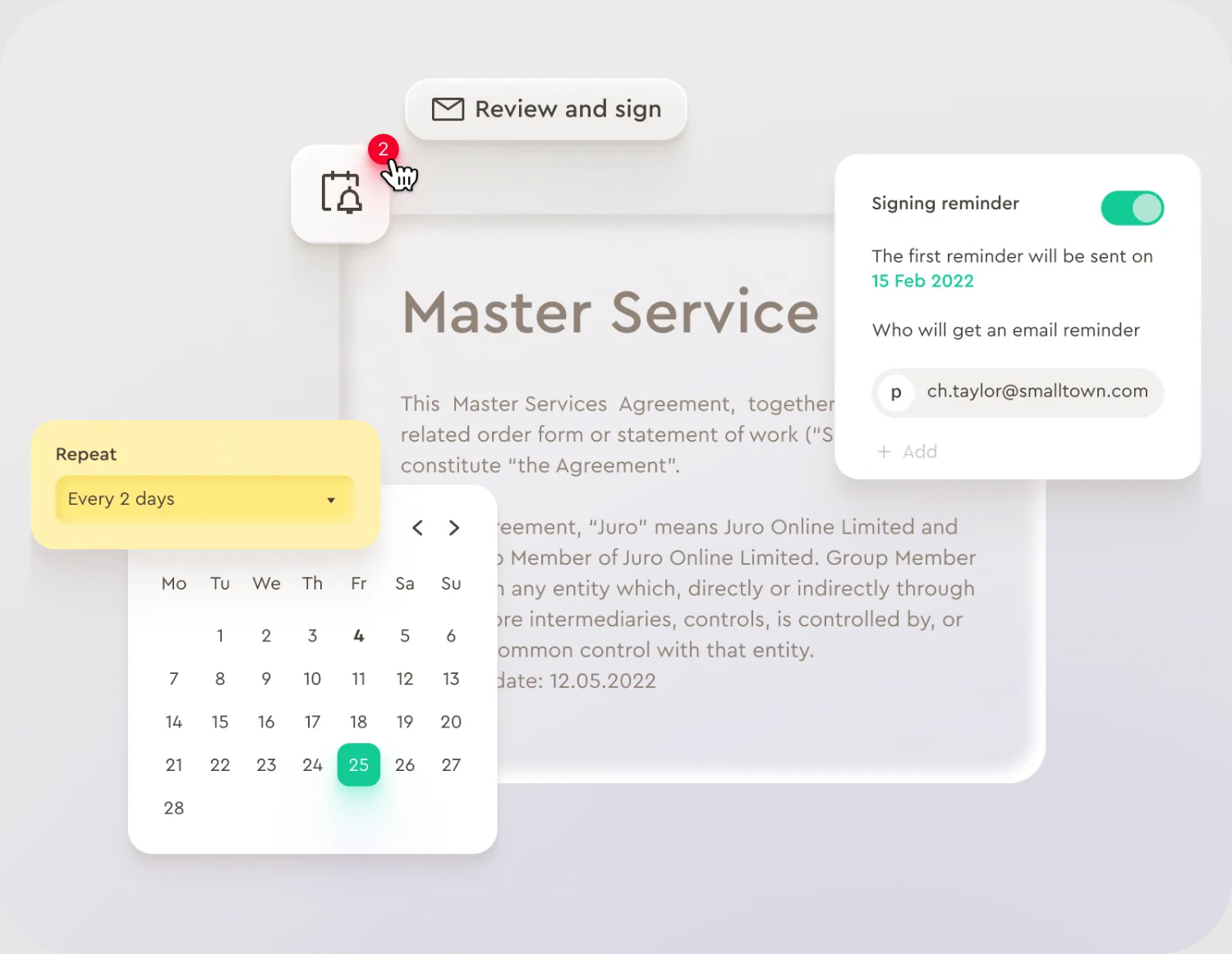
A renewal or expiry date lives in a date smartfield on the contract. It's filled in when the contract is created from a template, or captured by AI Extract when you upload existing documents. On the smartfield you switch a reminder on, choose how many days before the date it fires and pick who's notified. Juro's June 2026 release notes say each date smartfield takes up to five reminders, for example 90, 60 and 30 days before a renewal, and reminders can be set on the template so every contract created from it inherits them. The repository can then be filtered and reported on by those fields.
- you draft most contracts yourself from templates and want renewal dates and multi-step reminders in the same system as approvals and signature
- legal, sales, HR and operations all need self-serve contracting and procurement is one user among several
- your vendor contracts mostly arrive as supplier-drafted PDFs or through a source-to-pay tool: Juro lists no Coupa integration, so intake leans on AI Extract and manual fields
- you need a bounded price before a demo: Juro shows no USD prices, and reviewers mention cost
- Users like
- an intuitive interface and workflow
- Users dislike
- limited advanced formatting and reporting, and a price that is hard to justify for a growing company
- Source: Capterra, 47 reviews
How renewals work in practice
Juro's site has a procurement page and a finance and operations page that describe keeping vendor paper next to your own and tracking renewal dates on it. The product's still built for drafting from templates, approving and signing in the browser, and we didn't find a procurement-suite connector such as Coupa on its integrations page. Named integrations include Salesforce, HubSpot, Slack, Google Drive, Word, Docusign and Zapier, plus an API and MCP access for Claude, ChatGPT and Copilot. Juro lists SOC 2 Type II, which you'll want to match against your own security review.
Juro doesn't show USD prices; each plan has unlimited users, workflows and templates, and the price depends on contract volume and integrations. Capterra shows 4.8 from 47 reviews. Reviewers praise the interface and mention limited advanced formatting and reporting, and cost for a growing company.
- Starting price
- Not published, quote only, annual billing with unlimited users, workflows and templates
- Pricing
- Quote based, annual billing
- Reminders
- Up to 5 per date field
- Certification
- SOC 2 Type II
SpotDraft
A contract platform with an AI metadata repository, obligation tasks with reminders, e-signature and a Coupa integration that syncs effective dates and renewal terms back.
SpotDraft's the pick for procurement teams on Coupa, because renewal terms can flow back into the system where purchasing already happens.
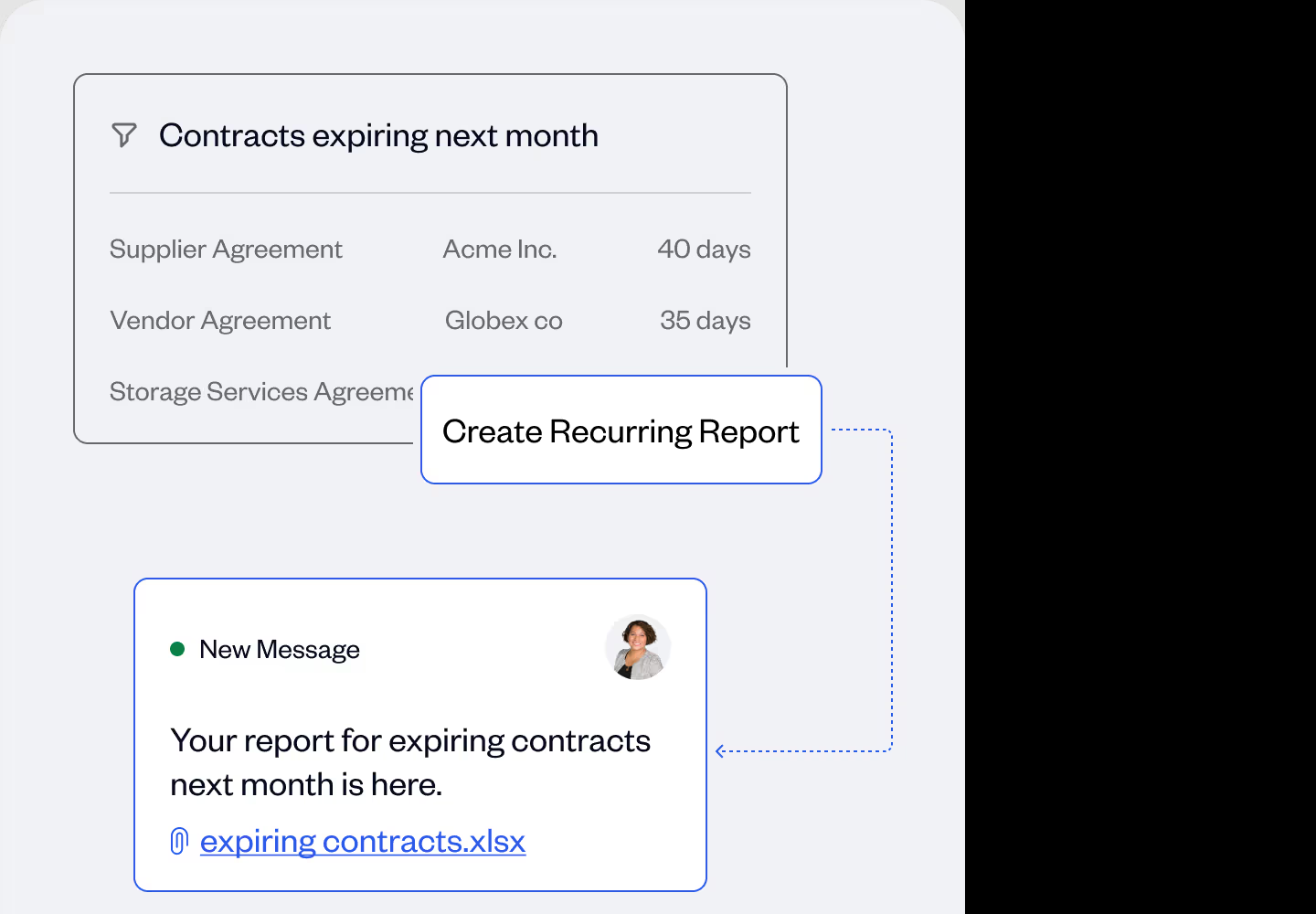
With the Coupa integration, a contract can start from a Coupa request, supplier data fills in automatically, approvals route to finance and legal, and the effective dates and renewal terms sync back to Coupa once the contract is executed. In SpotDraft's repository, AI pulls metadata such as execution, expiry and renewal dates, and you can filter by those fields, save views and schedule recurring reports for stakeholders in finance and procurement. SpotDraft claims it extracts more than 1,000 metadata types.
- procurement owns vendor contracts and runs Coupa, so contracts can start in Coupa and renewal terms sync back
- you want AI-extracted metadata across a legacy archive with migration included, plus scheduled renewal reports for finance
- you want self-serve pricing and a short trial: pricing is quote only and the vendor cites four to six weeks of implementation
- you need mature renewal alerts today: the only reminder documentation we found covers Obligation Management, which SpotDraft labels Beta
- Users like
- customer success and support
- Users dislike
- template changes that depended on SpotDraft staff, in reviews from 2021 to 2023
- Source: Capterra, 26 reviews
How renewals work in practice
The hands-on reminder tool we could document is Obligation Management, which SpotDraft labels Beta. On an executed contract you extract or create obligations, such as an insurance renewal or a termination window, switch on a task, pick an assignee and a due date, and add up to five reminders, for example 30 days before. SpotDraft's procurement page also promises expiry alerts, but it gives no lead times, and we couldn't confirm that a plain expiry date triggers a reminder outside that feature, so ask for a demo of one.
SpotDraft's pricing is by users or contract volume, and it isn't published. SpotDraft says implementation's included and takes four to six weeks, and it lists ISO 27001:2022 and SOC 2. Capterra shows 4.8 from 26 reviews, most of them from 2021 to 2023, praising support and noting that one team had to ask SpotDraft staff to change templates. If you run Coupa, our Coupa review explains what you'd be connecting to.
- Starting price
- Not published, quote only, priced by users or contract volume, implementation included
- Pricing
- Quote based, by users or volume
- Reminders
- Up to 5 per obligation task (beta)
- Certification
- ISO 27001:2022, SOC 2
Concord
A contract tool that drafts, redlines, e-signs and stores contracts, with AI-extracted renewal and termination-notice dates and a weekly deadline email.
Concord combines drafting, redlining, e-signature and a deadline report at a price you can see, which suits a small team that doesn't want to run four tools.
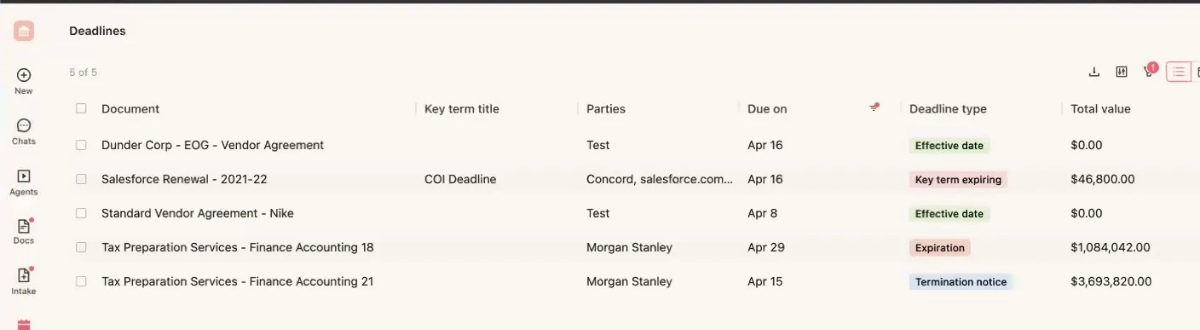
When a contract is signed in Concord or uploaded, the AI fills a lifecycle record: signature date, effective date, duration (fixed, until a date or evergreen), renewal terms and a separate termination-notice deadline taken from clauses such as a 60 day notice requirement. Every field can be overridden by hand. Each Monday, every user with access to a contract receives one email that groups upcoming deadlines. The default look-ahead window is 120 days, and each user can change it or switch the email off. A deadline report and a calendar view can be synced to Google or Outlook, and Concord leaves contracts set to auto-renew out of the email, so don't rely on it for those.
- you want drafting, e-signature and renewal tracking in one tool for a small team, with five seats included and free viewers
- you want a US price list you can budget without a sales call
- you need reminders at several lead times such as 90, 60 and 30 days: Concord documents one weekly digest with a per-user look-ahead window
- you need procurement workflows or ERP links: named integrations are mostly CRM, storage and e-signature, and approvals start on the $899 Business plan
- Users like
- drafting, redlining, e-signing and search in one tool, and no document limits
- Users dislike
- bugs and slow support replies, in reviews from 2023 and 2024
- Source: G2, 133 reviews
How renewals work in practice
Concord's own documentation describes one weekly digest, not per-contract reminders at 90, 60 and 30 days, so if you want escalating alerts, test that first, because you won't find them in the docs. Concord's paid plans all include unlimited e-signatures, unlimited documents and free viewers. Essentials costs $499 per month with five users, Business $899 adds intake forms, approval workflows and integrations with Salesforce, HubSpot and Zapier, and Enterprise $1,299 adds a clause library, bulk send and an open API. All plans are billed annually, and extra users cost $49 to $89 per month.
G2 shows 4.2 from 133 reviews, the lowest rating in this list, though it's still above four out of five. Reviewers like having drafting, redlining, e-signing and search in one tool, but they complain about bugs and slow support, in reviews from 2023 and 2024.
- Starting price
- From $499 per month billed annually (Essentials, 5 users); Business $899, Enterprise $1,299; extra users $49 to $89 per month
- Entry price
- $499/month billed annually, 5 users
- Extra seat
- $49 to $89/month by plan
- Weekly deadline email
- Mondays, default 120-day window
Contractbook
A contract platform where AI Import extracts renewal and expiry dates from uploaded contracts into a searchable repository, with tasks, reminders and e-signature.
Contractbook is a good fit when you've got a pile of existing contracts and want AI to turn them into a searchable, filterable repository with tasks attached.
Contractbook's AI Import scans uploaded contracts and extracts data fields, including renewal and expiry dates, which you can verify and enrich. The Contracts View lets you search by names, dates or data fields and save filters as views. According to the August 2025 changelog, you can create a task of type Approval, Renewal or Review and add a reminder to an obligation date straight from that view. A 2026 changelog entry says the default data-field prompts are now editable.
- you want AI to extract renewal and expiry dates from an existing archive into saved views, plus tasks and reminders
- you need e-signature that includes Scandinavian national ID signing next to contract storage
- you need a US price before talking to sales: team plans are quote only and the rendered pricing page shows no amount
- you need documented reminder lead times and recipients before buying: the public pages describe reminders only at a high level, and annual signed-contract caps apply
- Users like
- a central repository that is easy to use, with alerts for tasks and deadlines
- Users dislike
- coarse user roles, and onboarding that took longer than expected for non-legal users
- Source: Capterra, 78 reviews
How renewals work in practice
We couldn't verify who gets notified or what the default lead times are, because the help center's behind a login and the public pages describe reminders only at a high level. Ask for a live walkthrough of one renewal reminder before you're committed.
Team plans are quote only. The rendered pricing page doesn't show a US price, though a 14 day free trial and a limited free plan are offered. Contractbook's plans include 1, 5 or 10 users, and annual signed-contract caps of 100, 350 or 500 apply. Integrations include HubSpot, Salesforce on Accelerate, Pipedrive, Slack, Zapier and an API. Contractbook's site now says it's part of Scrive. Capterra shows 4.7 from 78 reviews: reviewers like the central, easy-to-use repository, and one says roles are too coarse and onboarding took longer than expected for non-legal users.
- Starting price
- Not published for US buyers, team plans by quote; a 14-day free trial and a limited free plan are offered
- Pricing
- Quote based
- Included users
- 1, 5 or 10 by plan
- Signed-contract cap
- 100, 350 or 500 per year by plan
Contract compliance software: what these tools track
Contract compliance software, in practice, means a tool that makes sure the dates, obligations and access rules in a signed contract are tracked and provable. The eight tools here do part of that, but they leave the rest to people.
What they track well:
- Dates and notice deadlines. Every tool on this page can alert someone before a renewal or notice date. The difference is how many reminders a date can carry and who's on the list.
- Obligations. Zoho Contracts has an Obligations tab with owners and reminders, Gatekeeper assigns approvers and renewal owners per phase, and SpotDraft offers obligation tasks in beta. The others treat obligations as tags or notes.
- Access and audit trail. ContractSafe's security page lists roles, SSO and an audit trail, and Concord's lists audit trails and version control. The security certifications vendors' pages name include SOC 2 Type II for ContractSafe and Juro, ISO 27001 for ContractSafe and SpotDraft.
What they don't do is decide whether a clause complies with a law or a policy, and they won't confirm a notice term for you. ContractSafe asks a user to confirm each AI-suggested date, and Gatekeeper can't set a notice period date automatically. In both cases a person has to read the contract.
From signed contract to renewal decision
The tool holds the record, but the renewal still needs people. The steps below don't change with the tool you choose, and the last ones are where deadlines get missed.
- Contract ownerUploads the signed contract and checks the AI's suggested dates Day of signature
- ProcurementConfirms the notice period against the contract and enters it as the tool's notice date Within the first week
- ToolSends the first reminder to the owner and the owner's backup About 120 to 90 days before the notice date
- Business owner, Finance, ITReview usage, cost and security, and answer the renewal question 90 to 60 days before the notice date
- ProcurementDecides to renew, renegotiate or cancel, and records who decided and why Before the internal decision target
- ProcurementSends notice if needed, or lets the term roll over on purpose Before the notice deadline
Every tool above sends the reminder. None of them asks Finance, IT and the business owner for their answers or records the decision on the same page, so most teams fall back on email threads, and that's where the deadline slips. We built The Procurement Manager for that one step. It isn't contract management software, and it doesn't replace any tool above: it keeps the decision target, the notice deadline and the renewal date apart, routes the review to the business owner, Finance and IT, and records the decision with source evidence. It never sends notices or cancels anything.
How much does contract management software cost?
Contract management software has a public price for only three of these eight tools: ContractSafe starts at $450 per month, Concord at $499 per month and Zoho Contracts at €25 per user per month. ContractWorks shows plan limits but doesn't show amounts, and Gatekeeper, Juro, SpotDraft and Contractbook ask for a quote. However, the license line isn't the whole bill: budget for implementation, extra modules, extra e-signature licenses and connectors, because that's where quotes grow.
| Tool | Price status | What the vendor page shows |
|---|---|---|
| ContractSafe | Published | From $450 per month billed annually, by plan and active contract volume; unlimited users |
| Concord | Published | From $499 per month billed annually with 5 users; $899 and $1,299 for higher plans |
| Zoho Contracts | Published | Free for up to 3 users; paid plans from €25 per user per month billed annually |
| ContractWorks | Plan limits only | Three plans with unlimited users and document and e-signature limits, no amounts |
| Gatekeeper | Quote only | Plans sized by third-party count, from up to 250 to more than 750 |
| Juro | Quote only | Unlimited users, workflows and templates; price depends on contract volume and integrations |
| SpotDraft | Quote only | By users or contract volume; implementation included |
| Contractbook | Quote only | Team plans by request; a 14 day free trial and a limited free plan |
Contract management software FAQ
What is contract management software?
Contract management software stores signed contracts in one searchable repository, extracts the dates and terms that matter, and sends alerts before renewal and notice deadlines. Many tools also handle drafting, approvals and e-signature.
What is CLM vs CRM?
CLM, or contract lifecycle management, covers a contract from request and drafting through signature, tracking and renewal. A CRM tracks customers and deals, not the agreements behind them. Several contract tools connect to a CRM such as Salesforce or HubSpot so a deal's data can fill in the contract.
How much does contract management software cost?
Three of the eight tools we compared publish an amount: ContractSafe from $450 per month, Concord from $499 per month and Zoho Contracts from €25 per user per month. ContractWorks, Gatekeeper, Juro, SpotDraft and Contractbook don't publish an amount, so you'll need a quote.
Is there free contract management software?
Zoho Contracts' free plan covers up to three users, ten contracts and five counterparties. Contractbook offers a 14 day free trial and a limited free plan. The other tools we checked don't show a free plan.
Does contract management software send renewal reminders automatically?
Contract management software does send renewal reminders automatically, but how it works differs, and it's worth checking before you buy. Juro allows up to five reminders per date field, Gatekeeper starts a renewal workflow 90 days before the notice date by default, ContractSafe can email anyone, and Concord sends one weekly digest. A person should still confirm the notice term against the contract, since none of these tools can do that for you.
What is the best contract management software for small business?
For tracking vendor contracts, ContractSafe and Zoho Contracts are the simplest starts, and Zoho has a free plan. If you also draft and sign contracts, Concord's $499 per month plan includes five users and e-signature.