
Third-party risk management software keeps one record per supplier of how risky it is, what evidence supports that view and what you did about it. For most buyers the best software depends on who owns the program and where the risk evidence comes from. UpGuard, Bitsight and Panorays rate a vendor from the outside, OneTrust, ProcessUnity and Venminder collect evidence from the supplier, and Kodiak Hub and Gatekeeper attach risk to supplier and contract records you already keep.
Most comparisons of these tools are written by security vendors and score the security team's dashboard. We read eight tools from the procurement owner's side: where each tool gets its evidence, what a supplier has to do, how it tiers vendors and what happens after a finding. Only one of the eight publishes a starting price, and only two name Coupa on their own integration pages, so the useful question usually isn't the price. It's what you need to ask for before the first demo.
- tools read for evidence source, supplier effort, tiering and what follows a finding
- 8
- rate a vendor from the outside with no supplier input
- 3
- publishes a starting price
- 1
- name Coupa on their own integration pages
- 2
Our picks by situation
 Best when you want a rating the day you add a vendorUpGuardScans the vendor's domain and rates it with no supplier effort, then adds 30-plus questionnaires and remediation requests. It is the only tool here with a published starting price.
 Best when security owns the programBitsightRatings validate questionnaire answers, tiers set which questionnaire a vendor gets, and the rating pushes into ServiceNow, Archer, OneTrust or ProcessUnity.
 Best for weighting questionnaires against scansPanoraysOne cyber posture rating mixes the questionnaire score and the outside-in scan, and you set the weights.
 Best inside an existing OneTrust privacy programOneTrustOne editable vendor profile, adaptive assessments and rules that trigger reassessments and remediation.
 Best for tier-driven due diligence tied to your S2P toolProcessUnityAn inherent risk score at intake sets the tier, and the tier sets how deep due diligence goes. Connectors cover Coupa, SAP Ariba, Ivalua and ServiceNow.
 Best when analysts should read the vendor's documentsVenminderVenminder staff review SOC reports and other documents and return a risk-rated assessment, so your team doesn't.
 Best for self-assessments with sustainability questionsKodiak HubProcurement sends scheduled self-assessments to supplier segments and turns low scores into corrective actions.
 Best when risk should gate onboarding and renewalsGatekeeperA scored SIG Lite questionnaire and SecurityScorecard grades sit on the same record as the contract and its renewal dates.
 For the renewal behind the risk findingThe Procurement ManagerRoutes each contract renewal to the business owner, Finance and IT before the notice deadline.
Third-party risk management software compared
The table shows where each tool's evidence comes from, what it does after you add a vendor, the price status in US dollars and a review rating as of October 25, 2026. Seven of the eight tools quote the price instead of publishing it, so the table says that and doesn't rank them by cost.
| Tool | Evidence source | What it does after you add a vendor | Price status (USD) | Review rating |
|---|---|---|---|---|
| UpGuard | Security ratings plus questionnaires | Rates the domain daily, tiers vendors, opens remediation requests | From $1,750 per month billed annually for 50 vendors; extra vendors $79 per month each; larger plans by quote | 4.5 (766) |
| Bitsight | Security ratings with a vendor risk module | Tiers vendors, sends the matching questionnaire set, alerts on rating changes | Not published, quote only (third-party sources report about $34,000 a year on average across all Bitsight products) | 4.5 (76) |
| Panorays | Cyber-focused third-party risk | Weights both into one cyber posture rating, assigns remediation tasks to the supplier | Not published, quote only (modular bundles for inventory, assessment and monitoring) | No reviews yet |
| OneTrust | Privacy and GRC suite with third-party risk | Runs adaptive assessments and rule-triggered reassessments | Not published, quote only (priced on admin users and third-party inventory) | No reviews yet |
| ProcessUnity | Configurable TPRM workflows | Scores inherent risk at intake, sets the tier and the due diligence depth | Not published, quote only (buyers are split by revenue and headcount) | 4.5 (54) |
| Venminder | TPRM software plus analyst-written assessments | Sends questionnaires, orders analyst assessments, monitors vendors | Not published, quote only; Professional and Enterprise packages with unlimited users and vendors, add-ons priced separately | 4.7 (115) |
| Kodiak Hub | Supplier relationship management (SRM) | Scores suppliers and turns findings into corrective actions | Not published, quote only (modular SaaS licence) | 4.8 (Capterra, 14) |
| Gatekeeper | Vendor and contract management | Gates onboarding and renewal workflows on risk status | Not published, quote only, plans sized by number of third parties (Pro up to 250, Enterprise up to 750, Enterprise Plus 750+) | 4.5 (91) |
| The Procurement Manager Our product | Contract renewal decisions | Routes renewal reviews to the business owner, Finance and IT before the notice deadline | From $49 per month, flat, no per-seat fees (Starter, up to 50 contracts) | No reviews yet |
Prices checked October 25, 2026. Ratings are the review-site figures we could read that day; Panorays and OneTrust have no rating we could verify.
What third-party risk management software does
Third-party risk management software is a system of record and a workflow for assessing and monitoring the risk that comes with the suppliers, vendors and partners you depend on. It holds a vendor inventory, sorts vendors into tiers by how much damage a failure would cause, collects evidence about each vendor, watches for changes and tracks the fix when something is wrong.
The procedure behind it is older than the software. The 2023 interagency guidance from the Federal Reserve, the FDIC and the OCC describes a life cycle of five stages: planning, due diligence and third-party selection, contract negotiation, ongoing monitoring and termination (FDIC FIL-29-2023). It was written for banks, but the sequence isn't specific to banking, and any buyer can use it. In practice it becomes six steps in the software.
- Inventory. List every third party, who owns the relationship and what data or systems it touches.
- Tier. Rate how critical each vendor is and how much data or access it has, so a payroll provider and a coffee supplier don't get the same questionnaire.
- Assess. Collect evidence at the depth the tier requires, from questionnaires, documents, ratings or an analyst review.
- Decide. Approve, approve with conditions or reject, and write down who decided.
- Monitor. Watch ratings, documents and news, and reassess on a schedule or when something changes.
- Remediate and exit. Track findings to closure, and plan the exit when a vendor can't fix them.
A third party can be a software vendor, a payment processor, a logistics provider, a consultant with system access or a subcontractor of one of them. A cloud provider that hosts your customer data is the classic example, and a cleaning contractor with a badge to your office is another.
Vendor risk management software vs third-party risk management software
Vendor risk management software and third-party risk management software describe the same product category from two angles. Vendor risk management covers suppliers you buy from. Third-party risk management also covers partners, resellers, contractors and other parties that aren't vendors in the purchasing sense. The tools in this article are sold under both names, and the assessment steps don't change, so we treat them together. The difference shows up in the inventory, which should include parties that never receive a purchase order.
Frameworks and regulations behind TPRM programs
Most programs borrow a framework instead of writing one. NIST SP 800-161 Rev. 1 covers cybersecurity supply chain risk management for systems and organizations (NIST). In the EU, the Digital Operational Resilience Act has applied since January 17, 2025 and puts ICT third-party risk requirements on financial entities (ESMA). In the US, the 2023 interagency guidance above covers banks. Outside regulated sectors nothing forces a framework, so the practical choice is usually the one your customers' security questionnaires already use, such as SIG or ISO 27001, both of which the tools here support.
TPRM software vs a GRC platform
A governance, risk and compliance platform tracks risk across the whole company, including policies, audits and internal controls. TPRM software narrows that to third parties, with vendor-facing questionnaires, a vendor inventory and monitoring of outside data. Some products straddle both, and OneTrust sells third-party risk inside a wider privacy and GRC suite. If you already run a GRC platform, check its third-party module before you buy a second system. If you don't, a dedicated TPRM tool is often the lighter place to start.
How we compared the tools
Every tool was read against the same four questions, using pricing pages, product and feature pages, vendor documentation and review sites. The aim was to find what the vendor's own pitch leaves out.
| Test | Why it matters to a procurement owner |
|---|---|
| Evidence source | A scan shows what the outside world can see, a questionnaire shows what the vendor says and a document review shows what the vendor can prove. They answer different questions. |
| Supplier effort | A tool that needs every supplier to log in and answer 200 questions slows onboarding and adds cost on their side. |
| Tiering | If every vendor gets the same assessment, the team spends its time on the wrong suppliers. |
| After a finding | A finding that nobody owns is a report. The tool needs tasks, owners and deadlines. |
| Price status | Most tools quote the price, so the question is what sizes the quote. |
Where a page was silent we wrote "not stated" rather than guessing, because a vendor's silence isn't proof that a feature doesn't exist. G2 and Capterra blocked direct reads for several tools, so ratings for those come from the review-site listing summaries and we say so in the entry.
Tools that read risk from the outside
An outside-in tool rates a vendor from data it can see without the vendor's help, such as open ports, certificate problems, leaked credentials and exposed services. The upside is speed: you get a first reading the day you add the vendor, and the vendor doesn't have to do anything. The limit is scope. A scan shows the vendor's internet-facing posture, not whether it has a business continuity plan, pays its subcontractors or protects data inside the building.
UpGuard
UpGuard
Rating from the domain name, then questionnaires and remediation
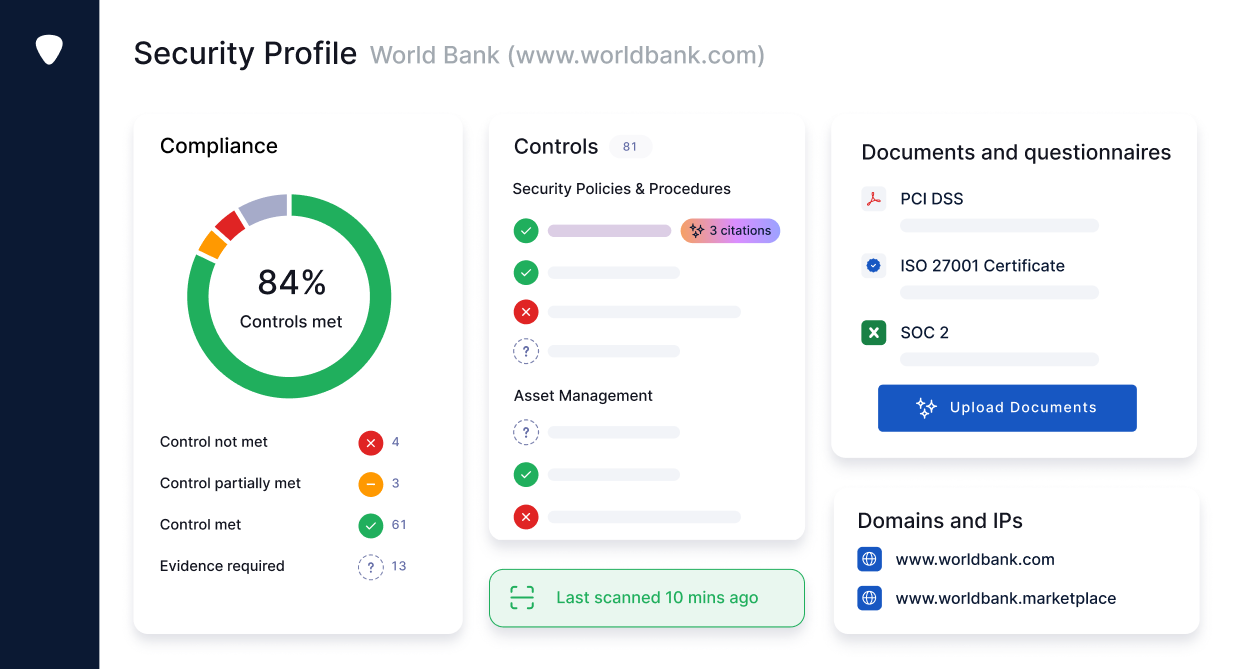
UpGuard rates a vendor from its domain before the vendor does anything, then lets you ask for evidence and track what the vendor fixes.
Where the evidence comes from. A user adds a vendor by URL or name, UpGuard scans the domain and starts rating it, and ratings update several times a day. A vendor with no web presence can be created by name and industry and gets a rating only after it returns a questionnaire. Questionnaires come from a library of more than 30 (NIST, ISO, SIG and regional sets) or from a builder, with deadlines and reminders.
What the supplier does. Nothing to be rated. To answer a questionnaire a vendor can create a free account and save its answers to a shared profile for reuse.
Tiers and findings. You set a tier per vendor, and the tier drives assessment schedules and notification rules. A tier can be assigned automatically from the vendor's answers to a relationship questionnaire. Scan findings open remediation requests that you track in one place, and a planner shows the rating change expected from each fix. With Risk Automations, a new onboarding request, a score drop or a missed deadline can open a ServiceNow or Jira ticket.
Plans. The Standard plan covers 50 vendors and 6 platform users, and each extra vendor adds $79 a month. The onboarding portal, templates and automation start at Professional, and fourth-party detection starts at Corporate.
- you want a rating the day you add a vendor, with no work from the vendor
- you need a published starting price and tickets in ServiceNow or Jira when a score drops
- your supplier risk is mostly financial, ESG or operational: the pages we read describe cyber ratings and security questionnaires
- you monitor far more than 50 vendors on a small budget, because each extra vendor adds $79 a month
- Users like
- Ease of use, security and time saving.
- Users dislike
- Lack of clarity, price and limited customization.
- Source: G2, 766 reviews
- Starting price
- From $1,750 per month billed annually for 50 vendors; extra vendors $79 per month each; larger plans by quote
- Evidence source
- Outside-in scan, then questionnaires
- Plans
- Standard 50 vendors, Professional 150, Corporate 500, Enterprise unlimited
- Supplier effort
- None to be rated; free account to answer questionnaires
- Fourth parties
- From the Corporate plan
Bitsight
Bitsight
Security ratings with a vendor risk module on top
Bitsight starts from a daily external rating and uses it to check what vendors say in questionnaires and documents.
Where the evidence comes from. You build the inventory by inviting vendors or adding them from Bitsight's vendor network, which Bitsight says holds more than 75,000 profiles. Vendors send questionnaires and documents such as SOC 2 and ISO 27001 reports, insurance and audits, and Bitsight maps SOC 2 reports to SIG Lite, NIST CSF 2.0 and ISO 27001 with AI summaries. Self-reported answers are compared with the external rating, and the tool produces separate scores for inherent and residual risk.
What the supplier does. Vendors are invited to the platform to submit questionnaires and documents. Bitsight reports a 90 percent vendor acceptance rate, which is its own figure, and the pages we read don't say whether a vendor pays.
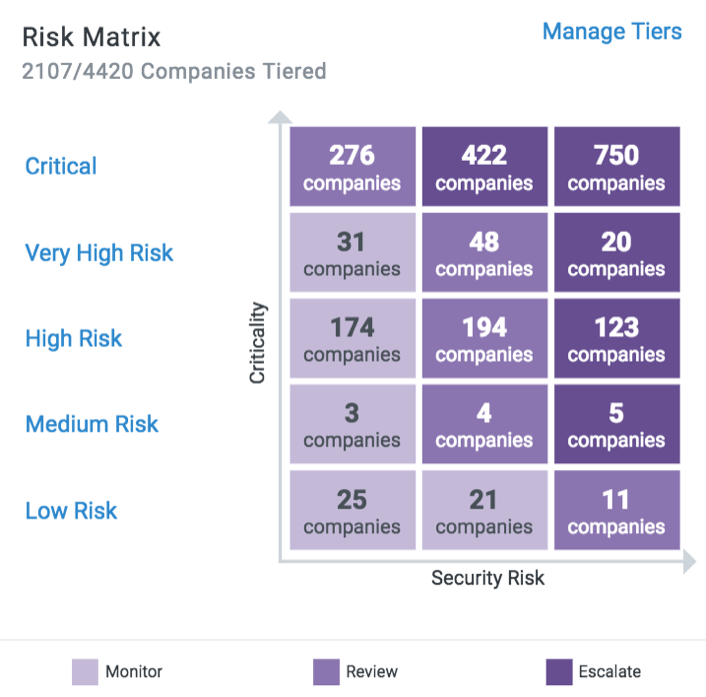
Tiers and findings. You define criticality tiers from inherent risk and data or system access, and bulk-assign vendors. The tier sets which questionnaire set a vendor gets (SIG, NIST CSF, ISO 27001 or CAIQ), triggers document requests and sets alert thresholds. A Risk Matrix compares tier against rating. For a zero-day event, a separate module identifies exposed vendors and sends templated outreach.
Fit. Bitsight lists ServiceNow Vendor Risk Management, RSA Archer, LogicManager, OneTrust, ProcessUnity and Aravo as integrations, and G2 lists Coupa.
- a security or risk team owns the program and wants ratings that validate questionnaire answers
- you already run ServiceNow, Archer, OneTrust, ProcessUnity or Aravo and want ratings pushed into them
- a procurement-led team wants a published price or a self-serve start
- you need non-cyber supplier risk: the pages we read describe cyber ratings
- Users like
- Security, risk management and ease of use.
- Users dislike
- Lack of clarity, missing features and poor notifications.
- Source: G2, 76 reviews
- Starting price
- Not published, quote only (third-party sources report about $34,000 a year on average across all Bitsight products)
- Evidence source
- Outside-in rating plus supplier questionnaires and documents
- Tiering
- Buyer-defined criticality tiers set the questionnaire set and alert thresholds
- Vendor network
- 75,000+ vendor profiles (vendor figure)
- Supplier effort
- Vendors are invited to submit questionnaires and documents
Panorays
Panorays
Questionnaires and outside-in scanning in one rating
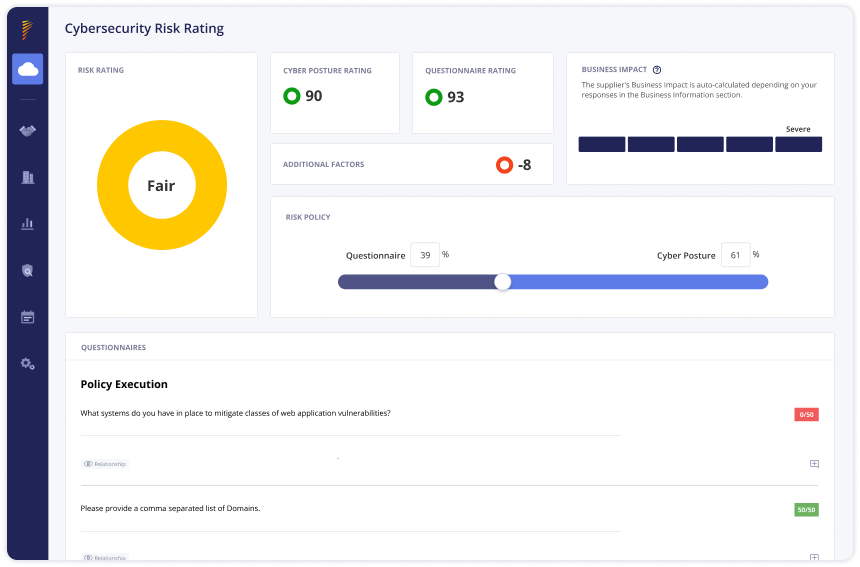
Panorays mixes what a supplier says with what it can see, and lets you decide how much each counts.
Where the evidence comes from. Panorays keeps a central inventory in which a team defines each third party's business impact and criticality. It then sends customizable questionnaires and runs continuous scanning of the external attack surface. Suppliers can reuse past answers, and AI-assisted features scan vendor documentation and certifications. The two results combine into one cyber posture rating, and the weighting between questionnaire and scan is a setting you control.
What the supplier does. The supplier answers questionnaires in the platform and can discuss each question with you. Release notes describe supplier users and automatic reminders for remediation tasks. They don't say whether a supplier needs a login or whether access is free.
Tiers and findings. Impact and criticality come from data access, physical facility access, the departments involved and how critical the service is. You pick an evaluation process per third party: inventory, assessment or monitoring. When a gap is found, the platform suggests steps, prioritizes them by business impact and lets your team assign remediation tasks to the supplier contact.
Fit. Panorays lists Coupa, SAP, Oracle, NetSuite, ServiceNow, Jira, Slack and Zip among its integrations. The only review score we found was a Capterra rating from two reviews, which is too small to quote.
- you want questionnaires and outside-in scoring in one tool and a score you can weight between the two
- a procurement team needs a supplier intake form and connections to Coupa, Jira or ServiceNow
- you need financial, ESG or compliance risk beyond cyber, since the described scoring is cyber posture
- you need a published price or a confirmed free supplier portal before a demo
- Starting price
- Not published, quote only (modular bundles for inventory, assessment and monitoring)
- Evidence source
- Questionnaires plus outside-in scan, weighted by you
- Tiering
- Impact and criticality from data access, facility access, departments and service criticality
- Integrations
- Coupa, SAP, Oracle, NetSuite, ServiceNow, Jira, Slack
- Supplier effort
- Answers questionnaires in the platform; login terms not stated
Tools that collect evidence from your suppliers
A supplier-answered tool asks the vendor to prove things: answer the questionnaire, upload the report, attach the policy. It reaches questions a scan can't, such as whether the vendor has a tested recovery plan or screens its own subcontractors. The cost is supplier effort and review time, so these tools put the most weight on tiering, on pre-filled answers and on shortcuts for your analysts.
OneTrust
OneTrust
Third-party risk inside a privacy and GRC suite
OneTrust is built for teams that already run privacy or GRC work in OneTrust and want vendor risk to share the same records, rules and reports.
Where the evidence comes from. Each vendor gets one combined, editable profile in a central inventory. You run template or custom assessments whose questions adapt to the vendor's answers, mapped to one of more than 50 built-in control frameworks or one you import. OneTrust describes continuous monitoring for vendor changes, but the pages we read don't name the data sources behind it.
What the supplier does. Not confirmed. The product page doesn't say whether vendors need an account to answer assessments.
Tiers and findings. Assessment depth varies by vendor tier, vendor type, data access and business criticality, and OneTrust separates inherent from residual risk. Rules send notifications or trigger actions such as a reassessment, and a workflow builder assigns risks to owners and starts remediation. Role-based dashboards and branded PDF reports go to stakeholders, and a risk register keeps the audit trail.
Fit. OneTrust says it has dozens of integrations but names none on the product page, so confirm Coupa, SAP Ariba, ServiceNow and SSO before a pilot. Pricing is based on admin users and third-party inventory, and usage above a tier's limits moves you to a higher tier. Reviewers describe heavy customization effort, which we could only read in search-result summaries.
- you already run OneTrust for privacy and want vendor risk in the same suite
- you need rules that start reassessments and assign remediation to owners across many vendors
- you are a small procurement team without admin time: reviewers describe heavy customization effort
- you need named procurement connectors or a published price confirmed on the public site
- Starting price
- Not published, quote only (priced on admin users and third-party inventory)
- Evidence source
- Supplier-answered assessments and monitoring
- Assessments
- Templates and adaptive custom questions mapped to 50+ control frameworks
- Tiering
- Assessments vary by vendor tier, type, data access and criticality
- Pricing basis
- Admin users and third-party inventory
ProcessUnity
ProcessUnity
Intake, inherent risk and tier-driven due diligence on one record
ProcessUnity decides how much work a vendor deserves at intake, and a configurable workflow carries that decision through assessment, monitoring and remediation.
Where the evidence comes from. A business owner or procurement submits a vendor through intake, which can flag duplicates against the existing vendor record. An inherent risk assessment is scored and the vendor lands in a tier. Questionnaires then go to the vendor, with an Assessment Autofill feature that pre-fills answers from validated data and an Evidence Evaluator that checks submitted documents. ProcessUnity says buyers accept more than 95 percent of the AI-populated answers, which is its own figure. External feeds include Bitsight, SecurityScorecard, Dun & Bradstreet and EcoVadis.
What the supplier does. Not confirmed for the main platform. Vendor material for the separate Global Risk Exchange says completing an assessment there costs the vendor nothing.
Tiers and findings. A Risk Index score and the inherent risk assessment decide the tier, and the tier decides due diligence depth and workflow. Changes found by monitoring trigger follow-up work, and a remediation AI agent drafts vendor communications and recommended steps while analysts make the judgment calls.
Fit. ProcessUnity lists two-way connectors for Coupa, SAP Ariba, Ivalua, SAP, Oracle, Workday, ServiceNow, RSA Archer and Jira. That is the longest procurement connector list in this article. The pricing page splits buyers by revenue and headcount, with one path under $3 billion in revenue and one above, and publishes no amounts. Reviewers mention a learning curve for administrators.
- you want one configurable workflow engine connected to Coupa, SAP Ariba, Ivalua or ServiceNow
- you want tier-driven due diligence with AI-assisted questionnaire and evidence review
- you need a published price to budget before talking to sales
- your admin team is small: reviewers cite a learning curve for administrators
- Users like
- Configurability and ease of use.
- Users dislike
- A learning curve for new administrators.
- Source: G2, 54 reviews
- Starting price
- Not published, quote only (buyers are split by revenue and headcount)
- Evidence source
- Supplier questionnaires and evidence, plus monitoring feeds
- Tiering
- Inherent risk assessment and Risk Index decide the tier
- Connectors
- Coupa, SAP Ariba, Ivalua, SAP, Oracle, Workday, ServiceNow
- Risk feeds
- Bitsight, SecurityScorecard, Dun & Bradstreet, EcoVadis
Venminder
Venminder
Software plus analysts who read the vendor's documents
Venminder is the tool for teams that don't want to read SOC reports themselves.
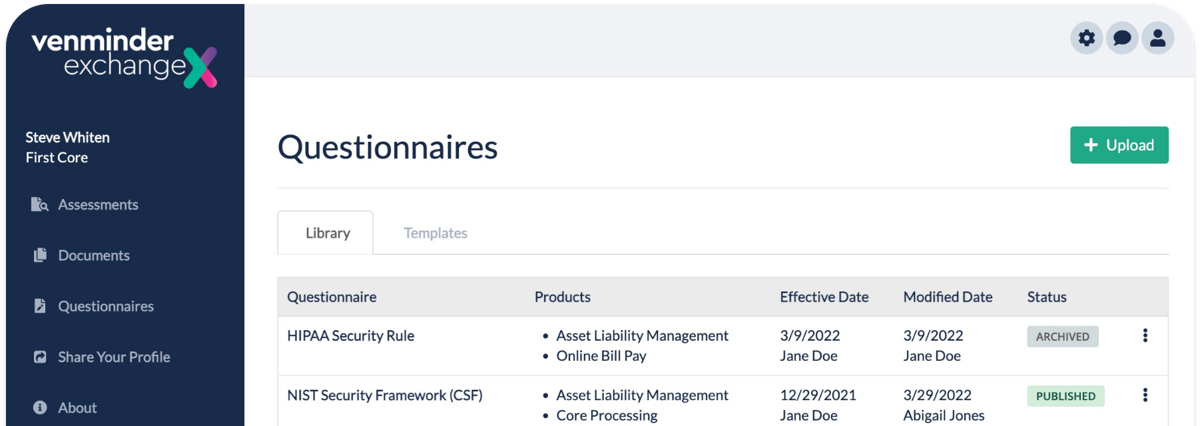
Where the evidence comes from. Your team adds a vendor in the onboarding workspace and sends a customizable questionnaire that the vendor completes in a secure portal. Scoring weights and points per question produce scores per question, per section and overall. Optionally you order a Vendiligence control assessment, in which Venminder experts review the vendor's documents and return a risk-rated report. A separate monitoring product, Ven-monitor, watches business health and cybersecurity and needs no supplier involvement.
What the supplier does. Vendors answer in a secure recipient portal, and several people on the vendor side can work on one questionnaire at once. Venminder also runs an Exchange where vendors keep a profile and pre-complete standard questionnaires. We couldn't confirm whether vendors pay for it.
Tiers and findings. Explicit risk tiers aren't described on the pages we read, although an Advanced Risk Assessment add-on exists. Contracts, issues and service levels are tracked in an ongoing workspace, and issue and SLA management are add-ons.
Plans. Two packages, Professional and Enterprise, list unlimited users, vendors and contracts. Control assessments are sold à la carte or as annual packages, monitoring is an annual subscription, and Venminder says implementation typically takes 30 to 90 days. We found no documented Coupa, SAP Ariba or ServiceNow connectors. SSO and API access are paid add-ons.
- a small risk team wants analysts to review vendor documents and write the assessment
- you want unlimited users and vendors in the package instead of per-vendor sizing
- you need documented Coupa, SAP Ariba or ServiceNow connectors: none were found on the pages we read
- you want one price: SSO and API, issue and SLA management and other features are add-ons
- Users like
- Quality of support and ease of use.
- Source: G2, 115 reviews
- Starting price
- Not published, quote only; Professional and Enterprise packages with unlimited users and vendors, add-ons priced separately
- Evidence source
- Questionnaires and analyst-reviewed documents
- Packages
- Professional and Enterprise
- Monitoring
- Ven-monitor, annual subscription
- Implementation
- Typically 30 to 90 days (vendor figure)
Tools that tie risk to supplier and contract records
Kodiak Hub and Gatekeeper start from the supplier record that procurement already owns, and risk is one module on it. They are a weaker fit if a security team wants outside-in ratings as the core, and a stronger fit if the question is whether a risky supplier can be onboarded or renewed.
Kodiak Hub
Kodiak Hub
Supplier relationship management with self-assessments and risk signals
Kodiak Hub puts risk inside a procurement-led supplier management platform, so assessments sit next to performance and sustainability scoring.
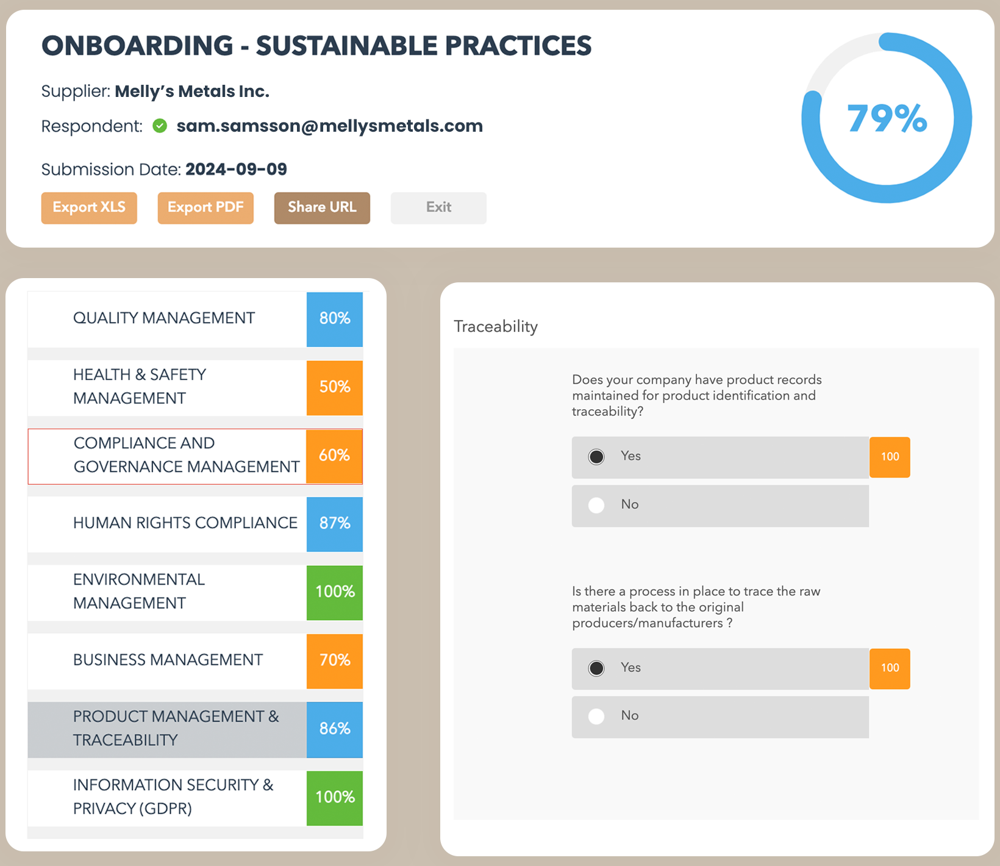
Where the evidence comes from. A procurement, quality or compliance user builds a self-assessment from a template builder or a best-practice library. Kodiak lists 15 business and sustainability areas, among them quality management, labor rights and product compliance. Assessments can be scheduled and sent to supplier segments defined by category, risk or business criticality. Suppliers answer and the platform produces ratings from a configurable rating scheme. Alongside that, it tracks external signals on financial health, sanctions, politically exposed persons, blacklists and media coverage, and you can connect your own risk, ESG, financial or compliance data providers.
What the supplier does. Suppliers answer the self-assessment. Kodiak's pages describe a configurable sign(UP) form for supplier self-registration, and they don't say whether supplier access is free.
Tiers and findings. No named tiering model is published. You segment suppliers and target assessments by category, risk or criticality. Findings can feed workflows, notifications and corrective-action or improvement projects owned by your team.
Fit. Kodiak Hub keeps your ERP or source-to-pay suite as the system of record and adds scorecards and risk on top. The integrations page returned an error when we checked, so confirm connectors in a demo. Reviewers on Capterra rate it 4.8 from 14 reviews and name reporting that isn't fully developed as a weakness.
- you want suppliers to register and answer assessments themselves, with sustainability and compliance questions built in
- your ERP or source-to-pay suite stays the system of record and you need an SRM layer for scorecards and risk on top
- you need a price before the first sales call
- reporting is your main requirement: several reviewers call it the weakest part
- Users like
- Ease of use, all supplier data and documents in one place, and an easier ERP integration than older SRM platforms.
- Users dislike
- Reporting that isn't fully developed yet, module names some users find confusing, and, for one reviewer, a platform that's hard to customize.
- Source: Capterra, 14 reviews
- Starting price
- Not published, quote only (modular SaaS licence)
- Also on G2
- 4.4 out of 5 from 31 reviews
- Risk data
- Financial, sanctions and PEP, adverse media, country risk modules
- Supplier join
- Self-registration through a configurable sign(UP) form
- Supplier SSO
- Single sign-on offered, ISO/IEC 27001 certified
- Evidence source
- Supplier self-assessments plus external risk signals
- Assessments
- Template builder and library covering 15 business and sustainability areas
- Corrective actions
- Findings feed workflows and improvement projects
Gatekeeper
Gatekeeper
Risk status that gates onboarding and renewals
Gatekeeper keeps vendor risk on the same record as the contract, so a risk result can hold up an onboarding or a renewal.
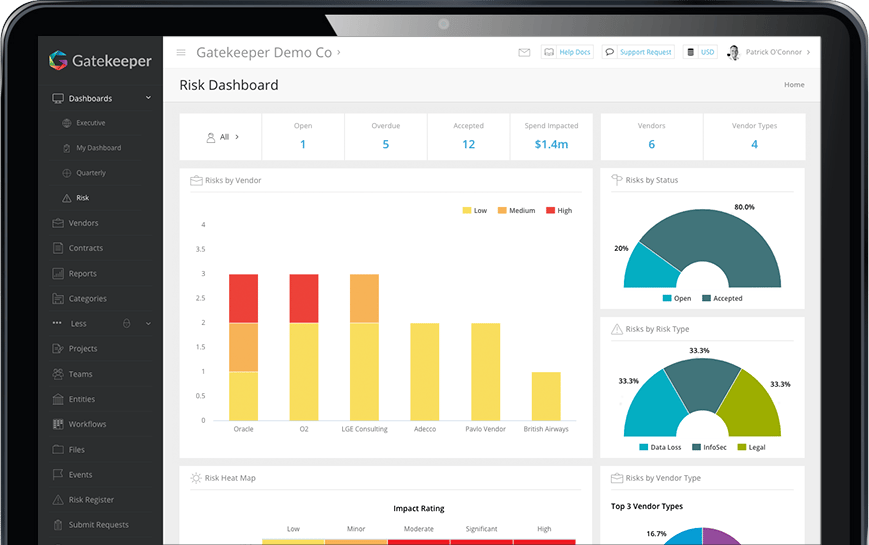
Where the evidence comes from. An admin adds the SIG Lite assessment workflow and sets a trigger on a custom field. When a vendor-creation action sets the status to "assessment required", the vendor contacts on the record get an email and complete a 169-question form in the vendor portal. Each answer is pre-scored and weighted, and the final score is saved on the vendor record. A separate Market IQ integration pulls a SecurityScorecard grade and Creditsafe data for financial stability, sanctions, politically exposed persons and adverse media.
What the supplier does. Vendors complete the form in the portal after being added as vendor users. We couldn't confirm whether the portal is free for vendors.
Tiers and findings. There is no fixed tier model. The Risk Module holds a risk register by supplier, type and category, with a score from probability and impact and a heat map. After a buyer-side reviewer completes the review, an automated action sets the status to complete and can set the next review date 12 months out, and a refresh trigger starts the next review when that date is seven days away. A SIG Lite Review Agent suggests approve, conditionally approve or reject. Vendors under a Low Risk threshold can be pre-approved in onboarding or contract workflows.
Fit. Gatekeeper lists NetSuite, Jira, Slack, Microsoft Teams, ServiceNow and Workday among its integrations. Coupa and SAP Ariba aren't named. Plans are quote only and sized by third-party count: Pro up to 250, Enterprise up to 750 and Enterprise Plus above that.
- you want vendor risk, onboarding, spend and contract renewals in one system with approval workflows and escalation to a team manager
- you run NetSuite or need many system connections and want unlimited contracts, users and e-signature licenses
- you want self-serve pricing: every plan is quote only and sized by third-party count
- you only need a simple repository with date reminders: the workflow setup is more configuration than a basic tracker needs, and notice dates cannot be set automatically
- Users like
- a user-friendly interface and efficient contract processing, per G2's summary of reviews
- Users dislike
- limited customization and slowdowns with larger data sets, per the same summary
- Source: G2, 91 reviews
- Starting price
- Not published, quote only, plans sized by number of third parties (Pro up to 250, Enterprise up to 750, Enterprise Plus 750+)
- Pricing
- Quote only, by third-party count
- Plan tiers
- Pro (250), Enterprise (750), Enterprise Plus (750+)
- Default renewal triggers
- 90 days before notice date and end date
- Vendor portal
- Invitation or self-registration link, scored questionnaires, document upload, two-factor authentication for every portal user
- Evidence source
- SIG Lite questionnaire plus SecurityScorecard and Creditsafe data
- Questionnaire
- SIG Lite, 169 questions, pre-scored, annual refresh
- Risk Module
- Risk register scored from probability and impact
Who owns each step: procurement, security or compliance
Ownership of each step decides whether third-party risk management works, and most programs fail on ownership before they fail on software. Security owns the technical evidence, compliance owns the regulatory view, and procurement owns the relationship and the contract. The supplier relationship management software comparison covers the tools that track that relationship through scorecards and reviews. If nobody owns the decision to renew, tighten or exit, the findings just pile up in a tool, and software doesn't fix that.
- Business ownerRequests the supplier and states what data, systems and sites it will touch Before sourcing starts
- ProcurementAdds the supplier to the inventory and assigns the tier At intake
- Security or complianceReviews the evidence at the depth the tier requires and records findings Before contract signature
- ProcurementTurns findings into contract terms such as breach notification, audit rights and subcontractor limits During negotiation
- Business owner and procurementApprove, approve with conditions or reject, and record who decided Before the first order
- Security or complianceWatches ratings and documents and reassesses on schedule or on alerts Through the contract term
- ProcurementBrings open findings into the renewal decision before the notice deadline Ahead of the notice date
Pick the tool that fits the owner. A security-led team will want a rating it can defend, which points to UpGuard, Bitsight or Panorays. A compliance-led team that needs evidence by framework looks at OneTrust, ProcessUnity or Venminder. A procurement-led team whose supplier data lives in a contract or supplier management tool should start with Kodiak Hub or Gatekeeper, or with the risk module of the source-to-pay suite it already has. If supplier data quality is the first problem, our supplier information management software comparison shows which tools validate tax and bank data.
What a risk finding should change in the buying decision
A finding isn't worth tracking unless it changes something you buy. Three outcomes cover most cases.
- Accept with conditions. The supplier stays, and the contract gets terms that match the finding: breach notification within a fixed number of days, audit rights, evidence refreshed each year.
- Renegotiate. The finding is serious but fixable, so you use the renewal to ask for a remediation plan with dates, a price concession or a shorter term.
- Replace. The supplier can't or won't fix it, and you start sourcing before the notice deadline closes your options.
All three depend on a date. Among the tools here, Gatekeeper describes triggers that start a renewal review before the notice date. For the rest we read only the risk side, and in many teams the renewal conversation still happens in email and a spreadsheet. Our contract renewal checklist and the guide to the contract renewal notice period show what to gather before the deadline.
What third-party risk management software costs
Third-party risk management software costs are published by only one tool here, UpGuard. The others quote, and what they measure isn't the same from one tool to the next.
| Tool | What we found | What sizes the price |
|---|---|---|
| UpGuard | From $1,750 a month billed annually | Vendors monitored: 50 on Standard, 150 on Professional, 500 on Corporate, unlimited above that |
| Bitsight | Quote only | Not stated. A third-party buyer guide reports about $34,000 a year on average across all Bitsight products, which is not specific to vendor risk |
| Panorays | Quote only | Modular bundles for inventory, assessment and monitoring |
| OneTrust | Quote only | Admin users and third-party inventory |
| ProcessUnity | Quote only | Buyer size by revenue and employees |
| Venminder | Quote only | Package, add-ons, assessments and monitoring bought separately |
| Kodiak Hub | Quote only | Modules, sold through a demo |
| Gatekeeper | Quote only | Number of third parties: 250, 750 or more |
UpGuard's own arithmetic is worth running before you commit. At the listed $79 a month for each vendor above 50, monitoring 100 vendors on Standard would cost $5,700 a month, which is more than three times the entry price, so the Professional plan is the likely fit past 50 vendors.
How to run a 30-day pilot
A 30-day pilot gives each shortlisted tool the same ten suppliers: two critical, four moderate and four low-risk, including at least one that hasn't answered a questionnaire before. The goal isn't a demo score. It's to see what the tool does when suppliers behave like suppliers.
- Every supplier received the assessment that matches its tier, not the same questionnaire
- At least seven of ten suppliers answered without a call from your team
- The tool produced a finding you didn't already know about
- The finding became a task with an owner and a due date
- A reviewer outside the security team could read the result and make a decision
- You know what the price would be at your real vendor count
Run the pilot with the people who will own each step in the table above. If procurement can't read the output without help from security, the tool will end up as a security tool even if you bought it for the whole business.
FAQ
What is the third-party risk management procedure?
The procedure has six steps: inventory your third parties, tier them by criticality and data access, assess each at the depth its tier requires, decide whether to approve, monitor ratings and documents through the contract term, and track remediation or exit when a vendor can't fix its findings. The 2023 interagency guidance from the Federal Reserve, FDIC and OCC frames the same life cycle as planning, due diligence, contract negotiation, ongoing monitoring and termination.
What are four risk management tools?
In third-party risk, four kinds of tools cover most programs: security ratings platforms such as UpGuard and Bitsight, questionnaire and assessment tools such as Panorays and Venminder, governance, risk and compliance suites such as OneTrust and ProcessUnity, and supplier or contract management systems with a risk module such as Kodiak Hub and Gatekeeper.
What is an example of a third-party vendor?
A cloud hosting provider that stores your customer data is the standard example, and a payment processor, a payroll provider and a software-as-a-service tool with access to your systems are others. A contractor with a building badge or a subcontractor of one of your vendors also counts.
What is the difference between vendor risk management and third-party risk management?
Vendor risk management covers the suppliers you buy from, and third-party risk management also covers partners, resellers, contractors and other parties without a purchase order. The software and the assessment steps are the same, which is why vendors sell the tools under both names.
Which third-party risk management companies are reputable?
Reputable third-party risk management companies include the eight we read for this article: UpGuard, Bitsight, Panorays, OneTrust, ProcessUnity, Venminder, Kodiak Hub and Gatekeeper. Each has a different evidence source, so reputation matters less than fit: choose by who owns the program, how many vendors you have and what your suppliers can be asked to do.
Do suppliers have to pay or log in to be assessed?
Whether a supplier has to pay or log in to be assessed depends on the tool and the evidence source. With an outside-in rating such as UpGuard, Bitsight or Panorays, the vendor does nothing to be rated. UpGuard says vendors of its customers can create a free account to answer questionnaires. For most other tools we couldn't confirm whether a supplier needs a login or pays, so ask before you send the first request.