Vendor portal software gives your suppliers a login where they register, upload tax forms and certificates, keep bank details current and, in some tools, see purchase orders, send invoices and check payment status. For most procurement and finance teams, the best vendor portal software is Coupa or SAP Ariba when the portal sits inside a source-to-pay suite, Tipalti or BILL when the portal exists mainly to get suppliers paid, and Graphite Connect, Gatekeeper, Kodiak Hub or HICX when onboarding data and compliance documents are the job.
Most comparisons score the buyer's dashboard. We scored the other side of the screen: what a supplier can actually do after clicking the invitation, and what it costs them. We read eight tools against six supplier-side checkpoints using pricing pages, feature pages, vendor documentation and review sites. Only two of the eight document PO confirmation and invoice creation inside the supplier portal, and for the rest the useful question is which part of the loop you still handle by email.
- tools read against six supplier-side checkpoints
- 8
- document PO confirmation and invoice creation inside the portal
- 2
- offer suppliers a free account or profile
- 4
- quote the buyer price instead of publishing it
- 6
Our picks by situation
 Best when suppliers invoice from POs in a free portalCoupaSuppliers see POs from every Coupa customer, send ship notices and create invoices from a PO. SSO, API and accounting sync sit in the paid Coupa Advanced tier.
 Best for suppliers already on SAP Business NetworkSAP AribaA free Standard supplier account covers PO confirmation, ship notices, invoices created from the PO, and invoice and payment status.
 Best for paying many suppliers across countriesTipaltiThe Supplier Hub collects W-9 and W-8 forms with TIN checks, lets payees manage payout details and shows six payment statuses.
 Best for US AP teams paying vendors by ACHBILLInvited vendors get a free BILL account, and a W-9 Agent requests and validates their forms. Vendor-side POs aren't documented.
 Best for bank and tax validation at onboardingGraphite ConnectSuppliers keep a free profile, and OCR checks their documents against TIN, EIN and company name before data reaches the ERP.
 Best for onboarding forms tied to contractsGatekeeperVendors answer scored questionnaires and upload insurance and certificates in a portal that is listed as included in every plan.
 Best for self-registration and supplier assessmentsKodiak HubA configurable sign(UP) form, self-assessments, e-signed codes of conduct and action plans for suppliers.
 Best for one validated supplier record across several ERPsHICXBank, tax ID and address checks run as suppliers submit data, and bank changes after onboarding are monitored.
 For the renewal behind the supplierThe Procurement ManagerRoutes each contract renewal to the business owner, Finance and IT before the notice deadline.
Vendor portal software compared
The table shows each tool's category, what its supplier side does best, the buyer price status and a review rating as of October 24, 2026. Six of the eight tools quote the buyer price instead of publishing it, so the table says that and doesn't rank them. The last line of each price cell says what the supplier pays.
| Tool | Category | What suppliers can do | Price status (USD) | Review rating |
|---|---|---|---|---|
| Coupa | Enterprise spend management and procurement | PO view, ship notices, invoices from POs, profile sharing | Custom buyer quote; no public US rate card verified | 7.2/10 (TrustRadius, 168) |
| SAP Ariba | Enterprise source-to-pay and sourcing | PO confirmation, ship notices, PO-flip invoices, payment status | Price upon request, no public buyer rate | 7.6/10 (TrustRadius, 757) |
| Tipalti | AP automation and global payments with a procurement module | Tax forms, payout details, six payment statuses | Accounts Payable from $99 per month; Procurement module and per-invoice and per-payment fees by quote | 4.5 (417) |
| BILL | SMB accounts payable and payments network | Free vendor account, bank setup, W-9 collection, ePayments | Per user per month: Essentials $49, Team $65, Corporate $89, Enterprise custom; Procurement is an add-on on Essentials and Team and included from Corporate | 4.1 (Capterra, 563) |
| Graphite Connect | Supplier onboarding and data validation | Profile, secure documents, tax and bank validation | Not published by the vendor; Capterra lists a starting price of $25,000 per year, flat rate | 4.3 (Capterra, 26) |
| Kodiak Hub | Supplier relationship management (SRM) | Self-registration, assessments, e-signing, action plans | Not published, quote only (modular SaaS licence) | 4.8 (Capterra, 14) |
| Gatekeeper | Vendor and contract management | Onboarding forms, questionnaires, document uploads | Not published, quote only, plans sized by number of third parties (Pro up to 250, Enterprise up to 750, Enterprise Plus 750+) | 4.5 (91) |
| HICX | Supplier information management for multi-ERP enterprises | Registration with validation, document checks, order visibility | Not published, quote only | No reviews yet |
| The Procurement Manager Our product | Contract renewal decisions | Routes renewal reviews to the business owner, Finance and IT before the notice deadline | From $49 per month, flat, no per-seat fees (Starter, up to 50 contracts) | No reviews yet |
Ratings are out of 5 except Coupa and SAP Ariba, which TrustRadius scores out of 10. Sources and dates: Capterra for Tipalti, BILL, Graphite Connect and Kodiak Hub, G2 for Gatekeeper, TrustRadius for Coupa and SAP Ariba, checked October 20 to 24, 2026. HICX has a single G2 review, so no rating is shown. Tipalti's pricing page shows a dollar sign without naming the currency.
What vendor portal software does
Vendor portal software is a secure website where suppliers deal with one buyer's procurement and finance teams without email. The supplier logs in to complete onboarding, keep company, tax and bank data current, and, depending on the tool, receive purchase orders, send invoices and follow payment. The buyer gets one record per supplier that is current because the supplier maintains it. For how those records are validated and kept accurate across tools, see our comparison of supplier information management software.
Three jobs sit behind that definition, and tools cover different mixes of them. Onboarding collects and validates supplier data before the first order. Transaction exchange moves POs, ship notices and invoices between the two companies. Payment visibility tells the supplier what has been approved, scheduled and paid. Most tools in this list are strong at one or two of these jobs, which is why the supplier-view test below checks all three.
Vendor portal vs vendor management system
A vendor management system is the buyer's own system of record for suppliers, with contracts, performance scores, risk checks and approvals. A vendor portal is the part suppliers see. Some products are both, as Gatekeeper and Kodiak Hub are, while payables tools such as Tipalti and BILL expose only a payee-facing portal. The practical difference is who does the typing: in a management system your team enters and updates the data, and in a portal the supplier does. If your question is about scoring and risk, our guide to supplier management software and our comparison of third-party risk management software cover that side, and this article stays with the supplier-facing surface.
Supplier portal software: the same thing, seen from the supplier
Supplier portal software and vendor portal software describe the same product, and tools use both words. Teams that buy physical goods tend to say supplier, and teams that buy services say vendor. A supplier collaboration portal is a portal that also exchanges forecasts, order confirmations and ship notices in both directions, which in this list means Coupa and SAP Ariba. The buying questions are identical, so we use both terms and test the same six checkpoints.
Here is the journey a supplier takes, with the owner of each step. The tools differ mainly on steps three to seven.
- ProcurementInvites the supplier or shares a registration link Before the first order
- SupplierCompletes the profile, tax form, bank details and certificates Within days of the invite
- Procurement or APReviews the data, runs validation checks and activates the supplier Before the first PO
- SupplierReceives the PO and confirms or rejects it At ordering
- SupplierSends the invoice against the PO After delivery
- Accounts payableMatches, approves and pays the invoice On invoice
- SupplierChecks payment status and, if needed, requests a bank-detail change After payment
- Accounts payableConfirms any bank-detail change before the next payout Whenever it changes
What to look for in vendor portal software
Feature lists look alike, but six criteria separate the tools in practice, and each can be tested with a real supplier in a demo or trial.
| Criterion | What to test |
|---|---|
| Supplier cost | Is the supplier account free, and which features sit in a paid supplier tier? |
| Join and approval | Can suppliers self-register, and who on your side approves them before they can be paid? |
| Data checks | Are tax IDs, bank accounts and documents validated when submitted, or only collected? |
| Orders and invoices | Can the supplier confirm a PO, create an invoice from it and see its status? |
| Bank-detail changes | Who approves a change, and does the buyer get an alert before the next payment? |
| Fit with your stack | Which ERP or accounting system receives the data, and does the sync run both ways? |
The first criterion is the one buyers skip. A portal that costs suppliers a fee or a second login gets ignored, and suppliers who ignore it keep sending PDFs by email, which leaves you running two processes.
The supplier-view test we use for every tool
We read each tool as a supplier would meet it. A small supplier gets an invitation on Monday, completes its profile by Wednesday, receives a PO the following week, sends an invoice after delivery and asks in month three to change its bank account. Six checkpoints follow from that story.
| Checkpoint | The question we ask |
|---|---|
| Join | How does the supplier get in, and who approves the registration? |
| Profile and documents | Which data and documents does the supplier submit, and what is validated? |
| Orders | Can the supplier see, confirm or reject a PO and send a ship notice? |
| Invoices | Can the supplier create or submit an invoice and see its status? |
| Payment | Can the supplier see payment status and manage payout details, and who approves a change? |
| Access | What do SSO, languages, mobile and support look like for the supplier? |
Where the documentation is silent, the entry says "not documented" and we don't guess. The first table shows how the eight tools answer the join and profile checkpoints.
| Tool | Join | Profile data |
|---|---|---|
| Coupa | Buyer invitation, self-registration or a PO email; invitation links expire after 30 days | Public and customer-specific profiles; buyer sees differences and accepts or declines |
| SAP Ariba | Buyer invitation, registration questionnaire, then a trading relationship request | Buyer-defined questionnaires, reviewed by the buyer before onboarding completes |
| Tipalti | Registration invitation from the paying company to the Supplier Hub | W-9, W-8BEN and W-8BEN-E forms with TIN checks; payout details |
| BILL | Invitation to a free BILL account; web portal for unsupported countries | Contact and bank details; W-9 Agent requests and validates forms |
| Graphite Connect | Buyer email invitation; questions already answered for another buyer can be skipped | Tax and bank documents through a secure connection, OCR-checked against TIN, EIN and name |
| Kodiak Hub | Self-registration through a configurable sign(UP) form | Company data, certificates, self-assessments and e-signed contracts |
| Gatekeeper | Invitation or a self-registration link | Onboarding form, scored questionnaires, insurance and certificate uploads |
| HICX | Registration workflow with duplicate detection; invitation and approver not spelled out | Bank, tax ID and address checks at submission; W-8 and W-9 validation |
The second table covers the transaction checkpoints, where the tools differ most.
| Tool | Orders | Invoices | Payment |
|---|---|---|---|
| Coupa | POs from every connected customer, ship notices, Accept PO | From a PO, contract, time sheet or blank; credit notes | Bank or virtual card details need customer approval; Payments tab for Coupa Pay buyers |
| SAP Ariba | Confirm, partly confirm or reject lines; ship notices | Created from the PO with two-way or three-way matching | Invoice and payment status in the Standard account |
| Tipalti | Not documented | Self-billing invoice creation mentioned | Six payment statuses; payee edits payout methods |
| BILL | Not documented | Vendor emails the invoice to the buyer's AP address | Vendor adds bank account; status view not described |
| Graphite Connect | Not documented | Not documented | Bank checks at onboarding; status not documented |
| Kodiak Hub | Not documented | Not documented | Not documented |
| Gatekeeper | Not documented | Not documented | Not documented |
| HICX | Order intake described; PO and invoice visibility in a separate module | Sending invoices named | Bank validation and change monitoring; status not documented |
Enterprise suite portals: Coupa and SAP Ariba
Coupa and SAP Ariba are the two tools in this list where suppliers can run the whole order-to-invoice loop in the portal. Both are priced for enterprise buyers and both give suppliers a free entry account, which is the reason buyers choose them: suppliers don't have to pay to be paid. For a wider comparison of the two suites, see our Coupa vs SAP Ariba guide and the Coupa pricing guide.
Coupa
Free supplier portal inside an enterprise spend suite
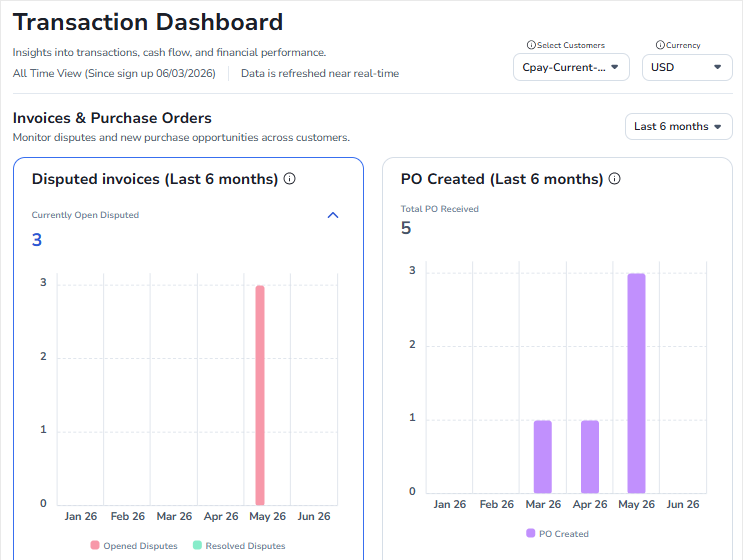
Coupa gives each supplier one login to the Coupa Supplier Portal, where POs from every Coupa customer they serve appear in one place, next to invoices, profile data and payment details.
Join. Suppliers arrive by buyer invitation, by self-registering, from a link in a PO email or through a forwarded invitation. Invitation links expire after 30 days, and a self-registered supplier still has to connect to each customer by hand.
Profile and documents. A supplier keeps a public business profile plus a profile per customer and answers customer information requests. When it shares changes, the buyer sees them next to its own record with differences highlighted and accepts or declines them. The pages we read don't describe expiry reminders for certificates or insurance.
Orders and invoices. Suppliers can send advance ship notices, and depending on buyer settings the PO action reads Accept PO and Create Invoice. Invoices can be created from a PO, a contract, a time sheet or from scratch if the buyer allows it, and credit notes are supported. Small suppliers can answer from an email without logging in through Supplier Actionable Notifications, and high-volume suppliers can use cXML. In-portal invoicing works only for buyers that use Coupa invoicing.
Payment. Suppliers register bank transfer or virtual card details under their legal entities and share them with customers. The customer must approve bank account details before payment. A Payments tab handles digital checks from buyers on Coupa Pay.
Access. SSO through SAML, the invoice REST API and QuickBooks Online and NetSuite invoice sync are part of the paid Coupa Advanced tier. Help chat and a Premium Support option exist, and user guides come in Chinese, French, Japanese, Portuguese and Spanish. We found no supplier mobile app in the documentation.
- your suppliers send mostly PO-backed invoices and you want them to self-serve in a free portal, with email-only invoicing as a fallback for small vendors
- you want suppliers to maintain their own profile and bank details while your team approves every change
- your suppliers are small and would resist another login, since reviewers name supplier adoption as the main friction
- you need supplier SSO or an API without paying, because both sit in the paid Coupa Advanced tier
- Users like
- Approval routing and spend compliance for indirect buying, with clear purchase limits per person.
- Users dislike
- Heavy integration work with ERPs such as SAP, and a supplier portal that confuses vendors asked to create profiles.
- Source: TrustRadius, 168 ratings
Price, limits and what reviewers say
Coupa doesn't publish a buyer price, and we found no official price for Coupa Advanced. On Capterra, Coupa holds 4.0 from 134 reviews, and reviewers credit it with faster invoice handling, one saying it halved the time per invoice. The recurring complaint is on the supplier side: one reviewer calls the portal good for the buyer but annoying for suppliers who must log in just to submit an invoice, and another says convincing vendors to sign up is the hardest part. TrustRadius lists 7.2 out of 10 from 168 reviews (read October 20, 2026).
- Starting price
- Custom buyer quote; no public US rate card verified
- Standard supplier portal
- Free for suppliers; Coupa Advanced is a paid supplier tier (SSO, API, QuickBooks and NetSuite sync)
- Buyer-side platform
- No verified public universal USD rate
- Requisition API
- Create and submit for approval
- Process Automator
- Document events and API call outs
- Supplier join
- Buyer invitation (link expires after 30 days), self-registration or a PO email
- Supplier cost
- Free portal; Coupa Advanced is a paid tier, price not found
- Buyer price
- Quote only
- Invoice options
- Portal, email actions or cXML
SAP Ariba
Supplier network with a free Standard account
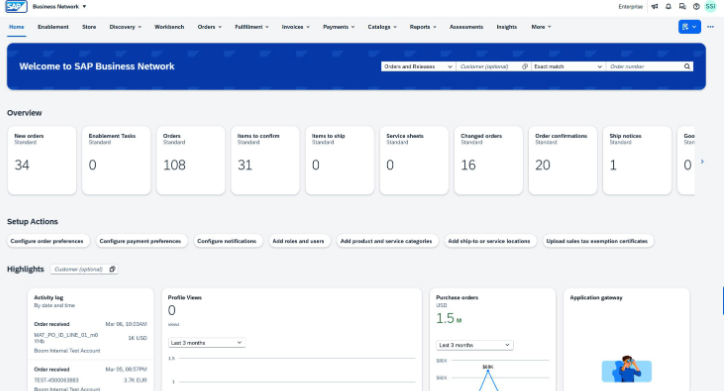
SAP Ariba's supplier side now runs on SAP Business Network, formerly Ariba Network. Suppliers get a workbench where POs arrive, orders are confirmed and invoices are created from the PO.
Join. A buyer sends an email invitation to the supplier contact. In the supplier guide Wells Fargo publishes, the supplier completes a registration questionnaire and then a financial questionnaire, accepts a trading relationship request from the buyer and chooses a Standard or Enterprise account. The same guide warns that the invitation can't be forwarded to another person.
Profile and documents. The questionnaires are set by the buyer. In that example the supplier submits a D-U-N-S number, contact and tax data, banking details, a remittance address and a sample invoice, and the buyer reviews them before onboarding completes. Other buyers ask different questions, and we found no expiry reminders for certificates or insurance.
Orders and invoices. Suppliers see POs in a workbench and confirm them, and most buyers expect a quick answer. If the buyer allows it, a supplier can partly confirm or reject lines. Suppliers send ship notices for goods or service entry sheets for services, and create invoices straight from the PO. The network runs two-way or three-way matching, and duplicate invoice numbers or missing ship notices cause rejections that the supplier fixes and resubmits.
Payment. The Standard account includes document and payment status updates, and remittance or bank data is maintained through the buyer's questionnaires. Wells Fargo requires its own suppliers to be paid by ACH, which shows that payout rules belong to the buyer. We didn't read other buyers' bank-change approval rules.
Access. Both account types offer web and mobile access, multiple users with roles and messaging with customers. Standard support is basic online help, while Enterprise adds chat, phone and dedicated help, system-to-system integration and invoice archiving. SSO and interface languages weren't documented on the pages we read.
- your suppliers already have Ariba Network accounts, because the free Standard account means no new cost or login for them
- you want ship notices and two-way or three-way matching enforced on the supplier side
- your suppliers need system-to-system integration or invoice archiving, since both are Enterprise features with fees unless you absorb them
- you want lightweight onboarding, because the questionnaire and trading relationship steps take several rounds and reviewers describe a learning curve
- Users like
- Punch-out catalogs and guided buying with approval workflows that standardize how people buy.
- Users dislike
- An outdated interface, weak reporting and hard integration with non-SAP ERPs.
- Source: TrustRadius, 757 ratings
Price, limits and what reviewers say
SAP's supplier pricing page says the Standard account is free and the Enterprise account is priced by a subscription level plus transacted volume; we didn't open the fee schedule. Buyers usually decide who carries the cost, so ask before you promise suppliers a free account. On TrustRadius, SAP Business Network holds 8.2 out of 10 from 114 reviews. Reviewers praise real-time visibility and a smooth order and invoice flow, and the most common complaint is an outdated, cluttered interface. The SAP Ariba listing shows 7.6 from 757 reviews (read October 22, 2026), with weak reporting and hard non-SAP integration as recurring themes.
- Starting price
- Price upon request, no public buyer rate
- Buying and Invoicing pricing
- Price upon request, priced on processed spend
- Standard supplier account
- Free on SAP Business Network, unlimited documents
- Enterprise supplier account
- Fixed subscription level fee plus transacted volume
- Supplier order flow
- PO confirmation, ship notices, PO flip invoices, invoice and payment status
- Standard account
- Free, unlimited documents
- Enterprise account
- Fixed subscription level fee plus transacted volume
- Buyer price
- Quote only
Payables and payment portals: Tipalti and BILL
Tipalti and BILL start from the payment. The supplier portal exists so that vendors can enter tax forms and bank details themselves and see when they will be paid, and neither tool documents PO acknowledgement on the supplier side. They fit teams whose supplier pain is chasing W-9s and bank details by email.
Tipalti
Payee portal built around tax forms and payout details
Tipalti is an accounts payable and global payments platform. Its Supplier Hub is where payees complete setup, manage tax forms and payout methods and follow the status of each payment.
Join. The supplier logs in to the Supplier Hub after a registration invitation from the paying company. Setup covers contact details, payment information and, if required, tax information, and the profile stays unpayable until it is complete.
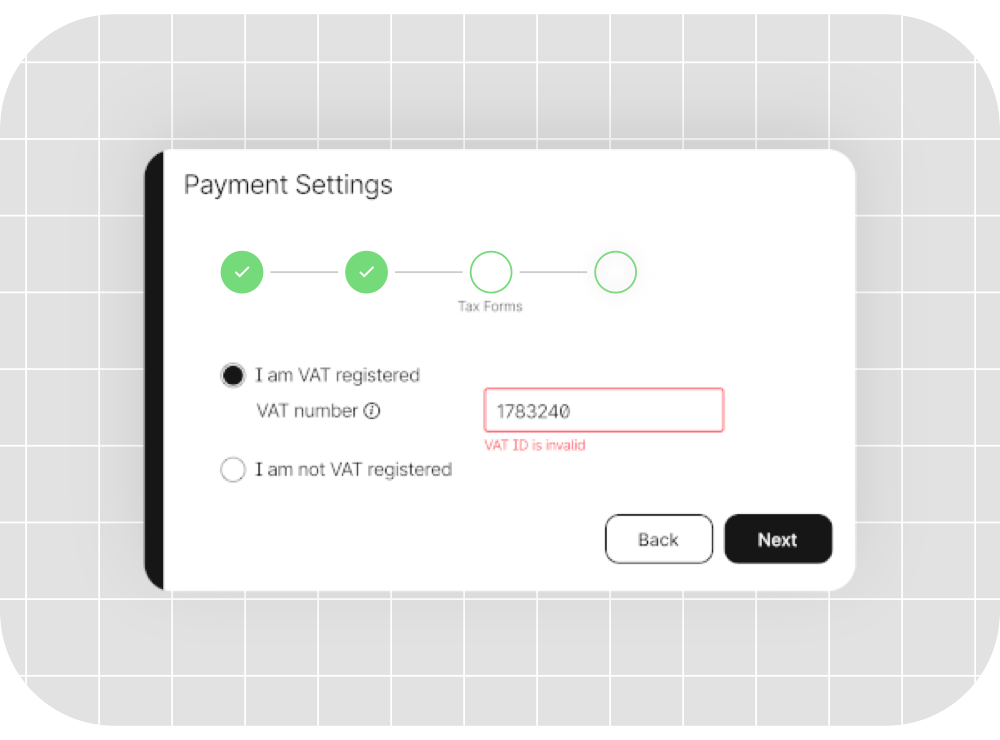
Profile and documents. Suppliers update a W-9, W-8BEN or W-8BEN-E in the Tax Forms tab. The W-9 name on line 1 must match IRS records, and the profile may stay unpayable until the form is validated. Tipalti's supplier management page also claims automatic TIN validation. Certificates and insurance documents aren't described.
Orders and invoices. The supplier management page doesn't mention purchase orders. It does mention automated invoice creation and submission under self-billing, without tying that explicitly to the portal.
Payment. Payment statuses are Scheduled, Processing, Sent to payee, Paid, Deferred and Rejected, depending on how the payer configured the account. Suppliers add or change bank accounts, PayPal and country-specific methods in Payment Details, and the page claims more than 50 payment methods. Changing an address or country can invalidate the payout method.
Access. The portal is described as multi-language without a language list. Questions about approvals, timing and lockouts go to the paying company. Supplier SSO, mobile access and service levels aren't documented.
- you pay many suppliers across countries and currencies and want them to manage tax forms and payout methods themselves
- you need W-9 and W-8 collection with TIN validation feeding an ERP
- you need suppliers to acknowledge POs or send ship notices in the portal, since the supplier pages don't show PO features
- you want a public all-in price, because transaction fees and add-ons are quoted
- Users like
- Ease of use, helpful support and time saved on international payments.
- Users dislike
- Invoice and ERP sync problems and weak reporting.
- Source: G2, 417 reviews
Price, limits and what reviewers say
Accounts Payable starts at $99 a month and Mass Payments at $249 a month on Tipalti's pricing page, which shows dollar signs without naming the currency. Per-invoice and per-payment fees and add-on modules are not published. Received amounts can still shrink through exchange rates, bank charges and withholding, which the payee FAQ mentions. On Capterra, Tipalti holds 4.5 from 179 reviews, and one reviewer says vendors manage their own payment details, which cuts fraud risk and AP time. Another reports a steep learning curve with vendor onboarding and custom approval workflows. On G2 the rating is 4.5 from 417 reviews (read October 22, 2026), with invoice and ERP sync problems and weak reporting as complaints.
- Starting price
- Accounts Payable from $99 per month; Procurement module and per-invoice and per-payment fees by quote
- Tolerances
- Amount or percentage, bill or line level
- Payments
- 200+ countries and territories, 120 currencies
- Supplier Hub
- Payees complete tax forms and payout details and follow six payment statuses
- Supplier cost
- No payee fee listed on the pages we read
- Statuses
- Scheduled, Processing, Sent to payee, Paid, Deferred, Rejected
- Tax forms
- W-9, W-8BEN, W-8BEN-E
BILL
Free vendor account on a US payment network
BILL is a US payables platform with a payment network. Invited vendors get a free BILL account to manage contact and bank details, and vendors in countries BILL doesn't support receive a web portal invitation.
Join. The payer sends an invitation to create a free BILL account. The vendor verifies an email address, confirms the connection request and sets up a bank account. Vendors who already have an account sign in and add the new customer.
Profile and documents. Vendors manage contact and payment information, and if the payer keys in bank details, the vendor is asked to confirm them. BILL's W-9 Agent emails vendors for W-9s, validates the TIN and name and flags mismatches. It has been on by default since June 2026. Certificates and insurance aren't described.
Orders and invoices. Vendor-side PO viewing or acknowledgement isn't documented, and Procurement is a buyer-side add-on. Vendors can email a digital invoice to the customer's dedicated AP address, and processing starts on arrival. A vendor-side invoice status view isn't described.
Payment. Vendors add bank accounts to receive ePayments and the payer is notified. We found no vendor-facing payment status page on the pages we read.
Access. SSO and API access are buyer-plan features starting at Corporate. Vendor login steps, languages, mobile access and service levels weren't found.
- you run a US small or mid-size AP team on QuickBooks or Xero and want vendors paid by ACH or card through an invited network
- you mainly need W-9 and 1099 handling with a free vendor account
- you need suppliers to acknowledge POs or receive ship notices online, since none is documented on the vendor side
- you need a vendor-facing payment status page, which the pages we read don't describe
- Users like
- Vendors manage their own accounts and onboarding is simple, with little interaction needed from the buyer.
- Users dislike
- Weak customer support, including a vendor payment that never arrived and hard escalation.
- Source: Capterra, 563 reviews
Price, limits and what reviewers say
BILL's US pricing page lists Essentials at $49, Team at $65 and Corporate at $89 per user a month, with Enterprise custom, and doesn't say whether those prices assume annual billing. It also lists fees for the receiving side, such as $0.59 for ACH and 2.9% for card, so confirm who bears which fee before you tell vendors the account is free. On Capterra, BILL holds 4.1 from 563 reviews. One reviewer says vendors manage their own accounts and onboarding is simple, while several report weak customer support, including a vendor payment that never arrived.
- Starting price
- Per user per month: Essentials $49, Team $65, Corporate $89, Enterprise custom; Procurement is an add-on on Essentials and Team and included from Corporate
- Supplier cost
- Free account for invited vendors; fees listed for some receive methods
- W-9 Agent
- Emails vendors for W-9s, validates TINs, on by default since June 2026
- Buyer price
- $49, $65 or $89 per user a month
- Procurement
- Add-on on Essentials and Team, included from Corporate
Onboarding and compliance portals: Graphite Connect, Kodiak Hub, Gatekeeper and HICX
Graphite Connect, Kodiak Hub, Gatekeeper and HICX are built around the first mile of the supplier relationship: collecting the right data and documents, validating them and keeping them current. None of them documents invoice submission, so they sit next to an ERP, AP tool or suite that handles the transaction.
Graphite Connect
Supplier profile network with tax and bank validation
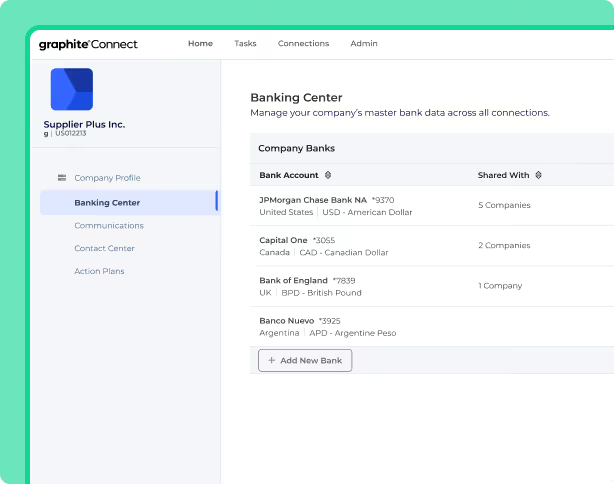
Graphite Connect is a supplier onboarding and vendor data network. Suppliers maintain a secure profile, and Graphite validates identity, tax and bank data before it reaches the buyer's ERP.
Join. The buyer emails an invitation and the supplier sets up a secure profile. If another buyer already uses Graphite, the supplier can skip questions it has answered before.
Profile and documents. Suppliers submit company information and answer tax and cybersecurity questions. Sensitive files such as W-9s and bank statements go through a secure Graphite connection instead of email. OCR checks the documents against TIN, EIN and company name, and the buyer's team is alerted to review, approve or request more documents. Onboarding flows can vary by supplier category, location, risk area and ESG needs, and the vendor names identity verification, two-factor authentication and video validation. Expiry reminders aren't described.
Orders and invoices. No supplier-facing purchase order or invoice features are documented. The product focuses on vendor data.
Payment. Graphite says a complete profile helps buyers pay on time, but no payment status or remittance view is described, and neither is change control for later bank edits.
Access. Support runs through a help center with supplier guides, which blocked our reader, and an open API powers more than 50 ERP integrations. SSO and supplier languages aren't mentioned.
- new-vendor volume is high and payment fraud through fake or changed bank details is a real risk
- AP and procurement both onboard vendors and you want one validated profile going into NetSuite, Oracle, SAP or Workday
- suppliers need to receive POs and submit invoices online, because no order or invoice features are documented
- your budget for onboarding software is well below the listed $25,000 a year
- Users like
- A registration flow suppliers find quick and easy, one place for every stakeholder in vendor onboarding, and responsive support.
- Users dislike
- Task statuses that don't make clear whose turn it is, and integration issues that can take a long time to resolve.
- Source: Capterra, 26 reviews
Price, limits and what reviewers say
Graphite doesn't publish a price, and its pricing page was not available when we checked. Capterra lists a starting price of about $25,000 a year, flat rate, which we could not confirm with the vendor. On Capterra, Graphite Connect holds 4.3 from 26 reviews (read October 21, 2026). Reviewers like a registration flow suppliers find quick and easy, one place for every stakeholder in onboarding and responsive support, and complain that task statuses don't make clear whose turn it is and that integration issues can take a long time to resolve.
- Starting price
- Not published by the vendor; Capterra lists a starting price of $25,000 per year, flat rate
- ERP connections
- NetSuite, Oracle, SAP S/4HANA, SAP Ariba, Workday, open API
- Users
- Unlimited
- Supplier cost
- Free for suppliers
- Supplier data
- OCR checks W-9 and bank documents against TIN, EIN and company name
- Setup
- ERP configuration from about 2 weeks, depending on complexity
Kodiak Hub
Self-registration and assessments on top of your ERP
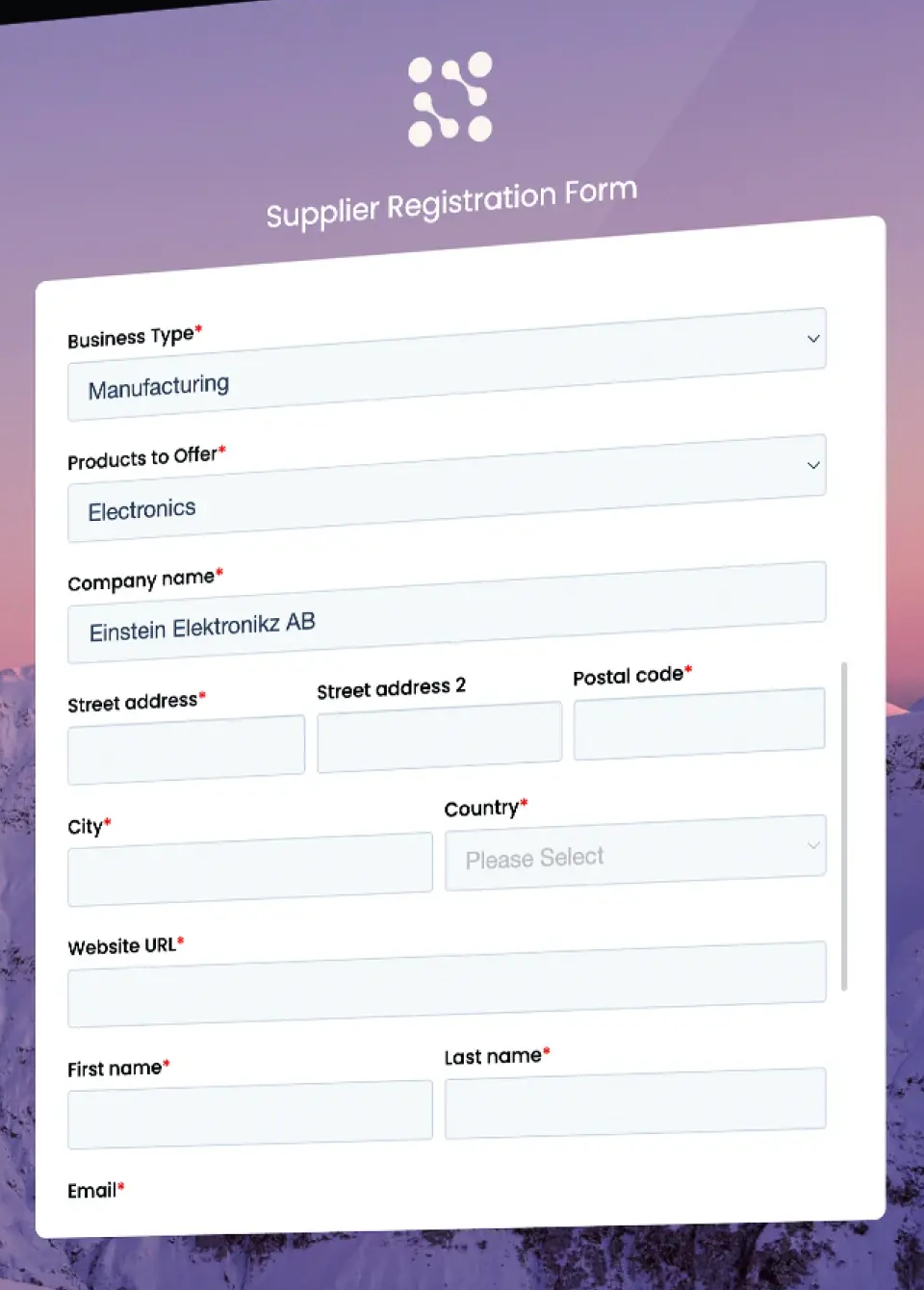
Kodiak Hub is a supplier relationship management platform. Its supplier side is built around self-registration, questionnaires, e-signing and joint action plans, not around PO and invoice exchange.
Join. Suppliers self-register through a configurable sign(UP) form that can follow the buyer's process and industry.
Profile and documents. Suppliers submit company information, offerings, certificates and documents, complete self-assessments and e-sign contracts, SLAs and codes of conduct through sign(ON). Screening covers sanctions, politically exposed persons and adverse media. Expiry reminders and specific approval steps aren't described.
Orders and invoices. Purchase orders, acknowledgements, ship notices and invoices aren't mentioned on the pages we read.
Payment. Payment status, remittance and bank-change control aren't mentioned either.
Collaboration. Action plans can be sent to suppliers at scale with progress tracking.
Access. The security page says single sign-on is offered and that the company is ISO/IEC 27001 certified. A mobile auditing app is mentioned. We found no supplier support details or supplier-facing language list.
- you want suppliers to register and answer assessments themselves, with sustainability and compliance questions built in
- your ERP or source-to-pay suite stays the system of record and you need a supplier layer for scorecards and risk on top
- suppliers must see POs, submit invoices or check payment status, because none of that is documented
- you need a price or supplier-side documentation before the first sales call, since neither was published
- Users like
- Ease of use, all supplier data and documents in one place, and an easier ERP integration than older SRM platforms.
- Users dislike
- Reporting that isn't fully developed yet, module names some users find confusing, and, for one reviewer, a platform that's hard to customize.
- Source: Capterra, 14 reviews
Price, limits and what reviewers say
Kodiak Hub doesn't publish a price, and its pricing page was not available when we checked. On Capterra the rating is 4.8 from 14 reviews, and on G2 4.4 from 31 (both read October 21, 2026). Reviewers praise ease of use and having all supplier data and documents in one place, and name reporting that isn't fully developed and confusing module names as weaker points.
- Starting price
- Not published, quote only (modular SaaS licence)
- Also on G2
- 4.4 out of 5 from 31 reviews
- Risk data
- Financial, sanctions and PEP, adverse media, country risk modules
- Supplier join
- Self-registration through a configurable sign(UP) form
- Supplier SSO
- Single sign-on offered, ISO/IEC 27001 certified
- Supplier cost
- Not documented
- Integrations named
- Coupa and SAP Ariba
- Security
- SSO offered, ISO/IEC 27001
Gatekeeper
Vendor portal inside a contract and vendor management platform
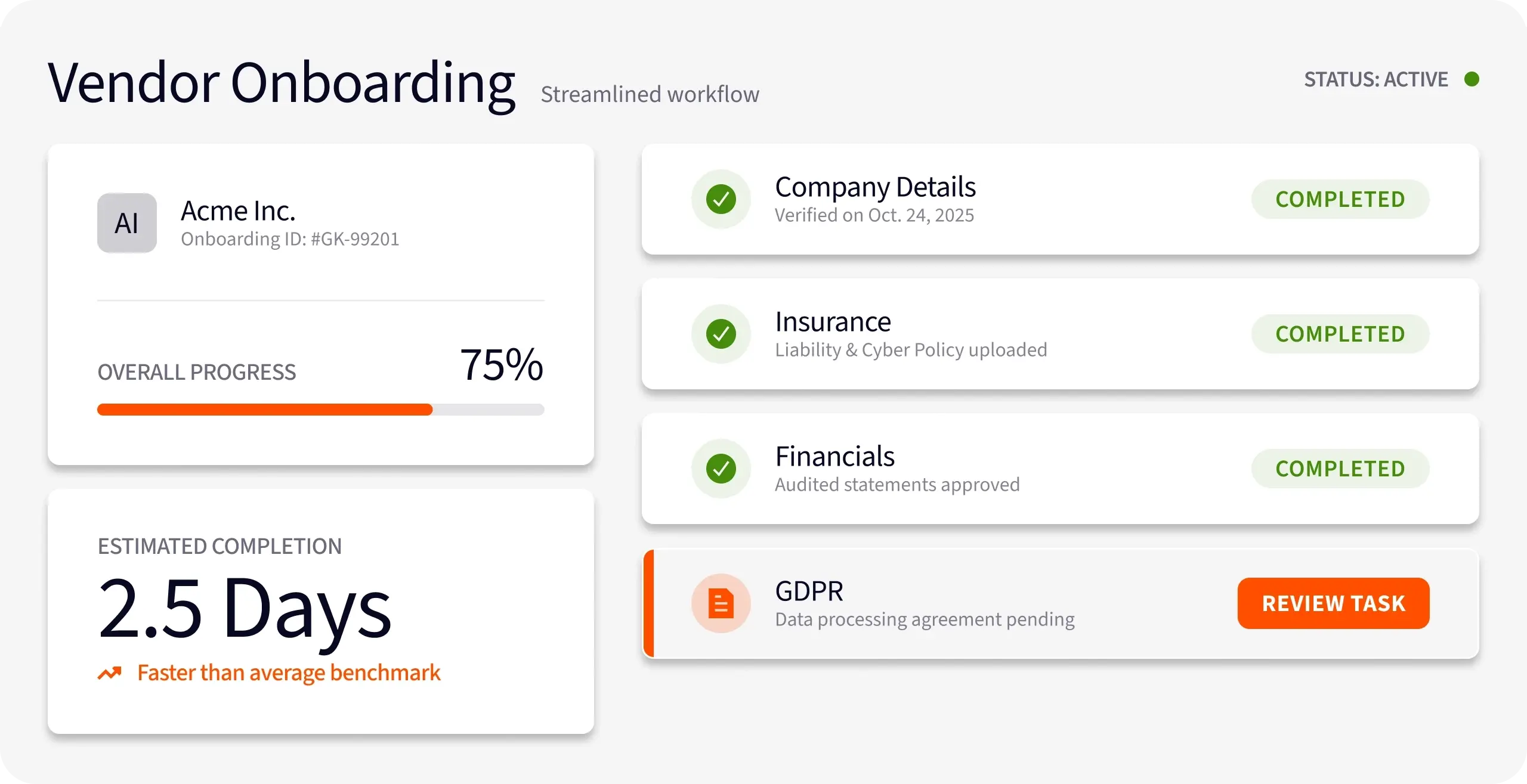
Gatekeeper pairs vendor and contract records with a branded vendor portal. Vendors use it to answer onboarding forms and questionnaires, upload documents and exchange messages with the buyer team.
Join. Admins invite vendors to the portal or switch on self-registration with a shared registration link. Approvals stay internal, in an approval phase and an onboarding review phase, and a rejection can send the form back to the vendor for resubmission. Self-registration needs the Vendor Portal module.
Profile and documents. Vendors fill in an onboarding form about their organization and compliance standards, with attachments, and upload insurance, certifications and policies. Scored forms add weighted questions with red, amber and green indicators. Buyers track expiry dates and flag expiring documents, but the pages don't say vendors get their own reminders. Document-level visibility controls decide which files each vendor sees, and we found no tax-form or bank-detail collection.
Orders, invoices and payment. No PO view, invoice submission or payment status is described for suppliers.
Access. Two-factor authentication is required for every portal user and the portal can be branded. The pricing page lists API access and SSO in all plans, but supplier-side SSO, languages and mobile aren't described. The vendor says AI agents chase insurance certificates and score due diligence questionnaires.
- you want a vendor portal mainly for onboarding forms, questionnaires and certificate collection tied to contract management
- you run NetSuite, Xero or QuickBooks and want vendor records synced from one central record
- suppliers must see POs, submit invoices or track payments online, because none of that is documented
- you need supplier-facing bank-detail validation or tax-form collection, which the pages don't describe
- Users like
- a user-friendly interface and efficient contract processing, per G2's summary of reviews
- Users dislike
- limited customization and slowdowns with larger data sets, per the same summary
- Source: G2, 91 reviews
Price, limits and what reviewers say
Gatekeeper doesn't publish dollar prices. Plans are sized by the number of third parties, and the vendor portal is listed as included in all three tiers. One competitor blog calls the portal a paid add-on, which conflicts with Gatekeeper's own page, so confirm it in the quote and ask whether portal users count toward the third-party limit. On G2, Gatekeeper holds 4.5 from 91 reviews (we read G2's summary page). Reviewers cite ease of use and contracts and vendors in one place, and limited customization and slowdowns with large data sets, though none of those themes is specific to the portal.
- Starting price
- Not published, quote only, plans sized by number of third parties (Pro up to 250, Enterprise up to 750, Enterprise Plus 750+)
- Pricing
- Quote only, by third-party count
- Plan tiers
- Pro (250), Enterprise (750), Enterprise Plus (750+)
- Default renewal triggers
- 90 days before notice date and end date
- Vendor portal
- Invitation or self-registration link, scored questionnaires, document upload, two-factor authentication for every portal user
- Supplier cost
- No fee stated; portal listed in every plan
- Plans
- Pro up to 250, Enterprise up to 750, Enterprise Plus 750+ third parties
- Sync
- NetSuite two-way SuiteApp
HICX
Validated supplier records across several ERPs
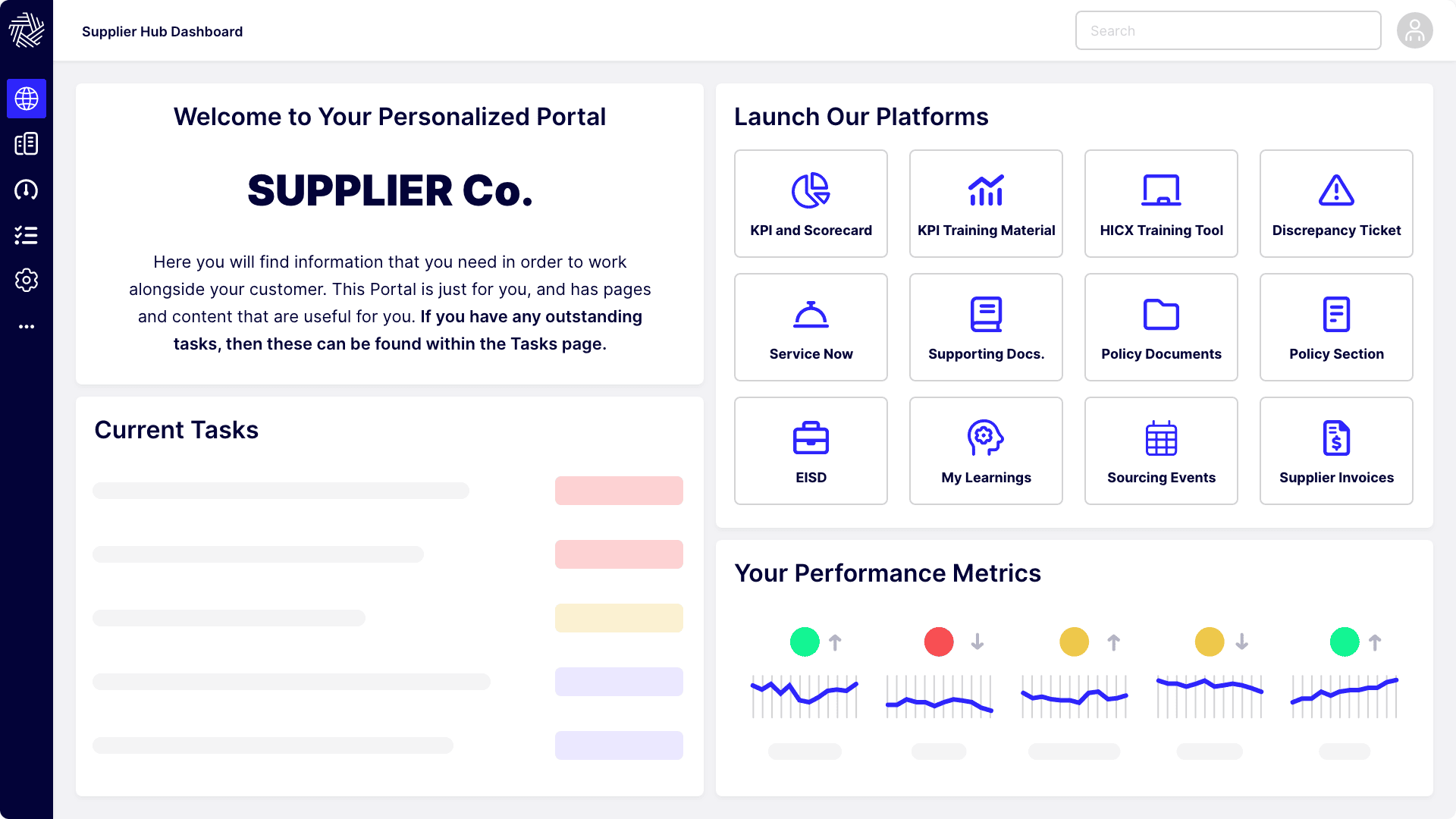
HICX is a supplier data platform with a supplier portal and HICX Origin, a layer that validates supplier data against external sources. Suppliers register and maintain their own data while checks run in the background.
Join. HICX describes supplier-facing registration workflows with built-in validation, duplicate supplier detection and compliance document upload. The pages we read don't spell out how suppliers are invited or who approves them.
Profile and documents. Origin checks bank accounts, tax IDs and addresses as the supplier submits them and flags invalid entries before activation. For US suppliers it validates W-8 and W-9 forms with expiry tracking. Bank changes after onboarding are monitored and the buyer is alerted. HICX says suppliers take no extra steps, and only flagged items need follow-up.
Orders and invoices. The portal is described as a single entry point for receiving orders, and a separate Supplier Transaction Visibility module gives real-time PO and invoice visibility. PO acknowledgement, change proposals and ship notices aren't described, and sending invoices is named without detail.
Payment. Payment status isn't mentioned. The bank validation added in the first-quarter 2026 release is aimed at payment diversion fraud.
Access. The portal page describes single sign-on across supplier-facing systems, a mobile experience, an AI chat assistant and a configurable dashboard. A third-party directory lists 11 languages, which HICX's own pages didn't confirm.
- you need supplier bank and tax ID validation, including W-8 and W-9 checks, at the moment suppliers submit data
- you run several ERPs and want one governed supplier record, especially alongside SAP Ariba
- you want a published price or a quick self-serve start, since HICX is quote only with project-team implementation
- your suppliers mainly need invoice, PO and payment tracking, because those functions are only partly described
Price, limits and what reviewers say
HICX doesn't publish a price, and its pricing page was not available. A third-party directory describes the quote as driven by the number of suppliers. G2 shows a single review from 2022, which is too few to call a pattern, so we show no rating. That review praises how adaptable HICX is for building multi-stream onboarding and notes that it takes complex programming skill.
- Starting price
- Not published, quote only
- Data validation
- HICX Origin add-on: bank details, tax IDs, addresses, sanctions
- Supplier portal
- Self-service, 100+ languages
- Origin validation
- Bank, tax ID and address checks at submission, W-8 and W-9 validation, bank-change monitoring
- Supplier cost
- Not documented
- Validation
- Bank, tax ID and address checks, W-8 and W-9
- Connector
- SAP Ariba (third-party source)
How much does vendor portal software cost?
Vendor portal software costs from $49 per user a month for BILL Essentials and $99 a month for Tipalti Accounts Payable where the vendor publishes a buyer price, and the other six tools quote it. The more useful number for adoption is the supplier's cost, because a portal that charges suppliers or hides features behind a paid tier gets less use.
| Tool | Buyer price (USD, October 2026) | What suppliers pay |
|---|---|---|
| BILL | $49, $65 or $89 per user a month; Enterprise custom | Free account; fees listed for some receive methods |
| Tipalti | Accounts Payable from $99 a month; transaction fees and add-ons quoted | No payee fee listed |
| Coupa | Quote only | Free portal; paid Coupa Advanced tier, price not found |
| SAP Ariba | Quote only | Standard free; Enterprise by subscription level plus volume |
| Graphite Connect | Quote only; about $25,000 a year per Capterra | Free |
| Gatekeeper | Quote only, sized by number of third parties | No fee stated; portal listed in every plan |
| Kodiak Hub | Quote only | Not documented |
| HICX | Quote only | Not documented |
The subscription is only part of the cost. Budget for the supplier outreach that no tool does for you, for the ERP integration, and for your own team's review of every new supplier. If the portal feeds a purchase order or payment process you are also choosing, compare these prices with the ones in our procure-to-pay software guide and the purchase order software guide.
Build or buy a vendor portal
No-code and low-code builders such as Softr, Zoho Creator and Microsoft Power Apps let you assemble a portal on top of a spreadsheet or database, and several competing lists include them. We didn't test them. A builder gives you full control over the forms and the branding, and it hands you the parts the tools above ship ready-made: tax and bank validation, duplicate detection, role-based access, an audit trail and the connection to your ERP. A reasonable rule is to build when you have fewer than a few dozen suppliers and one clear use, such as certificate collection, and to buy when suppliers submit bank details or invoices. A shared spreadsheet and email are the real competitor at that scale, and the pilot below tells you when they stop being enough.
How to pilot a vendor portal with 10 of your own suppliers
A demo supplier is cooperative, which is obviously why vendors use one. Yours include a one-person shop, a foreign payee and a supplier who changes its bank account. Before you buy, run the same ten suppliers through each shortlisted tool.
Pick ten suppliers that are hard on purpose
Include a one-person business, a large supplier with its own portal fatigue, a foreign payee, a service provider with no POs and one supplier that has recently changed its bank account.
Invite them with your real message
Send the actual invitation and note how many finish onboarding within a week, which step they abandon and how many write to your team for help.
Send one PO and one invoice per supplier
Check whether the supplier can confirm the PO, create the invoice from it and see its status, and what your AP team sees when the invoice arrives.
Change one supplier's bank details
Have a test supplier change its account. Check who is alerted, who approves the change and whether the next payment can go out before anyone confirms.
Ask the supplier what it cost them
Collect the supplier's view: extra logins, fees, time spent and whether it would keep using the portal. Compare it with the vendor's description.
- At least eight of ten suppliers finished onboarding without a call to your team
- The tax form and bank account were validated, not just stored
- The PO was confirmed and the invoice created in the portal, or you know which step stays on email
- The bank-detail change alerted the right person before the next payment
- No supplier had to pay for a feature your process needs
- You know which plan or tier includes each feature you tested
From supplier portal to renewal decision
A vendor portal keeps the supplier's data, orders and invoices current, and it answers whether a supplier can be paid, not whether its contract should renew. The notice deadline is a buyer-side date that no supplier-facing screen owns. Among the tools here, Gatekeeper's pages describe date-triggered renewal reviews, and for the others we read only the supplier-facing side. In many teams the renewal conversation still happens in email and a spreadsheet, and nobody's name is on the decision.
Our contract renewal checklist and the guide to the contract renewal notice period show what to collect before the deadline.
FAQ
What is vendor portal software?
Vendor portal software is a secure website where suppliers log in to onboard, keep company, tax and bank data current and, in some tools, receive purchase orders, send invoices and check payment status. The buyer gets one up-to-date record per supplier because the supplier maintains it.
What is the difference between a vendor portal and a vendor management system?
A vendor management system is the buyer's record of suppliers, contracts, scores and risk checks, and a vendor portal is the part suppliers log in to. Gatekeeper and Kodiak Hub combine both, while Tipalti and BILL expose only a payee-facing portal.
Do suppliers have to pay to use a vendor portal?
Suppliers often pay nothing for the basic vendor portal account. Coupa's supplier portal, SAP Business Network's Standard account, BILL's vendor account and Graphite Connect's supplier profile are free for suppliers, while Coupa Advanced and SAP Ariba Enterprise are paid tiers. None of the eight offers a free buyer plan, so the free part is always the supplier side. For a very small supplier base, a builder such as Softr or Zoho Creator or a shared spreadsheet is the low-cost alternative. Ask the vendor which supplier features sit behind a fee before you promise suppliers it is free.
Does vendor portal software integrate with my ERP?
Most tools in this list do, but the depth differs. Graphite Connect names NetSuite, Oracle, SAP S/4HANA, SAP Ariba and Workday, Gatekeeper has a two-way NetSuite connector, and BILL syncs with QuickBooks and Xero on its Team plan and up. Coupa's QuickBooks Online and NetSuite invoice sync for suppliers is part of the paid Coupa Advanced tier, so ask which side pays for the connection.
Where do suppliers log in to a vendor portal?
Suppliers log in to the product their buyer uses, such as the Coupa Supplier Portal, SAP Business Network, the Tipalti Supplier Hub or a BILL account, and the invitation email from the buyer is the starting point. Invitations can expire (Coupa's links last 30 days), so ask the buyer to resend one if the link has lapsed.
What is the best vendor portal software for a small business?
For a small US team, BILL is the lowest published entry at $49 per user a month, with a free vendor account, but it doesn't document PO acknowledgement for vendors. If suppliers must confirm POs or send ship notices, run the ten-supplier pilot with two shortlisted tools before you decide.