Zip vs Procurify comes down to where your purchasing process breaks. Zip's an intake and orchestration platform: it puts one guided request in front of every purchase and pulls Legal, Security, IT and Finance in at the right moment, with procure-to-pay as a newer layer behind it. Procurify's a purchasing-led platform: requests, approvals, purchase orders and receiving come first, and Accounts Payable and cards are optional modules on the same record.
Neither vendor publishes a price list, so it's not a spreadsheet comparison of two sticker prices. It's a question of which workflow you'd rather fix first, and which system your finance team's willing to keep as the system of record.
 Choose Zip for cross-functional intake
- Purchases need Legal, Security, IT and Finance review, not only a budget approval.
- You already run an ERP and want one front door for every request in front of it.
- You want to evaluate sourcing, supplier onboarding and contract workflows from the same vendor later.
 Choose Procurify for purchasing control
- You need approved requests, live budget impact, purchase orders and receiving in one trail.
- Your finance team can own the accounting integration and implementation work.
- You want optional AP and spending cards on the same platform, bought module by module.
Zip vs Procurify at a glance
Both products take a purchase from request to approval and on to a purchase order, and both can reach invoices and payments. They start from different ends. Zip starts with a plain-language request that becomes a structured form and routes to the reviewers a policy requires. Procurify starts with the purchasing record itself: order requests, budgets, purchase orders and receipts.
| Tool | Starting point | Invoices and payments | Review depth beyond Finance | Accounting and ERP sync | Published price | Review score |
|---|---|---|---|---|---|---|
| Zip | Guided intake and cross-functional approvals | Procure-to-Pay product, Global Payments and Vendor Cards add-ons | Legal, security and risk workflows in the portfolio | Oracle, NetSuite, Sage, SAP, Workday, Dynamics 365, QuickBooks, Brex | No public rate card | 4.7 of 5 on Capterra |
| Procurify | Order requests, budgets and purchase orders | Accounts Payable product, US ACH, wire or check | Approval groups and budget checks, contracts as add-on | QuickBooks, NetSuite, Sage Intacct, Business Central | No public rate card | 4.6 of 5 on G2 and Capterra |
Read the table as a starting map, not a verdict. A capability on a vendor page is listed for a product or add-on, and the quote decides whether you get it. Ask each vendor to confirm in writing which products and add-ons sit on your order form.
How each platform is built
Zip: an intake layer with a growing back end
Zip's portfolio now covers Intake-to-Procure, Procure-to-Pay, Contract Orchestration, Sourcing, Risk Orchestration and Supplier Onboarding, plus add-ons for Global Payments, Vendor Cards and App Studio. The intake product says it can turn a plain-language request into a completed form and route it for approval. That matters when employees buy software before anyone has looked at data access, budget or contract terms.
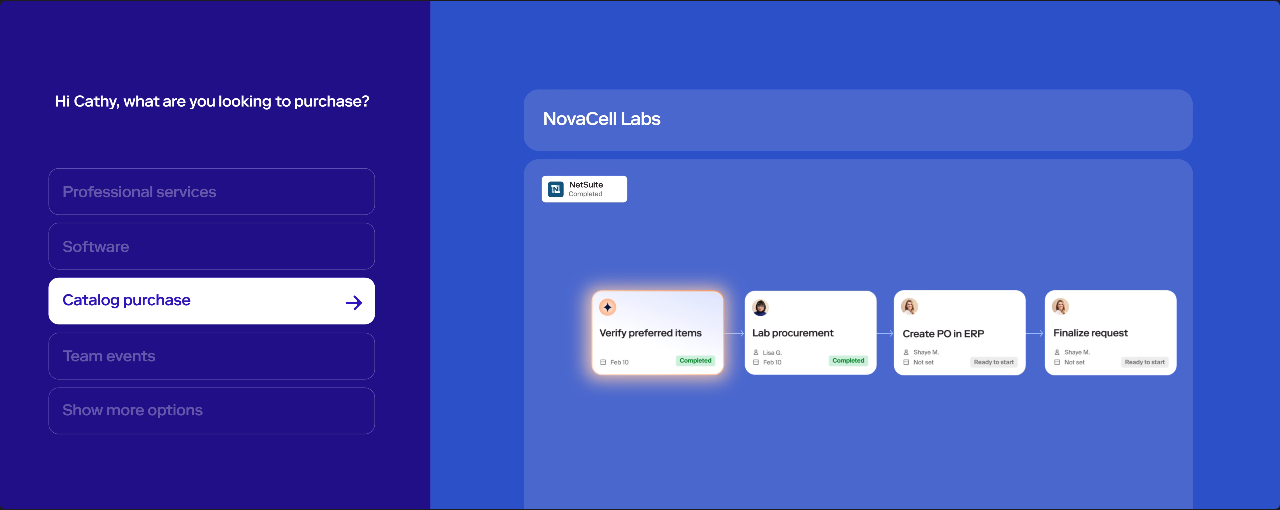
Zip's Procure-to-Pay page describes intake data populating purchase orders, an AI agent that extracts invoices from the AP inbox and codes them from policy and history, and a review step that catches duplicates, overages and contract mismatches before an approver sees them. It lists real-time sync to Oracle, NetSuite, Sage, SAP, Workday, Dynamics 365, QuickBooks and Brex, so it's no longer only an intake tool.
Procurify: a purchasing spine with modules
Procurify describes Purchasing as the product every customer starts with: order requests, purchase orders, product catalogs and vendors. Accounts Payable adds bills and payments, and Expense & Card adds spending cards and expenses. Guided Intake and Contracts are priced as add-ons. Approved requests become purchase orders, receiving closes the loop, and bills match against both.
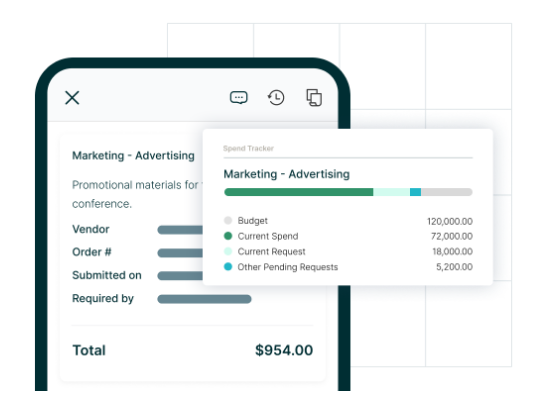
The feature that's definitely worth testing first is budget impact during approval. Procurify builds budgets by department, account code or both, counts pending requests against the active budget, and has an overage setting: with it disabled, approvers can't approve a request that exceeds the budget, and with it enabled they see a warning and can still approve. Confirm which setting your quote and configuration use.
Requests and approvals
Zip's strength is the front door. A request carries the business owner, supplier, estimated spend, contract term and data access, and the workflow shows the requester what's pending. Conditional routing means a low-risk renewal can skip a security review that a new vendor with customer data cannot. The risk is design debt: a visual builder is only as good as the approval policy someone wrote down first.
Procurify's approval model is closer to the purchasing record. Unlimited approval groups, delegation and mobile approvals are listed, and the budget is visible while the approver decides. That's what suits organizations where the main failure is spending before anyone checks the budget. Cross-functional intake is a separately priced add-on (Guided Intake).
Test both with the same request, and don't coach the requester. Submit a software purchase with no known supplier, change the estimated spend after approval has started, and make an approver absent. Record what each system does with the earlier approvals and what the audit history shows afterward.
Purchase orders, receiving and invoices
This is where the two products differ most. Zip now sells a separate Procure-to-Pay product, but intake remains its center of gravity. Procurify's purchasing-to-receiving flow is the center of its product: its mobile page describes marking items as received, notifying the requester and purchaser, and photographing packing slips and damaged goods.
| Stage | Zip: what to verify | Procurify: what to verify |
|---|---|---|
| Purchase order | PO populated from intake data and synced to the ERP | PO tracked through receipt with an audit trail |
| Receiving | Receiving isn't described on its intake or P2P pages; confirm scope | Partial receipts, damaged items, service acceptance |
| Invoice handling | AI extraction, coding and exception routing | Draft bills from one inbox, two- and three-way matching |
| Payments | Global Payments and Vendor Cards add-ons | ACH, wire or check in the US, EFT in Canada |
| Exceptions | Duplicate, overage and contract mismatch review | Price variance, quantity mismatch, no-PO charges |
Run a price variance, a duplicate invoice and a charge with no purchase order through both. A demo shows a configured scenario. It doesn't prove how a future exception gets resolved, so ask who's on the hook for the exception queue and how the resolution is documented.
Integrations and the accounting boundary
Zip names Oracle, NetSuite, SAP, Workday, Dynamics 365 and QuickBooks for ERP sync, and lists SAP Ariba, Icertis, Ironclad, Docusign, OneTrust and several collaboration tools on its site.
Procurify names QuickBooks, NetSuite, Sage Intacct and Microsoft Dynamics 365 Business Central, with a public API for other systems. PunchOut catalogs include Amazon Business, Staples and ZAGENO. When GetApp's listing was checked in late October, its NetSuite integration rating was 2.7 from only three ratings, against 4.5 for QuickBooks Online. The sample is tiny, so treat it as a prompt to test the connector you'll actually use, not as a verdict.
A named connector is the start of the question. Ask for a field-level map: suppliers, account codes, tax treatment, cost centers, PO status, receipts and invoice references. Ask who owns a failed transfer and how a retry avoids duplicate entries.
What reviewers like and dislike
Procurify's homepage cites 4.6 out of 5 on both G2 and Capterra. Reviewers most often praise ease of use, time savings, fast setup and real-time budget visibility. Complaints are narrower: missing features, a learning curve and clumsy search for older orders or SKUs.
Zip shows 4.7 out of 5 from 32 reviews on Capterra as of late October 2026, and its G2 listing showed 4.6 from 139 reviews. G2 also lists a separate Zip Platform profile, so the counts shouldn't be added. Reviewers praise workflows that are easy to configure and visibility into where a request stands. Criticism centers on reporting, navigating large request volumes, and one reviewer who said misconfigured routing sent approvals to the wrong person.
Neither score's a fit test. A 4.6 says little about a company that needs advanced sourcing events or supplier risk scoring, and a 32-review sample is thin. Treat the complaints as pilot scenarios, and don't skip them: reporting for Zip, integration behavior and search for Procurify.
Zip vs Procurify pricing
Neither vendor publishes a standard price. Procurify's pricing page says each quote reflects products, add-ons, users and integrations. Purchasing is required, Accounts Payable and Expense & Card are additional products, and Guided Intake and Contracts are priced separately. Basic users who request or receive orders are unlimited. Cost follows Pro users, the roles with broader permissions.
Zip's public pages list no price either. There's one public data point: a Zip Intake-to-Procure Starter Edition listed on the SAP Store in late October 2026 at $50,000 per year plus a $15,000 setup fee, for 50 users with a one-year minimum. That's one marketplace package, not a Zip price list, and the enterprise edition shows price on request.
| Cost question | Zip | Procurify |
|---|---|---|
| Public price list | None | None |
| What drives the quote | Modules, requesters, approvers, add-ons | Products, add-ons, Pro users, integrations |
| Likely extra lines | Procure-to-Pay, Global Payments, App Studio | Accounts Payable, Expense & Card, Guided Intake, Contracts |
| Implementation signal | No standard timeline published; ask for a responsibility matrix | Procurify's homepage cites about eight weeks and 33 hours of your team's time; twelve weeks for standard NetSuite |
| Renewal terms | Ask for term, uplift and notice date | 60-day renewal notice under standard terms effective 1 August 2026 |
A worked example shows why quote structure matters more than headline price. Suppose one quote is $60,000 in year one including setup, and another is $45,000 for purchasing only. Those are hypothetical inputs, not observed prices. If finance then needs bill matching and the second vendor adds a $25,000 AP line, it's $70,000 against $60,000, and the cheaper-looking quote is no longer cheaper. Always compare the same workflow coverage, and list one-time costs separately from recurring ones.
For single-vendor detail, see the Procurify pricing guide and the Zip procurement pricing guide.
Which procurement workflow should you test in both?
Run the same script with both vendors and score what actually happens, not the number of boxes ticked on a feature sheet.
- New software request: an employee asks for a tool with incomplete contract and data-access details. Note what's requested automatically and what is entered twice.
- Parallel review: Finance checks budget while Security checks data handling. Record who sees the outstanding work and whether an approval can reopen after changes.
- Changed order: change quantity and delivery date after approval. Confirm who's notified and how the change is recorded.
- Partial receipt: record a short shipment and a damaged item.
- Invoice exception: run a price variance and a duplicate, and name the exception owner.
- Audit export: export the request, approvals, PO, invoice and payment status without administrator help.
Score each step for user effort, control evidence, integration behavior and admin maintenance, and agree the weights before the demos. A product that handles the happy path well but loses the approval trail isn't a fit for regulated purchasing.
When each product is the wrong choice
Zip is likely the wrong choice if your problem is mostly a simple purchase order form and a budget check. You'd pay for cross-functional routing, sourcing and risk breadth that nobody will configure, and a lean finance team doesn't need an orchestration layer to approve office supplies. It's also a poor fit if you need a published price before you'll talk to sales, since there isn't one.
Procurify is likely the wrong choice if reviews from Legal, Security and IT drive most of your cycle time. Its approval groups and budget checks handle money well, but cross-functional intake is a separately priced add-on, and supplier risk scoring or strategic sourcing events aren't what the product is built around. It's also a weaker match if your finance team can't own the accounting integration, because reviewers on GetApp flag integration limits for some systems.
In both cases the cheapest mistake to avoid is buying breadth you won't use. Write down the three purchasing failures that cost you the most last year, and drop any module that doesn't address one of them.
Security, support and rollout
Zip lists SOC 1 Type 2, SOC 2 Type 2 and ISO 27001; Procurify lists SOC 2 Type 2, with MFA and SSO, and cites 24/5 support. Get current reports through your security review process, since a logo strip isn't an audit result.
Rollout's mostly your own work, and that's certainly true for both vendors. You'll clean supplier records, reconcile accounting dimensions, rewrite approval policy and train budget owners. Start with one purchasing category that's complex enough to expose defects but low in operational risk, and track how many requests still happen outside the system and why.
Where renewal decisions fit
Both vendors offer contract tooling, Zip through Contract Orchestration and Procurify through its Contracts add-on. An alert isn't a decision. Someone still compares the notice clause with usage, collects Finance and IT input, and records renew, renegotiate or cancel before the deadline.
For the manual version of that process, see the contract renewal checklist and the contract renewal notice period guide.
Which should you choose?
Choose Zip when the failing step is the request itself: employees buy outside policy, reviewers get pulled in late, and no one can see where a request stands. Choose Procurify when the failing step is control over the money: budgets, purchase orders, receiving and bills in one trail, with a finance owner for the accounting sync. If neither one clears your hard requirements in a pilot, don't manufacture a winner. Change the requirements or widen the shortlist.
- Coordinate Legal, Security, IT and Finance review where policy requires itZip
- Put one guided front door in front of an existing ERPZip
- Check budget live while approvers decideProcurify
- Confirm receipt of goods with photos on mobileProcurify
- Add sourcing, supplier risk and contract workflows laterZip
- Buy purchasing first and add AP and cards module by moduleProcurify
To place both in the wider category, see the best procure-to-pay software and the Zip procurement review.
Zip vs Procurify FAQ
Zip vs Procurify questions usually concern price, scope and which product replaces more of the purchase process. The answers depend on the modules you license.
Is Zip cheaper than Procurify?
Neither publishes a price list, so there's no reliable universal answer. Compare itemized quotes for the same scope, users, entities and integrations, and separate recurring from one-time costs.
Does Zip replace Procurify?
Zip can cover purchase orders, invoices and payments through its Procure-to-Pay product, but it starts from cross-functional intake. Procurify starts from purchasing and receiving. Whether one replaces the other isn't a given and depends on your licensed modules.
Which has better ERP and accounting integration?
Zip names Oracle, NetSuite, SAP, Workday, Dynamics 365 and QuickBooks. Procurify names QuickBooks, NetSuite, Sage Intacct and Business Central. Test your own system and edition for field mappings and error handling.
Does either offer a free trial?
Neither vendor's public pages advertise a free trial; both lead with a demo or a quote request. Ask sales whether a scoped pilot is possible.
Which is easier to implement?
Procurify's homepage cites about eight weeks and 33 hours of your team's time for a standard setup, and twelve weeks for standard NetSuite. Zip gives no standard figure, so request a project plan with named responsibilities.
What should a pilot include?
A new purchase, a changed approval, a partial receipt, an invoice mismatch and an audit export, run in both products with the same data.