Zip Procurement is a strong contender when buying requests get lost between employees, procurement, Finance, Legal, and IT. Its most compelling feature isn't a prettier purchase order. It's the ability to collect the right context at the start, route a request through the relevant reviews, and carry that context into downstream purchasing. Zip now also sells procure-to-pay, supplier onboarding, sourcing, risk, and contract orchestration products. It shouldn't be evaluated as an intake-only application.
The decision gets harder when you move beyond the demonstration. You need to know which modules are actually in the quote, whether the ERP will receive clean supplier and purchase order data, whether your team can explain an approval to an auditor, and whether the person responsible for a renewal will have the contract evidence before the notice deadline. This Zip Procurement review gives you the tests to answer them.
The assessment combines current vendor documentation, independently hosted customer reviews, and a buyer-oriented workflow analysis. We haven't operated a customer's Zip environment or run a hands-on product test. Claims about configuration and reliability are distinguished from what the vendor advertises.
- Best fit: teams that need one guided purchase request and cross-functional approvals before spend is committed.
- Strength: intake context can follow the request into supplier, contract, PO, invoice, and ERP workflows when the relevant products are in scope.
- Trade-off: confirm modules, integration mappings, exception handling, reporting, and renewal ownership in a live demonstration.
- Pricing: Zip's general site uses a sales-led motion; a specific SAP marketplace Starter listing has published terms, but isn't a universal quote.
- Our verdict: shortlist Zip for complex cross-team buying, then test the complete handoff rather than the intake screen alone.
What is Zip Procurement, and what does it actually cover?
Zip's a procurement orchestration platform. An employee can describe a purchase in ordinary language, and the intake experience can turn that request into a structured form. The workflow can then bring in the people who need to approve the supplier, spending, contract, security posture, or financial commitment. The point's to make procurement the normal way to buy, not a separate process that employees discover after signing a contract.
The product portfolio matters, and it's broad. Intake-to-Procure addresses requests and approvals. Procure-to-Pay adds purchase order and invoice workflows. Supplier Onboarding handles supplier information and assessment. Sourcing addresses RFx work. Risk Orchestration addresses third-party assessments and monitoring. AI Contract Orchestration covers buy-side contract review, repository and renewal workflows. They're distinct products and capabilities, not proof that every buyer receives everything in a base subscription.
That distinction changes how you review Zip. A team replacing an email approval chain might need a narrower scope than a controller replacing invoice operations. A procurement leader with a mature ERP might prefer Zip as the employee-facing layer rather than move the entire financial process. Ask the sales team to draw the exact system boundary for your implementation.
| Zip procurement problem | Relevant Zip capability | The question to ask in the demo |
|---|---|---|
| Employees don't know where to request a purchase | Guided intake and conditional routing | What happens when a requester chooses the wrong category? |
| Finance learns about spend after the commitment | Upstream approvals and budget context | Can the budget owner see the commitment before approval? |
| Vendor onboarding stalls in email | Supplier portal, records, assessments | Which checks are automatic, and who owns exceptions? |
| PO and invoice data don't reconcile cleanly | Procure-to-Pay and ERP integration | What's the source of truth for each field? |
| Legal loses track of amendments and renewals | Contract family and renewal management | Can we trace the notice date to the signed clause? |
| Security reviews don't match purchasing decisions | Risk-based workflows and audit trail | Which evidence is retained when a supplier is approved? |
Zip's strongest capability: guided intake and approval orchestration
The intake layer's where Zip's got a persuasive product story. Zip describes a process that converts a plain-language employee request into a completed form and routes it for approval. In practical terms, that can replace a confusing combination of email, spreadsheets, and separate departmental portals with one starting point.
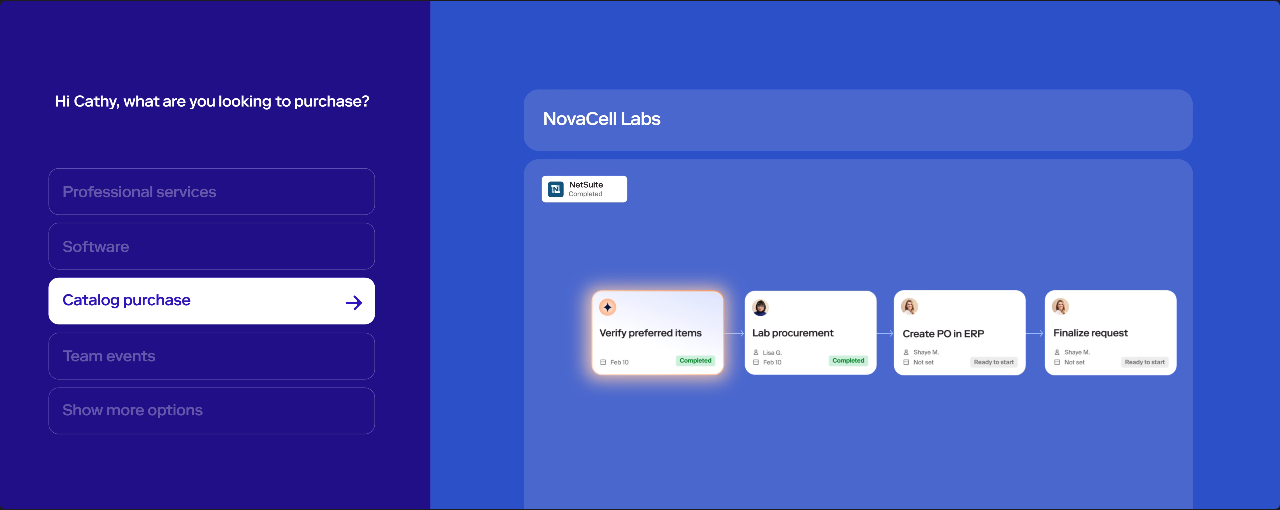
Imagine a marketing manager requesting a new analytics vendor. Procurement needs the business justification and expected spend. Finance needs a budget owner. Security needs to understand what data the vendor will handle. Legal may need a contract review. A well-designed workflow should collect the common fields once, then expose the relevant questions and documents to the right reviewers. Zip's documentation supports configurable orchestration across purchasing, supplier onboarding, and contracting.
The real test isn't the happy path. Have a requester submit incomplete information, select the wrong supplier, and change the estimated spend after approval begins. Ask an administrator to show how the route changes, whether prior approvals remain valid, and what the audit history records. A visual builder is useful only if the team can predict the consequences of its rules.
What procurement teams should validate
Request ownership: one accountable procurement owner should exist, so a request can't sit between teams with no person responsible for the next action. Approval conditions: Finance, Legal, IT, and Security should participate without every request taking the longest route. Requester visibility: employees should see what's pending without chasing approvers. Change control: test what happens when the vendor, entity, budget, or contract scope changes midstream.
A clean intake form can increase adoption. It can't fix a company that has never agreed who may approve which commitments. Before implementation, write down the approval policy, exceptions, escalation owner, and final decision authority. Configure the system around that policy rather than asking the workflow designer to invent it.
Does Zip support full procure-to-pay?
Yes, Zip markets a separate Procure-to-Pay product. Its current product description includes purchase order management, invoice extraction and coding, duplicate and overage checks, exception routing, and payment workflows. That's materially broader than Zip's early reputation as an intake front door.
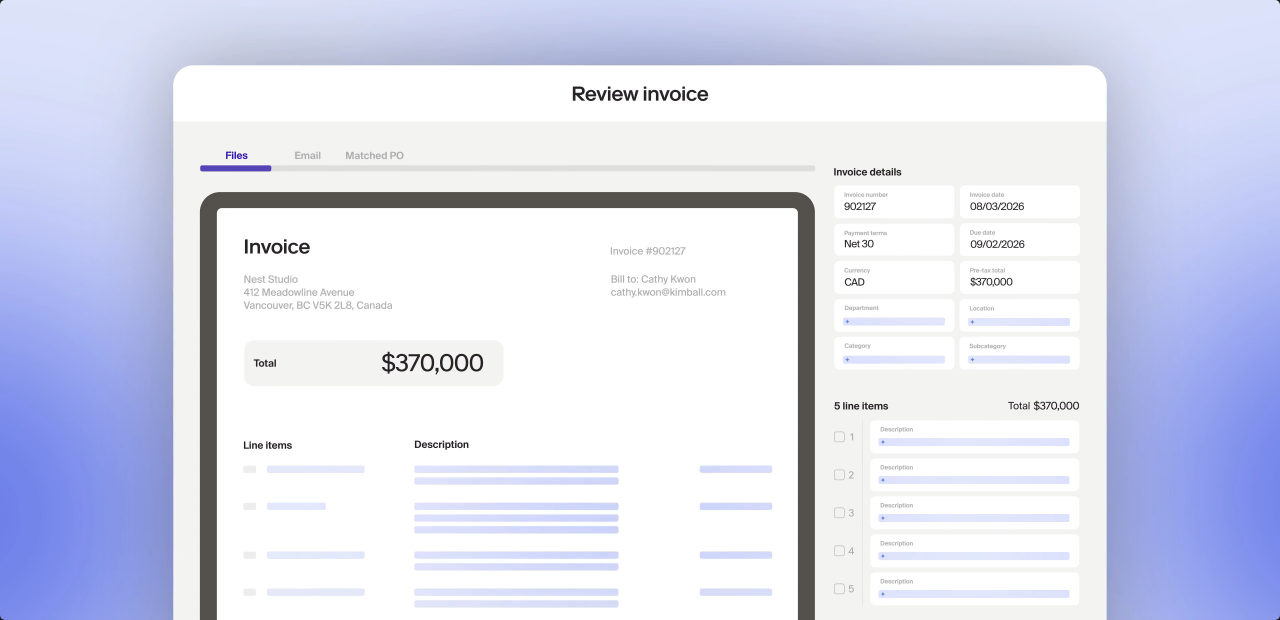
For an AP team, the most important question is how reliably information survives the handoff. Zip says intake data can populate POs and invoices. A purchase request may be approved with the right vendor and cost center, yet the downstream system can still receive a missing entity, an outdated supplier ID, or an invoice that doesn't match the PO. Treat these as test scenarios for any buyer, not as known Zip defects.
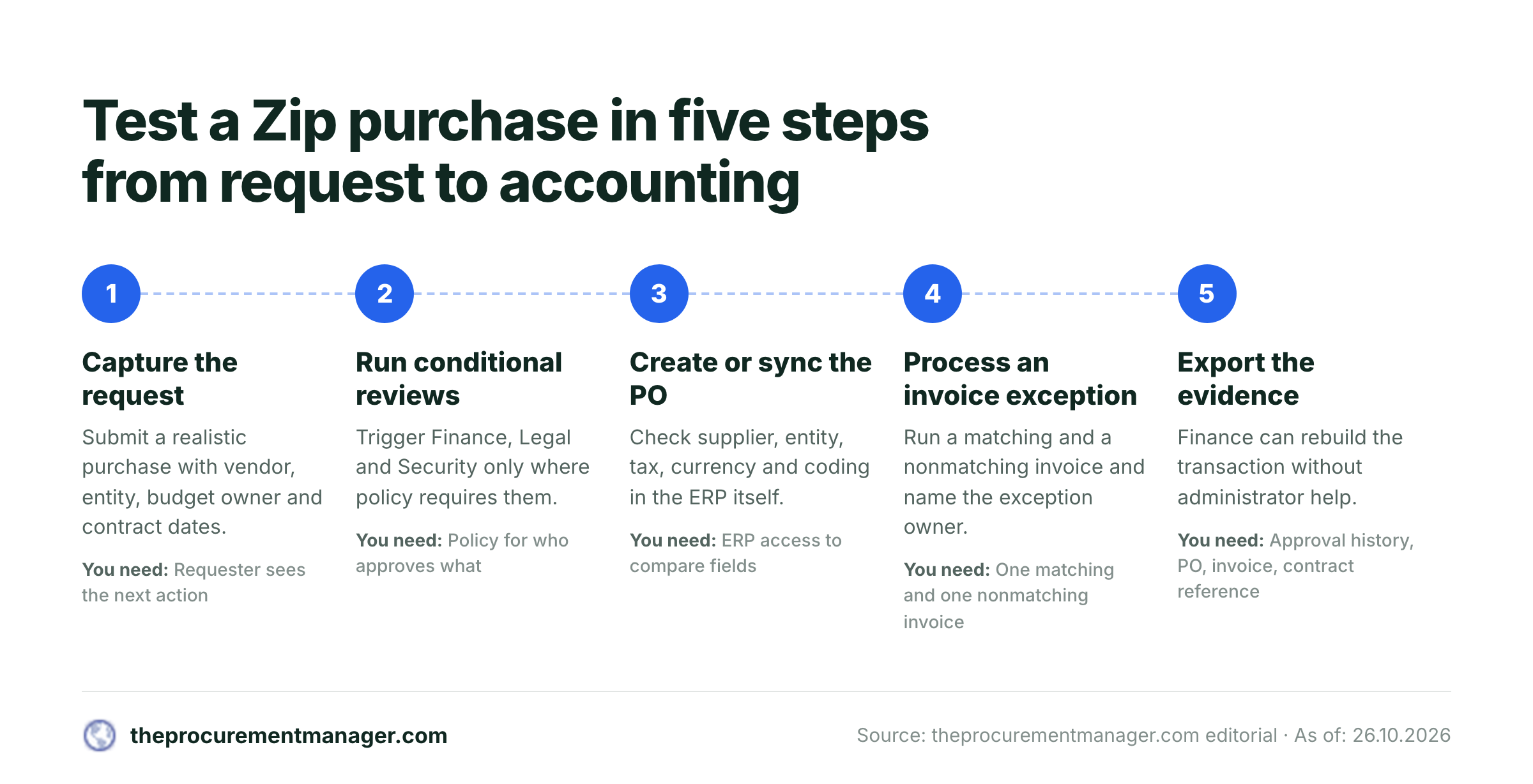
Follow a purchase from request to accounting
Capture the purchase and its owner
Submit a realistic request with the vendor, entity, business justification, budget owner, and expected contract dates. Confirm the requester can see the next action.
Run conditional reviews
Trigger Finance, Legal, and Security only where your policy requires them. Record who approved, which version they reviewed, and what changed afterward.
Create or sync the purchase order
Verify the approved supplier, legal entity, tax treatment, currency, account coding, and PO identifiers in the ERP, not just on the Zip screen.
Process a matching and a nonmatching invoice
Show both an ordinary invoice and an exception such as a price variance or duplicate. Confirm who receives the exception and how the resolution is documented.
Close the evidence loop
Export the approval history, purchase order, invoice, contract reference, and final payment status. Check that Finance can reconstruct the transaction without administrator assistance.
Don't assume that a particular payment rail, invoice control, or matching rule is included in your quote. Ask for a module-level scope sheet and use the same test transactions in the implementation acceptance plan. A successful demo is evidence of a configured scenario, not proof of every future transaction.
Supplier onboarding, risk, sourcing, and contracts
Zip's supplier onboarding product includes a guided supplier portal, centralized supplier documents, assessment workflows, and ERP supplier creation. Its risk product describes screening, risk tiers, scheduled reviews, monitoring signals, and searchable audit logs. For procurement leaders, the value is the potential connection between the decision to buy and the decision that a supplier is acceptable.
Suppose a requester selects a vendor that hasn't completed security review. The useful workflow isn't merely a warning banner. It should make the next action explicit: who requests the missing document, who decides whether the risk is acceptable, and whether a purchase may proceed with conditions. Zip advertises risk-based routing and supplier assessments. Your team should verify which checks require additional data providers, how results are reviewed, and where evidence is stored.
Zip's sourcing product covers RFx generation, supplier response tracking, structured evaluation, and audit history. That makes it relevant to teams that want competitive sourcing linked to intake rather than isolated in another project. A sourcing lead should still test how requirements change after the event starts and how an award decision becomes a contract and purchase request.
Contract Orchestration's particularly relevant to vendor renewals. Zip describes a repository that extracts metadata, connects amendments and statements of work to parent agreements, and raises renewal alerts. That's useful context, but an alert isn't a renewal decision. Someone must still verify the governing agreement, notice method, notice period, decision authority, and delivery evidence. If an amendment overrides the master agreement, the reminder's only as reliable as the underlying contract record.
The renewal control that a procurement team should demand
| Control | Evidence to retain | Accountable owner |
|---|---|---|
| Renewal date | Signed agreement and applicable amendment | Contract owner |
| Notice deadline | Clause, date calculation, and time zone assumption | Legal or procurement |
| Commercial decision | Usage, budget, supplier performance, alternatives | Business owner and Finance |
| Security decision | Current assessment and exceptions | Security or IT |
| Final authorization | Named approver and approved option | Delegated decision maker |
| Notice delivery | Approved notice and proof of permitted delivery method | Contract owner or Legal |
That's an operating control model, not a claim that Zip automatically performs every step. For a dedicated renewal decision workflow, see our contract renewal checklist and contract renewal notice period guide. If renewal ownership is the principal problem, assess that narrow workflow separately from a full procurement transformation.
Integrations and the actual system boundary
Zip's integration documentation lists ERP and finance systems including NetSuite, Workday, Oracle Fusion, and SAP S/4HANA. It also lists procurement systems such as Coupa and SAP Ariba, contract tools such as Ironclad, and collaboration systems including Slack. The current documentation describes prebuilt integrations, App Studio customization, APIs, flat-file options, and an MCP connection. The existence of an integration doesn't establish that every object and field is synchronized in your purchased configuration.
Ask your implementation team to produce a field-level integration map. For each record, name the source system, destination, write permissions, sync trigger, error queue, retry owner, and reconciliation method. Pay particular attention to supplier bank details, tax fields, legal entities, invoice status, and purchase order changes. Those are the places where a clean user interface can conceal expensive downstream repair work.
For example, if NetSuite remains the financial source of truth, define whether Zip creates a vendor record, requests its creation, or updates an existing one. Establish what happens when the ERP rejects the update, and who's alerted. Decide who can change payment details and how those changes are approved. These are procurement and finance governance decisions, not merely connector setup tasks.
A documented integration can still be wrong for your workflow. Insist on a test with your own chart of accounts, subsidiaries, approval hierarchy, and realistic exception cases.
What real users like and dislike about Zip
Zip's got positive reviews on the major software directories, but the samples and product profiles aren't interchangeable. On Capterra, the Zip listing showed 4.7 out of 5 from about 32 reviews when we checked on October 26, 2026 (Capterra pages show 31 or 32 depending on the view). A G2 listing for Zip showed 4.6 out of 5 from 139 reviews on October 26, 2026. G2 also lists a separate Zip Platform profile, so avoid combining their review counts as though they were one product.
Users frequently praise a clear intake experience, flexible workflow configuration, and visibility into approval status. A procurement analyst's Capterra review describes less training for internal requesters. Other reviewers value responsive support and the ability to adjust routing without rebuilding a process from scratch. They're user reports, not a performance guarantee.
The criticism's more instructive for a buyer. Capterra reviewers describe limits in reporting, difficulty navigating large volumes of requests, and integration or workflow-routing problems in particular deployments. At least one critical review rates Zip 2 out of 5 and says the product still has rough edges to fix. Those reports don't establish that every Zip customer encounters the same issues. They tell you which failure cases to put in a pilot.
Read the current Capterra reviews and G2 reviews with attention to the reviewer's role, company context, date, and the specific modules in use. An old complaint about intake-only functionality may no longer describe the current Procure-to-Pay product. Conversely, a current marketing page doesn't erase an integration defect reported by a real customer.
How to translate reviews into acceptance tests
For reporting, ask for a recurring report that Procurement and Finance can both reproduce, with the same filters and totals. For approval routing, simulate a reassigned manager and a purchase that crosses an authorization threshold. For integrations, compare source and destination fields, including a failed update. For request navigation, have a heavy user work through a realistic backlog. For support, ask who owns production incidents and what evidence the customer receives after resolution.
A high star rating matters less than whether the reviews help you spot the next expensive failure before signing.
Zip Procurement pricing: what's public and what isn't?
Zip's primary site directs buyers toward a demonstration rather than a universal self-service pricing grid. That means a general subscription price can't be inferred from the product pages. However, a specific Zip Intake-to-Procure Starter Edition is listed on the SAP Store marketplace (checked October 26, 2026) at $50,000 per year plus a $15,000 setup fee, with 50 users and a minimum one-year commitment. For that listed package, the stated subscription and setup amounts total $65,000 in the initial year, before any other negotiated scope or applicable charges. That's a marketplace-specific offer, not a claim about every Zip deployment or the price of its full suite.
| Zip price question | What the evidence supports (USD) | What to request |
|---|---|---|
| Universal Zip subscription price | No public all-product price card confirmed | Itemized quote for your exact scope |
| SAP marketplace Starter | $50,000 per year plus $15,000 setup, for 50 users | Confirm eligibility, edition, and current terms |
| Enterprise edition | SAP marketplace displays price on request | Written enterprise proposal |
| Additional products | Distinct product pages exist for P2P, risk, sourcing, and contracts | Separate line items and dependencies |
| Integration and rollout | Requirements vary by buyer | Statement of work, acceptance tests, support scope |
Don't build a business case from third-party estimates of what Zip costs. They aren't a substitute for a written quote. When you compare Zip with Coupa, Procurify, or Precoro, compare the same workflow coverage, not a full-suite contract against an entry-level license.
For a narrower price analysis, see our Zip procurement pricing guide. The Coupa vs Zip comparison addresses a different buying decision: whether an orchestration approach or an established spend platform better fits your existing stack.
Where Zip is a good fit, and when to look elsewhere
Shortlist Zip when employees buy across many departments, approval requirements change with supplier and spend context, and the organization needs procurement, finance, security, and legal decisions in one traceable process. It's especially worth evaluating when a capable ERP already exists but upstream requests arrive with poor data and weak ownership.
Consider a narrower purchasing product when the core need is purchase requisitions, POs, and basic invoice approval, without complex cross-functional review. Don't pay for contract, risk, and sourcing breadth merely because it looks impressive in a demo. Consider an established source-to-pay suite when your decision hinges on deeply specialized downstream procurement processes and you have already standardized on that ecosystem. Consider a focused renewal workflow when the actual pain is finding the notice deadline and obtaining a documented keep, renegotiate, or cancel decision.
A useful selection exercise is to write a problem statement before meeting vendors: “We need to stop unapproved purchases,” “We need invoices to reconcile,” or “We need contract renewals decided before notice deadlines.” Those aren't interchangeable requirements. Rank each vendor against the process that fails today, then assess the optional scope separately.
Zip vs Coupa, Procurify, and Precoro: practical positioning
Zip's differentiator is guided intake and cross-functional orchestration, with a broader product portfolio available for downstream work. Coupa's a relevant comparator for enterprise spend processes. Procurify and Precoro are useful comparators for teams whose principal requirement is structured purchasing and purchasing controls. Which one wins depends on the process, integration boundary, and quoted package. We don't assign a universal winner from marketing descriptions.
If you're evaluating Zip against another product, use a shared scorecard: request completion, approval correctness, supplier onboarding, ERP data integrity, invoice exception resolution, renewal evidence, administrative effort, and total contracted scope. Weight the items that have already caused real business loss.
A procurement leader's Zip demo and pilot checklist
Use the same scenario in every shortlisted platform. Choose a supplier that requires Legal and Security review, then create a request with an unusual legal entity and an amendment that changes the renewal date. Run it all the way to the ERP or AP endpoint. A platform that can display the workflow but can't reconcile its data hasn't passed the test.
- Document the exact modules, user roles, and services in the quote.
- Show a request with missing fields and a changed approval route.
- Verify who owns each Finance, Legal, IT, and Security decision.
- Test supplier onboarding and a rejected or duplicate vendor record.
- Trace PO and invoice fields through the ERP integration.
- Demonstrate a nonmatching invoice and its exception owner.
- Export an approval audit trail with version and timestamp context.
- Link a renewal alert to the governing contract clause and owner.
- Reproduce a filtered report without vendor assistance.
- Get written acceptance criteria, support terms, and data export provisions.
Don't let the pilot become a generic tour of every feature. The implementation team should be able to show the actual failure path, not only the perfect approval. Record what was configured, what was demonstrated, what required a workaround, and what remains outside scope. That evidence is more useful to a CFO than an unqualified promise of automation.
Where a dedicated renewal workflow fits
A full procurement platform and a renewal decision process can coexist. The former helps govern buying and supplier work. The latter ensures that someone reviews the contract, obtains the required internal approvals, and records a decision before the notice window closes. A procurement organization should make this boundary explicit so that reminders don't get mistaken for approvals or legal notices.
If renewal coordination is your immediate priority, compare the narrower process against the effort of configuring an entire procurement suite. You can also use our auto-renewal clause examples to see why a contract record needs the actual clause, not only a calendar date.
Final verdict: is Zip Procurement worth considering?
Yes, if cross-functional purchasing is the bottleneck and you're prepared to govern the workflow. Zip's current portfolio covers substantially more than intake, and its request-centered design makes a strong case for teams that want procurement to start before a purchase is committed. The vendor's integration and downstream product descriptions are credible reasons to investigate, not reasons to skip a pilot.
The cautions are equally important. Reviewers have described reporting and integration friction in particular environments. Pricing's tied to the actual package, and a marketplace listing isn't a universal enterprise price. Renewal alerts still need an accountable decision owner and source evidence. The right buying decision comes from proving the full request-to-accounting path and getting the commercial scope in writing.
Frequently asked questions
What does Zip Procurement do?
Zip provides guided purchase intake and cross-functional procurement workflows. Its product portfolio also includes procure-to-pay, supplier onboarding, sourcing, risk, and contract orchestration. Confirm which products are included in your quote.
Is Zip only an intake-to-procure tool?
No. Zip now markets a Procure-to-Pay product with PO, invoice, exception, and payment workflows, alongside separate supplier, sourcing, risk, and contract products.
How much does Zip Procurement cost?
There's no universal public price for the entire Zip suite. A specific SAP marketplace Starter Edition lists $50,000 annually plus a $15,000 setup fee for 50 users. Ask for a quote matched to your modules and implementation.
Does Zip integrate with NetSuite and SAP?
Zip lists NetSuite and SAP systems among its integrations. Verify the exact connector, object mappings, write permissions, and error-handling behavior in your environment before relying on it.
What do Zip Procurement users complain about?
Some independently hosted reviews mention reporting limits, navigation friction, and problems with approval routing or integrations. These are individual reports, so reproduce the relevant scenarios in your pilot rather than assuming every deployment has them.
Can Zip track vendor contract renewals?
Zip describes contract-family and renewal management in its Contract Orchestration product. Confirm that your package includes the required features, then separately verify notice clauses, owners, approvals, and evidence of any notice sent.