Contract approval software routes a draft contract to the people who must approve it before anyone signs, enforces the order and the conditions of those approvals and records who decided what. Eight products cover that job for procurement and operations teams:  Ironclad,
 Docusign CLM,
 Juro,
 SpotDraft,
 Concord,
 Zoho Contracts,
 Gatekeeper and
 LinkSquares. They don't differ much in whether they have an approval step. They differ in what triggers it, how it routes, who can approve and what remains on record afterward.
This page is for the procurement lead or operations manager who has to get vendor agreements through legal, finance, IT and the business owner. Each entry follows the same five checks, trigger, route, approver, record and handoff, says which of them the vendor documents and which it leaves open, and ends with price status, a review rating and a skip-if. Purchase-order and bill approvals are a different product class and are covered in our guide to approval workflow software.
What is contract approval software?
Contract approval software is a tool that sends a contract to the approvers a company requires, in the order it requires them, and keeps a record of each decision before the contract goes to signature. It usually sits inside a broader contract platform, so most products on this page are contract lifecycle tools where the approval workflow is one module.
Three neighbors are easy to confuse with it, so it's worth seeing where each one stops. The table shows what each one approves and where it stops.
| Product class | What it approves | Typical trigger | Where it stops |
|---|---|---|---|
| Contract approval software | A draft agreement before signature | Contract value, type, region or a changed clause | Hand-off to signature and the repository |
| Purchase approval software | A purchase request, purchase order or bill | Amount, cost center or budget | Order placed or invoice paid |
| Contract lifecycle management | The whole contract, from request to renewal | Stage changes | Renewal or expiry |
| E-signature software | Nothing, it collects signatures | A sent envelope | Signed document |
Our guides to contract lifecycle management software and contract management software cover the full lifecycle, and contract repository software covers storage after signature. This page covers the step in the middle.
Best contract approval software at a glance
Pick by the approval problem you've got today. If the pain is routing a contract to the right people by value or clause, look at the tools with documented conditional rules. If the pain is approvers who sit on a contract for days, look at the tools that document reminders and timeouts. The tag under each name says which job the vendor's own pages support best.
- Best for conditional routing with re-approval rulesIroncladSequential and parallel approver groups, conditions on workflow fields and approval resets when a value such as total contract value changes. Quote only.
- Best when the approval timeout is yours to designDocusign CLMAn Approve step that assigns in order or at once, with due-date timeout paths and recurring reminder steps. Quote only.
- Best for self-serve contracting with unlimited usersJuroSmartfield rules add approvers, external approvers act through an email link and users are unlimited on every plan. Quote only.
- Best when procurement runs CoupaSpotDraftIf / Else If / Else approval conditions, documented overdue reminders and approval chains that can complete through Coupa. Quote only.
- Best for a published price on a small teamConcordSequential steps with conditional approvals from Smart Fields. Approval workflows start on the Business plan at $899 per month billed annually.
- Best for the lowest published per-seat priceZoho ContractsSequential or parallel approval per contract type from $25 per user per month on G2's USD listing, with cheap lite users who only approve or reject.
- Best when approvals belong to vendor risk and renewalsGatekeeperSingle or parallel approval phases with conditional rulesets, delegation during absences and renewal review workflows on the same vendor record. Quote only.
- Best for approvals tied to clause textLinkSquaresApprovers can be tied to specific clause text in Word, and Slack notifications carry an Approve button. Quote only.
Contract approval software compared
Only the routing rules and the price status are comparable across all eight, so the table shows those plus the review basis. Ratings come from different sites with different review counts, so a 4.8 from 27 reviews doesn't outrank a 4.3 from 504.
| Tool | Approval routing documented | Price status (USD) | Review rating |
|---|---|---|---|
| Ironclad | Sequential groups, parallel approvers, conditions on workflow fields, resets when a field changes | Quote only | 4.4 (332) |
| Docusign CLM | Approve step in order or at once, any one or all assignees, timeout and reminder paths | Quote only, no CLM price listed | 4.3 (504) |
| Juro | Ordered or unordered, conditional approvers from smartfield rules, external approvers by email link | Quote only, unlimited users | 4.8 (Capterra, 48) |
| SpotDraft | Ordered or unordered, If / Else If / Else conditions on intake variables | Quote only | 4.8 (Capterra, 27) |
| Concord | Sequential steps, From Anyone or From Everyone, conditional steps from Smart Fields | Approvals from $899 per month, billed annually | 4.6 (Capterra, 235) |
| Zoho Contracts | Sequential levels or parallel, attached per contract type, no value rules documented | From $25 per user per month (G2), free plan for 3 users | 4.6 (14) |
| Gatekeeper | Single or parallel phases, conditional rulesets on form fields | Quote only, sized by third-party count | 4.5 (97) |
| LinkSquares | Ordered or unordered tasks, conditional paths by value and vendor risk | Quote only, G2 lists a Basic entry at $10,000 per year | 4.7 (446) |
 The Procurement Manager Our product | Routes renewal reviews to the business owner, Finance and IT before the notice deadline | From $49 per month, flat, no per-seat fees (Starter, up to 50 contracts) | No reviews yet |
Prices and ratings checked on November 18, 2026. The rating column names the review site for each row.
Who approves a vendor contract, and when
A vendor contract usually needs approval from five roles, and the order matters more than the count. The business owner confirms the need and the budget, procurement checks the vendor and the commercial terms, legal reviews the risk terms, IT security reviews data access when the vendor touches systems or personal data, and finance signs off the commitment. A signer with authority above the contract value comes last. Software doesn't decide who these people are. It enforces the order you give it and stops a contract from reaching signature until each required approval exists.
The block below shows a common path. Legal and IT security can run in parallel on most contracts, while finance waits until the commercial and legal terms stop changing, because a changed price or term invalidates an earlier approval.
- Business ownerConfirms the need, the budget line and the term, then submits the request with the vendor quote First, before any draft is reviewed
- ProcurementChecks the vendor record, compares the quote with alternatives and notes the renewal and notice terms After the business owner submits
- LegalReviews liability, indemnity, data and termination terms and approves or redlines In parallel with IT security on standard paper
- IT securityReviews data access, security questionnaire and single sign-on needs In parallel with legal when the vendor touches systems or personal data
- FinanceApproves the budget code, the payment terms and the committed amount After the commercial and legal terms stop changing
- Authorized signerSigns or authorizes signature for contracts above the signing threshold Last, only after every earlier approval exists
Tools differ on what happens when a term changes after approval. Ironclad, SpotDraft, Juro and Concord all document some form of re-approval after an edit, and that behavior matters more than any feature on the pricing page.
Approval matrix: who signs off on which contract
An approval matrix is a table that maps contract type and value to the approvers required, so the software can be configured from it. The matrix below is a starter with example thresholds. Replace the amounts with your own signing authority before you build any rule.
| Contract situation | Approvers required | Why |
|---|---|---|
| Standard NDA on your own template | Legal approves the template once, then no per-contract approval | The template is the control |
| SaaS renewal under $25,000 a year | Business owner and procurement | Low commitment, known vendor |
| New SaaS or renewal from $25,000 to $100,000 a year | Business owner, procurement, finance and IT security | Budget impact and data access |
| Any contract over $100,000 a year | All of the above plus legal and a finance executive | Commitment size |
| Non-standard liability, indemnity or data terms | Legal, whatever the value | Risk sits in the clause, not the price |
| Auto-renewal with a notice period | Procurement adds the owner of the notice date | Someone must own the deadline |
Rules like these need at least two inputs, and they're only as good as the fields behind them. Two inputs matter most, contract value and a clause or type field. Of the eight tools, the documentation of Ironclad, Juro, SpotDraft, Concord, Gatekeeper and LinkSquares describes conditions on contract fields. Zoho Contracts documents routing by contract type only.
Contract approval software reviews
We read vendor documentation, help-center articles and review-site listings and didn't run these products. Each entry follows the same five checks and says plainly when a vendor's public pages are silent. Where something isn't documented, ask for it in the demo before you assume it exists.
Ironclad
A contract lifecycle platform built around a no-code Workflow Designer for intake and approvals, a contract repository and AI review features.
Ironclad fits a company where legal and procurement share one workflow builder and a contract must be re-approved only when the field that mattered changes.
Trigger. An approval can be required always or on any condition set in the workflow configuration, such as contract value or type. AI Playbooks can add approvers when a clause departs from the standard.
Route. Approver groups run in sequence and individual approvers can run in parallel. Approval resets can be set on a workflow, document or property change, for example so that Finance re-approves only if the total contract value changes. Any workflow participant can add an ad hoc approver, who always goes last.
Approver. An approver can be a role, a named user or a group, and Ironclad recommends a group even for one person. Approvals happen in the app or by email reply once an admin enables it. Slack and Microsoft Teams integrations send notifications and show workflow details, and the pages don't say the approve action itself works there. The help pages imply approvers sit on Standard seats and name no free approver seat. An out-of-office status of up to a year can name a designee, who doesn't need a Standard seat.
Record. The Activity Feed logs approvals added, removed, reset and collected, reassignments, reminders and saved document versions.
Handoff. The workflow moves on to signature and archive, and Docusign and Adobe Acrobat Sign are listed integrations. Ironclad's integrations page also names Coupa, NetSuite, SAP, Salesforce, Slack and Teams.
What users report. 4.4 out of 5 from 332 reviews on G2. Reviewers praise ease of use and integrations and complain about poor search and a steep learning curve.
- legal and procurement both route contracts through one no-code workflow builder with sequential and parallel approver groups
- your stack includes Coupa, NetSuite, SAP or Salesforce, which the vendor lists as integrations
- you need automated overdue reminders or escalation, because the help pages document a manual reminder button only
- you want a published price, since Ironclad sells by custom quote built from products, users and add-ons
- Users like
- ease of use, integrations, customer support, approval process and collaboration
- Users dislike
- poor search, a steep learning curve, integration issues and workflow issues
- Source: G2, 332 reviews
- Starting price
- Not published, custom quote based on products, users and add-ons
Docusign CLM
A contract lifecycle product from Docusign that covers generation, review, approval, signature and storage, with AI extraction and a drag-and-drop workflow designer.
Docusign CLM fits a team that already signs in Docusign and wants to design its own approval timeouts and reminder paths.
Trigger. The workflow design decides when an approval applies. The product page describes review triggered by non-standard terms, and the pages read don't list trigger types such as value, region or counterparty.
Route. The Approve step assigns tasks to users or task groups, in order or all at once, and can require any one assignee or all of them. The outcome sets the next path, approve or reject. A due-date setting times the task out after a period from months to minutes, optionally counting business days only, and a timeout path runs when it expires. An Add Reminder step can run on a parallel path and repeat. That timeout path is the escalation mechanism, and you build it, for example by notifying a manager.
Approver. Tasks appear on a Task page and a task assignment email goes to each assignee. The product page says approvers can act from email or Slack. Approver seat rules aren't documented.
Record. The product page describes an audit trail of who acted and when, plus version control across internal and external review. Approve and reject comments can be required and used for audit.
Handoff. Send for signature is one of more than 100 pre-configured workflow steps and ties to Docusign eSignature. The product page lists Salesforce, SAP Ariba and Coupa connectors.
What users report. 4.3 out of 5 from 504 reviews on G2. Reviewers praise ease of use and digital signing and complain about cost and a steep learning curve.
- you sign in Docusign and want contracts, approval and signature with one vendor
- you want to build due-date timeouts and recurring reminders as part of the approval step
- you need documented delegation or out-of-office handling for approvers, because the pages read describe none
- you want a published price or a short rollout, since no CLM price is listed and G2 shows about 3 months of average implementation
- Users like
- ease of use, digital signing and document management
- Users dislike
- expense, a steep learning curve and complex setup
- Source: G2, 504 reviews
- Starting price
- Not published, contact sales
Juro
A browser-based tool for drafting, approving and signing contracts from templates, with renewal dates stored as smartfields that carry up to five reminders each.
Juro fits a team that drafts most contracts from templates and wants approvers, including people outside the company, to act without a seat.
Trigger. Approver rules are built on smartfields, with a field, a comparison and a value, for example jurisdiction equals UK. Juro's own examples include a contract value over a threshold, payment terms beyond net 30 and a liability cap below a minimum. The help article doesn't list which field types and comparisons exist.
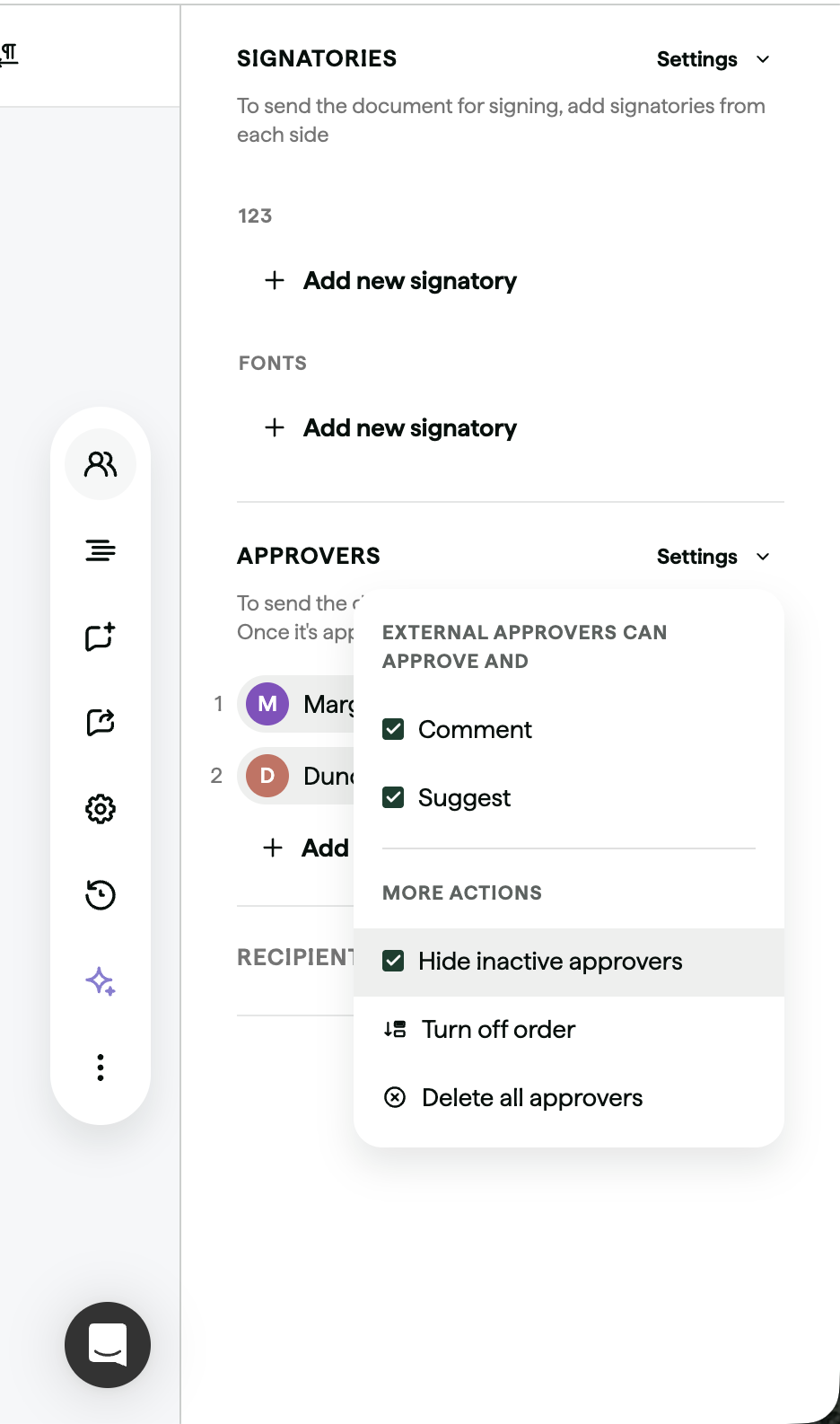
Route. Approvals can be ordered, so the next approver is emailed after the previous one approves, or unordered. Conditional approvers join when a rule matches. If the contract changes after approval, the approver is pulled in again unless they are set as a one-time approver, and an approver can be tied to specific smartfields so that only changes to those fields re-trigger them.
Approver. Internal approvers are picked from a list of named users and see the contract in a To Do tab with Approve and Reject buttons. External approvers are added by email address and act from a link in the notification. The pricing page states unlimited users on all plans, so internal approvers cost no extra seat. A Slack alert fires when an approval request arrives. The Slack page doesn't say approvers can approve inside Slack.
Record. Juro says every action is recorded in an audit trail. The pages read don't list the logged fields. Reminders, escalation timers and delegation aren't documented in the approval articles.
Handoff. Approval makes the contract ready for signing, and a rejection returns it to the creator. Juro also extracts key dates for renewal alerts, according to its own blog.
What users report. 4.8 out of 5 from 48 reviews on Capterra. Reviewers praise keeping creation, approval and signing in one place and quick support, and they cite a learning curve on advanced features and price. Juro states an average implementation of 21 days.
- you draft most contracts yourself from templates and want approval and signature in the same browser workspace
- you need external approvers, who approve through an email link, and you want unlimited users
- your vendor contracts arrive as supplier-drafted PDFs or through a source-to-pay tool, because Juro lists no Coupa integration
- you need documented reminders, delegation or an approve button inside Slack, none of which the approval articles describe
- Users like
- keeping contract creation, editing, approval and signing in one place, and fast support
- Users dislike
- a learning curve on advanced features, price, and some inflexible customization
- Source: Capterra, 48 reviews
- Starting price
- Not published, quote only, annual billing with unlimited users, workflows and templates
SpotDraft
A contract platform with an AI metadata repository, obligation tasks with reminders, e-signature and a Coupa integration that syncs effective dates and renewal terms back.
SpotDraft fits a procurement team that runs Coupa and wants approvals configured on intake-form variables with documented overdue reminders.
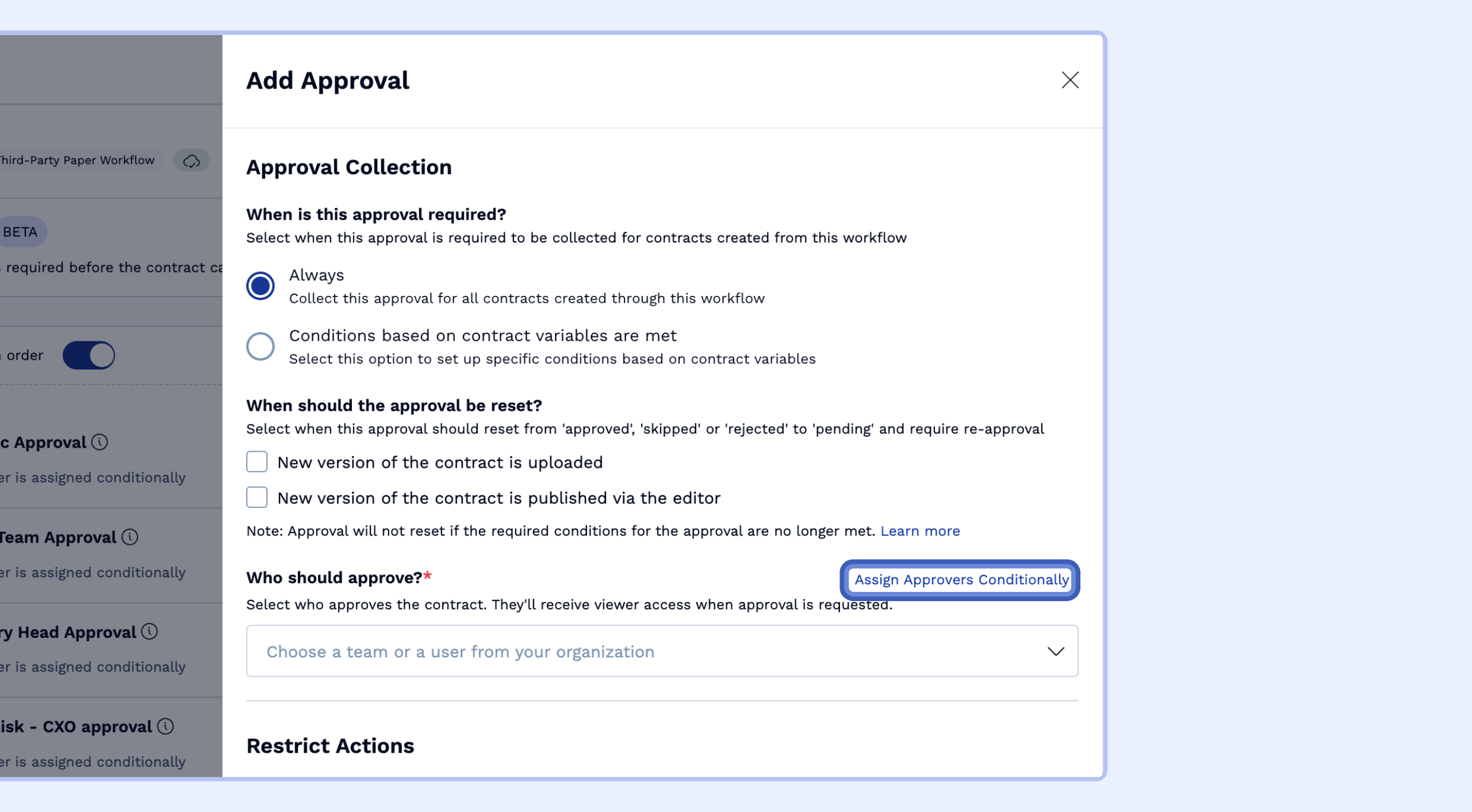
Trigger. Conditions are built on variables from the intake form. The help article's examples are department, contract value and region, and it evaluates If, Else If and Else blocks from the top, with an Else required as a fallback. Contract type and counterparty as triggers appear only in a vendor blog.
Route. Approvals run in parallel by default, or in order when the Collect approvals in order toggle is on, with steps you can drag to reorder. An approval resets to pending when a new version is uploaded or a condition variable changes. Ad hoc approvals can be added during negotiation.
Approver. An approver is a user or a team. Reminders go out by email, and by Slack when that integration is active. The first reminder defaults to 3 days after the task goes pending, within a range of 1 to 365 days, then repeats daily by default, optionally on business days only. Reminders stop when the approval is approved, skipped or reverted, and move to the requester after a rejection. The reminders article describes no escalation path.
Record. SpotDraft says its native e-signature logs every approval, comment and timestamp. The approvals help article itself doesn't cover audit history.
Handoff. E-signature is native on every plan according to the pricing page, and the repository adds AI metadata extraction, expiry alerts and renewal reports. The integrations page lists Salesforce, Coupa, Slack, Microsoft Teams, Word and Outlook.
What users report. 4.8 out of 5 from 27 reviews on Capterra, many of them dated 2021. Reviewers praise the support and implementation team and cite small gaps, such as an Outlook plugin issue.
- procurement runs Coupa and wants contracts to start there, with approval chains that can complete through Coupa and executed contracts syncing back
- you want approvers nudged on a schedule you set, with reminders that stop when the task is done
- you need a proven approve button inside Slack, because the vendor's marketing and the help center disagree
- you want a published price, since pricing is quote only and the vendor cites four to six weeks of set-up
- Users like
- the support and implementation team, and a flexible, easy interface
- Users dislike
- small gaps such as an Outlook plugin issue; many displayed reviews date from 2021
- Source: Capterra, 27 reviews
- Starting price
- Not published, quote only, priced by users or contract volume, implementation included
Concord
A contract tool that drafts, redlines, e-signs and stores contracts, with AI-extracted renewal and termination-notice dates and a weekly deadline email.
Concord fits a small team that wants contract drafting, approval and e-signature at a price it can read on the page.
Trigger. Conditional steps fire from Smart Field values. The help center's example is CFO approval for contracts over $300,000. Contract type, counterparty and region as triggers aren't documented in the help articles.
Route. A step is either a reusable company approval or a one-off custom approval on a document or template. Several steps form a sequential chain, and steps can't be reordered once built. Each step can require approval from anyone listed or from everyone listed. Mandatory steps always apply.
Approver. Approvers are users or teams who act in the document's Approvals panel and see tasks under Actions Required. An email goes to the next approver when the notify option is ticked, and there is no automatic notice for the first step. Delegation and recurring reminders aren't documented, and the pages don't say whether an approver uses a paid seat.
Record. The audit trail on the contract summary tab shows the timeline of changes and approvals. Editing after approval requires re-approval, and a rejection doesn't reset the chain until someone selects Cancel Rejection.
Handoff. Once the workflow is granted, all parties can sign with native e-signature, which the pricing page lists as unlimited on every plan. An option lets external guests sign before approvals finish, so check that setting before you rely on it.
What users report. 4.6 out of 5 from 235 reviews on Capterra. Reviewers praise ease of use, reliable signing and fast support and cite editor formatting weaknesses and limited reporting.
- you want drafting, approval and unlimited e-signature in one tool at a published US price
- a small team needs sequential approvals with a rule such as CFO approval above a contract amount
- you need approvals on a budget tier, because approval workflows start on the $899 Business plan
- you need Slack or Teams approving or documented overdue reminders, since the first-step notice must be triggered by hand and Slack is a beta entry
- Users like
- ease of use, reliable signing and document storage with access controls, and fast support
- Users dislike
- editor and formatting weaknesses, and limited reporting
- Source: Capterra, 235 reviews
- Starting price
- From $499 per month billed annually (Essentials, 5 users); Business $899, Enterprise $1,299; extra users $49 to $89 per month
Zoho Contracts
A per-user contract lifecycle tool with a repository, approval workflows, per-contract obligations and renewal reminders, sold standalone or inside Zoho One.
Zoho Contracts fits a team that already runs Zoho and wants contract approval at the lowest published per-user price on this list.
Trigger. A workflow is attached to a contract type, and a type without a workflow can go straight to negotiation. The help article describes no condition on contract value, clause deviation, counterparty or region.
Route. A workflow is sequential, with levels where one approver clears each level, or parallel, where everyone receives the request at once and all must approve. The owner can't edit the contract while approval is pending.
Approver. Approvers get in-app and email notifications and can comment. Lite users, who only approve, reject or complete obligations, cost 5, 10 and 15 euros per month on the Standard, Professional and Premium plans on Zoho's page, and at least one full user is required. An approver can delegate to another user, who can approve or reject once, and delegation can't be revoked. Delegation starts on the Standard plan. Admins set a first reminder and a repeat interval that continue until the approval is acted on. Escalation and out-of-office rules aren't covered.
Record. The Approval tab shows each action with timestamps, and change history logs activity, versions and suggestions, with counterparty changes shown as redlines.
Handoff. E-signature runs through Zoho Sign, pre-integrated, with a signing order. Obligation tracking and reminders start on the Professional plan.
What users report. 4.6 out of 5 from only 14 reviews on G2, whose one negative tag is adoption issues. The sample is too small to settle anything. Zoho offers a 15-day trial without a card.
- you run Zoho CRM or Zoho One and want contracts connected at a low per-user price
- many people only need to approve or reject, since lite users cost a fraction of a full seat
- you need approvals that branch on contract value, clause or region, because the documentation shows routing by contract type only
- you need links to Coupa, NetSuite, SAP or Salesforce, which the pages read don't list
- Users like
- collaboration, document storage, templates and visibility
- Users dislike
- adoption issues
- Source: G2, 14 reviews
- Starting price
- Free for up to 3 users. Paid plans from €25 per user per month billed annually on Zoho's site (G2 lists US$25)
Gatekeeper
A platform that keeps vendor records, contracts, spend and renewals on one record, with date-based triggers that start a renewal review workflow with approvers and escalation.
Gatekeeper fits a team that treats contract approval as one stage of vendor risk, onboarding and renewal management on the same vendor record.
Trigger. Conditional rulesets can use any form field to change which approvers apply. If no rule matches, no approver is assigned and an admin must assign one. The vendor's blog gives value thresholds, vendor category and business unit as examples.
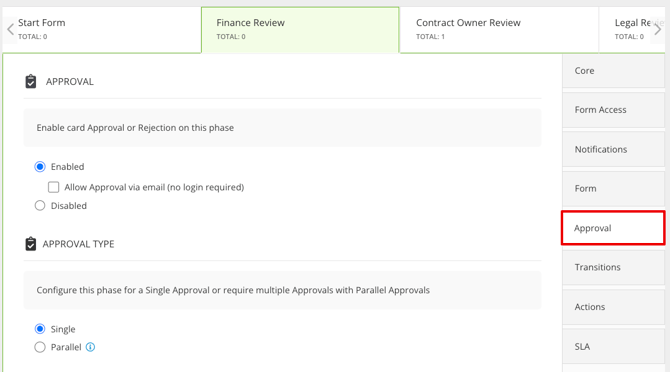
Route. An approval phase is either single, where one approval from the phase owners moves the card on, or parallel, where every assigned approval group must approve at the same time. Parallel approvers can be users, teams, workflow groups or owners pulled from form fields. The marketing page also claims sequential, multi-level approval, and the knowledge-base article doesn't describe it.
Approver. Single approvals without a mandatory checklist can be approved or rejected by email buttons, without comments. Approvers can set delegation for absences, and admins can act on a card for another user. Reminders in a parallel phase go only to approvers who have not yet approved, and SLA timers can be set per phase. Slack and Teams are listed integrations, and the pages don't say approvals can be actioned there.
Record. A decision is final, so reversing it needs an admin to move the card, and the original decision stays in the card history. Admin history records changes to the workflow configuration.
Handoff. Native e-signature and Docusign support are listed, and the signed agreement returns to the contract record. Renewal dates and notice periods trigger automatic owner alerts, and a renewal review workflow starts 90 days before the notice date by default.
What users report. 4.5 out of 5 from 97 reviews on G2. Reviewers praise ease of use and support and cite missing features, limited customization and cost.
- approvals, vendor onboarding, risk checks and renewals should live on one vendor record
- you run NetSuite, Microsoft 365 or Workday and want unlimited users and unlimited e-signature licenses
- you want a published price or a quick self-serve start, since every plan is quote only and sized by the number of third parties
- you only need a contract approval step and a repository, because the set-up is more configuration than that needs
- Users like
- efficient contract processing, per G2's summary of reviews
- Users dislike
- limited customization and slowdowns with larger data sets, per the same summary
- Source: G2, 97 reviews
- Starting price
- Not published, quote only, plans sized by number of third parties (Pro up to 250, Enterprise up to 750, Enterprise Plus 750+)
LinkSquares
An AI contract management platform that extracts key terms into a searchable repository, tracks renewal and termination dates, and runs intake and approval workflows.
LinkSquares fits a legal or procurement team that wants approvals tied to specific clause text and Slack nudges without a heavy enterprise rollout.
Trigger. The product page describes conditional approval paths using several criteria and value ranges, such as contract value and vendor risk. Approvals can come from the template or workflow, or be added ad hoc.
Route. An approval is a task on the agreement, ordered or unordered with unordered as the default. With several assignees, any one can complete the task. A rejection moves the agreement to Rejected status, and an admin or authorized role must send it back to Internal Review. Approval tasks can't be configured on request forms.
Approver. Approvers act in the web app, in Salesforce through Finalize or in a Word add-in, and Slack notifications carry an Approve button. Collaborators can send each user one email nudge per task, an overdue email goes out on the first overdue day and Slack overdue alerts arrive daily at 9 a.m. Eastern. A task can be reassigned, and a formal out-of-office rule isn't documented.
Record. The activity feed logs each approval with the approver and a timestamp, and a rejection requires a comment.
Handoff. When approvals are complete the agreement is ready for signature, and G2 lists Docusign and Adobe Acrobat Sign integrations. The help center describes Coupa and NetSuite links as API patterns, not prebuilt connectors. The vendor says most customers go live within 90 days.
What users report. 4.7 out of 5 from 446 reviews on G2. Reviewers praise ease of use and support and cite missing features and inaccurate AI.
- approvers should be tied to specific clause text, which a Word add-in supports
- approvers live in Slack and an Approve button on the notification is enough
- you need formal delegation, out-of-office handling or escalation timers, because the help pages describe a one-time nudge and one overdue email
- you want a published price, since pricing is a quote and G2 shows a Basic entry at $10,000 per year
- Users like
- ease of use and customer support, per a third-party summary of G2's tags
- Users dislike
- missing features and inaccurate AI, per the same summary; G2 shows an average implementation time of 3 months
- Source: G2, 446 reviews
- Starting price
- Not published, depends on contract volume, users and modules
What each vendor documents about the approval path
The approval path comes down to four questions a buyer can ask on a demo call, and the table records what the pages read for this guide document, and "Not documented" means only that the pages read are silent, so ask for it.
| Tool | Approve by email or reply | Delegation or out of office | Overdue reminders or timeouts | Approve inside Slack or Teams |
|---|---|---|---|---|
| Ironclad | Yes, email reply once an admin enables it | Yes, out-of-office status with a designee | Manual reminder button only | Not stated, notifications only |
| Docusign CLM | Yes, per the product page | Not documented | Yes, timeout path and recurring reminder step | Slack per the product page |
| Juro | Yes, external approvers by email link | Not documented | Not documented | Slack alert only |
| SpotDraft | Email reminders | Not documented | Yes, scheduled reminders, no escalation | Conflicting sources |
| Concord | Next-approver email, first step by hand | Not documented | Not documented | Not documented |
| Zoho Contracts | Email notification | Yes, one-time delegate from Standard | Yes, admin-set reminders | Not documented |
| Gatekeeper | Yes, for single approvals without a checklist | Yes, during absences | Yes, reminders and per-phase SLA timers | Not stated |
| LinkSquares | Email notification | Task reassignment only | One overdue email and one nudge | Approve button in Slack |
No tool documents every column. Ironclad, Zoho Contracts and Gatekeeper document delegation, and Docusign CLM, SpotDraft, Zoho Contracts and Gatekeeper document some form of overdue handling.
Which tool fits which situation
The right tool follows the approval problem, not the longest feature list. Use the table to match your situation to the product whose pages describe it.
- You need re-approval only when a specific field changesIronclad
- You want to build your own timeout and reminder pathsDocusign CLM
- Approvers outside the company must approve without a seatJuro
- Procurement runs Coupa and contracts should start thereSpotDraft
- A small team wants a US price list it can budgetConcord
- Many approvers, little budget, and you already use ZohoZoho Contracts
- Approval belongs with vendor risk, onboarding and renewalsGatekeeper
- Approvers are tied to clause text or live in SlackLinkSquares
Contract approval workflow set-up checklist
A workflow built on a vague policy only automates the confusion, so it's worth settling the policy first. Settle these points before you configure any rule, and take the same list into every vendor demo.
- Write the approval matrix by contract type and value and have finance and legal sign it
- Name one owner for each approver role and one backup for when that person is away
- Decide which edits after approval force a new approval, such as a changed price, term or liability clause
- Set a reminder interval and a maximum waiting time, and decide who is told when it passes
- Check whether approvers outside the company, such as a counterparty's counsel, need to approve and how
- Ask whether approvers need a paid seat, and price the seats that approvers alone would use
- Confirm where the approval record lives and that it can be exported for an audit
- Test one real contract end to end, including a rejection and a re-approval after an edit
What approval workflows don't catch: renewal notice dates
A contract approval workflow ends when the agreement is approved and signed. It doesn't tell you when the contract must be cancelled to avoid an automatic renewal. That date is a notice period written into the contract, usually counted back from the renewal date, and it isn't part of the approval record. Gatekeeper and Juro describe renewal alerts on their own pages, and Docusign CLM names an owner for each renewal. An alert is only as good as the date someone entered and confirmed.
So a team can run a clean approval process and still renew a software contract it meant to leave, because nobody owned the deadline. That's an ownership gap rather than an approval gap. Our guides on the contract renewal notice period and the contract renewal checklist show how to track the date by hand.
Frequently asked questions
What are the five steps of contract management?
A common split is request and draft, review and negotiate, approve, sign, and then manage and renew. Approval is the third step, and contract approval software automates that step by routing the contract to the required approvers and recording their decisions.
Who has to approve a contract?
The approvers a contract needs depend on your signing authority. Most vendor contracts need the business owner, procurement, legal and finance, and many add IT security when the vendor handles data or systems. Write the rule as an approval matrix by contract type and value, then configure the software from it.
How is contract approval software different from contract lifecycle management?
Lifecycle platforms handle drafting, storage, obligations and renewals as well. Approval routing is one module of them, so a buyer who only needs approvals should compare that module, not the whole suite.
Can approvers approve contracts in Slack or Teams?
Only some tools let approvers approve in Slack or Teams. LinkSquares documents an Approve button in Slack notifications, and Docusign CLM's product page says approvers can act from email or Slack. Ironclad and Gatekeeper list Slack and Teams integrations without saying the approval itself happens there, and Juro sends a Slack alert for requests. Concord and Zoho Contracts name no Slack or Teams approval.
How much does contract approval software cost?
Contract approval software is mostly sold by quote. Concord publishes $499, $899 and $1,299 per month billed annually for five users, and its approval workflows start on the $899 Business plan. Zoho Contracts lists $25, $40 and $50 per user per month on G2, with a free plan for three users. G2 shows a LinkSquares Basic entry at $10,000 per year.
Do approvers need a paid license?
Whether approvers need a paid license depends on the vendor. Juro and Gatekeeper state unlimited users on all plans, Zoho Contracts sells cheaper lite users who only approve or reject, and the Ironclad pages imply approvers sit on Standard seats. Docusign CLM, SpotDraft, Concord and LinkSquares don't document approver seat rules, so ask before you sign.