Construction procurement software is software that runs a contractor's buying against project budgets: it collects and compares subcontractor bids, turns the award into a subcontract or purchase order, commits the cost to a budget line, and matches deliveries and invoices to the order. The best choice depends on what you buy most. Procore ties bid awards to the project budget, Archdesk commits each purchase order to a budget line when it's approved, Planyard publishes a per-user price for cost control and purchase orders, and ProcureDesk, Precoro and Procurify are general procurement platforms with project budgets for contractors that mostly buy materials and supplies.
Construction buying splits into two jobs with different controls. Subcontracts depend on scope, bid leveling and compliance. Materials depend on catalogs, delivery dates and receiving. This page compares six tools for the procurement manager, purchasing lead or operations lead at a contractor. For each tool it says which buying step the vendor documents, what the tool costs or that it's quote only, and who should skip it.
Best construction procurement software at a glance
Pick by the kind of buying that causes the most trouble. A contractor that awards many subcontracts needs bid comparison and a clean handoff to the budget. A contractor that buys mostly materials needs approved catalogs, receiving and invoice matching, and a small team often needs only cost control with purchase orders.
 Best for subcontract awards tied to the project budgetProcoreSends invitations to bid, compares bids side by side and converts the awarded bid into a subcontract or purchase order in one click. Sold by quote, based on annual construction volume.
 Best for purchase orders that commit to a budget lineArchdeskEach purchase order commits against its budget line the moment it's approved, with bid comparison and three-way invoice matching in the same system. Sold by quote.
 Best for a published per-user pricePlanyardPurchase orders and committed cost start on the $158 Professional plan, with Xero, QuickBooks and MYOB invoice sync from Essential at $105.
 Best for catalog-based materials orderingProcureDeskRequesters build carts from approved vendor catalogs, and approved requests become purchase orders. From $830 per month with 10 users.
 Best for multi-site purchasing with a published pricePrecoroBudgets per site or crew, PunchOut carts for Home Depot, Lowe's and Grainger, and receipt photos from the job site. From $499 per month billed annually.
 Best for approvers who need to see committed spendProcurifyApprovers see what's already committed against a project budget before they approve. Sold by quote, and not built for construction specifically.
Construction procurement software compared
Prices were checked on vendor pages between October 20 and November 14, 2026. Three of the six tools publish an amount, and the amounts aren't comparable: Planyard charges per user, ProcureDesk and Precoro charge a monthly plan price, and the others sell by quote. Review ratings come from the site named in each row and use different review counts, so a 4.8 from 38 reviews doesn't outrank a 4.5 from 2,650.
| Tool | Buying step it owns | Price status (USD) | Review rating |
|---|---|---|---|
| Procore | Bid invitations, side-by-side bid comparison, one-click award to a subcontract or PO | Quote only: annual fee per product, based on annual construction volume | 4.5 (Capterra, 2,650) |
| Archdesk | Requisitions, POs committed to budget lines, bid comparison, three-way invoice match | Quote only: 30+ modules in one subscription | 4.3 (21) |
| Planyard | Budget, purchase orders and committed cost per project | From $105 per user per month; POs from $158 | 4.7 (13) |
| ProcureDesk | Catalog carts, approvals, POs, receiving, three-way match | From $830 per month, 10 users included | 4.8 (GetApp, 38) |
| Precoro | Requests, multi-step approvals, POs, three-way match | From $499 per month billed annually (Core) | 4.7 (222) |
| Procurify | Approved purchase requests to POs, with project budgets and committed spend | Quote only | 4.6 (GetApp, 208) |
 The Procurement Manager Our product | Routes renewal reviews to the business owner, Finance and IT before the notice deadline | From $49 per month, flat, no per-seat fees (Starter, up to 50 contracts) | No reviews yet |
Prices checked between October 20 and November 14, 2026. Ratings are from the review site named in each row.
Where each tool sits in construction buying
Every purchase on a project passes through the same five steps, and the tools differ in where they stop. Each column names the step and the tools in this list whose vendors document it most clearly. The line underneath names what goes wrong when that step runs on email and spreadsheets.
- Step 1Invite and level bids
- Procore
- Archdesk
Breaks when a low bid leaves out part of the scope and nobody catches it until the change order arrives - Step 2Award and commit the cost
- Procore
- Archdesk
- Planyard
Breaks when the award sits in an email thread while the budget still shows the old forecast - Step 3Approve against the budget
- Procurify
- Precoro
- Archdesk
Breaks when approvers can't see what's already committed, so a request passes that the budget can't carry - Step 4Order materials
- ProcureDesk
- Precoro
Breaks when site staff buy outside the approved suppliers and the cost lands on the wrong job - Step 5Receive and match invoices
- Archdesk
- ProcureDesk
- Precoro
Breaks when the invoice is paid against an order that was never fully delivered
How to choose construction procurement software
Choose by the mix of subcontracts and materials first, and by your accounting system second. The list price matters less than whether the plan you'd buy includes purchase orders and committed cost, because that's where the cheaper plans stop.
| Your situation | Where to start | What to check |
|---|---|---|
| Many subcontract awards, projects already run in one construction platform | Procore, Archdesk | How the award reaches the budget and what the quote is based on |
| Small or mid-sized contractor that wants cost control with purchase orders | Planyard | That purchase orders start on the Professional plan, not Essential |
| Mostly materials and supplies from catalog vendors | ProcureDesk, Precoro | Which catalogs you buy from and how receiving is recorded |
| Several sites or entities with separate budgets and approval rules | Precoro, Procurify | Which plan includes real-time budget tracking |
| You already run a construction ERP | Check the ERP's own purchasing module first | Whether a separate tool adds anything the ERP lacks |
Team size and project volume change the price model more than the feature list. Planyard charges per user, so a team of three to five project managers can price it from the published plans. Procore and Archdesk quote from annual construction volume or a fixed number of users, so a contractor with few projects but many users gets a different quote from one with many projects and a small office. ProcureDesk includes 10 users in its monthly plan price and charges $20 per month for each extra user, and Precoro prices by monthly plan.
A standalone procurement tool is enough when your accounting system stays the system of record and you want requests, approvals and purchase orders in front of it. A construction suite makes sense when bids, budgets, subcontracts and documents already live in one place, and it's the more expensive choice. Our guides to purchase order software and procure-to-pay software cover the general-purpose options in more depth, and RFQ software covers the quote side outside of construction.
- Run one real subcontract package with three bids, not the vendor's sample project
- Ask how a bid that leaves out scope is flagged and who signs off the leveling
- Ask whether a purchase order commits to the budget at approval or at invoice
- Ask which plan includes purchase orders, committed cost and real-time budget tracking
- Ask how a delivery is recorded on site and whether the invoice match uses it
- Ask which accounting system the sync supports, and which direction the data flows
- Ask what the quote is based on: users, annual construction volume or modules
- Ask what happens to your data and history if you leave
Construction procurement software reviews
Each entry describes the team the tool fits, what it documents for construction buying, how it connects to accounting, what reviewers report and who should skip it. We read vendor pages, help documentation and review-site listings and didn't run these products. Prices appear once per entry and in the table, so check them with the vendor before you budget.
Procore
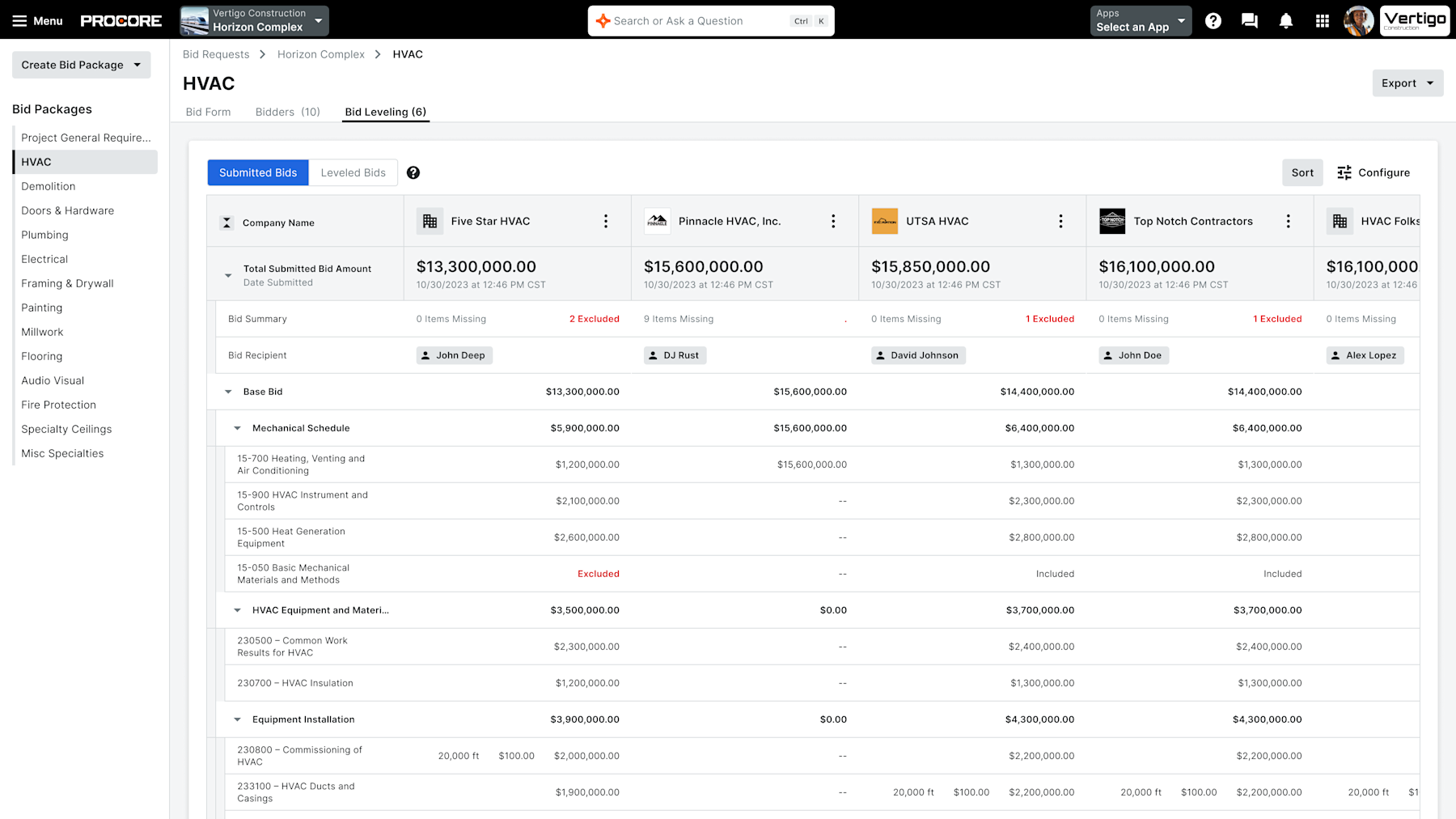
Procore is a construction management platform whose bid management module sends invitations to bid, compares bids side by side and turns the awarded bid into a subcontract or purchase order.
Procore fits a contractor that already manages projects, documents and financials in Procore and wants subcontract bids to flow into the same budget.
Fit. The bid management module builds a bid package from the project's documents, drawings and specs and sends invitations to bid with one click. A dashboard tracks what each bidder has done. Bids are compared side by side to show gaps and outliers.
Award. After you pick a bid, you convert it to a subcontract or a purchase order in one click, and the project budget updates automatically. Materials ordering through catalogs isn't what the module describes, so a contractor that buys mostly supplies would use only part of it.
Integrations. The vendor lists Sage and Unanet on the Procore Marketplace and offers an open API, and it claims more than 500 integrations. The tender page doesn't say what data each accounting connector syncs.
What users report. About 4.5 out of 5 on Capterra from roughly 2,650 reviews. Reviewers praise ease of use and support and call it one hub for drawings, documents and photos. The most common complaints are cost and more features than a team uses.
Price. Procore sells an annual fee per product, based on annual construction volume. Unlimited users, unlimited data and 24/7 support are included, and the vendor publishes no dollar amounts.
- you already run projects, drawings and financials in Procore and want bid awards to flow into the project budget
- you buy mostly subcontracts and want bid leveling and award in the same system as the budget
- you need a published price: Procore sells by quote based on annual construction volume
- you only need purchase orders for materials and don't want a full construction management suite
- Users like
- Capterra reviewers praise ease of use and support, and describe it as one hub for drawings, documents and photos.
- Users dislike
- Reviewers' most common complaints are cost and feature overload, with a few missing BIM capability.
- Source: Capterra, 2,650 reviews
- Starting price
- Quote only: an annual fee per product based on annual construction volume, unlimited users
- Pricing model
- Annual fee per product, based on annual construction volume
- Users
- Unlimited users and data included
- Bid award
- One click to a subcontract or purchase order
- Integrations named
- Sage and Unanet on the Procore Marketplace, open API
Archdesk
Archdesk is a construction management system whose procurement module covers requisitions, POs that commit to a budget line at approval, bid comparison, subcontract templates and three-way invoice matching.
Archdesk fits a contractor of roughly 5 to 250 employees that wants purchasing, subcontracts and cost control in one system and cares that a purchase order reserves budget the moment it's approved.
Fit. The procurement module raises purchase orders from requisitions through delivery, with multi-level approvals that stop lines that would break the budget. The vendor states that each purchase order commits against its budget line when it's approved.
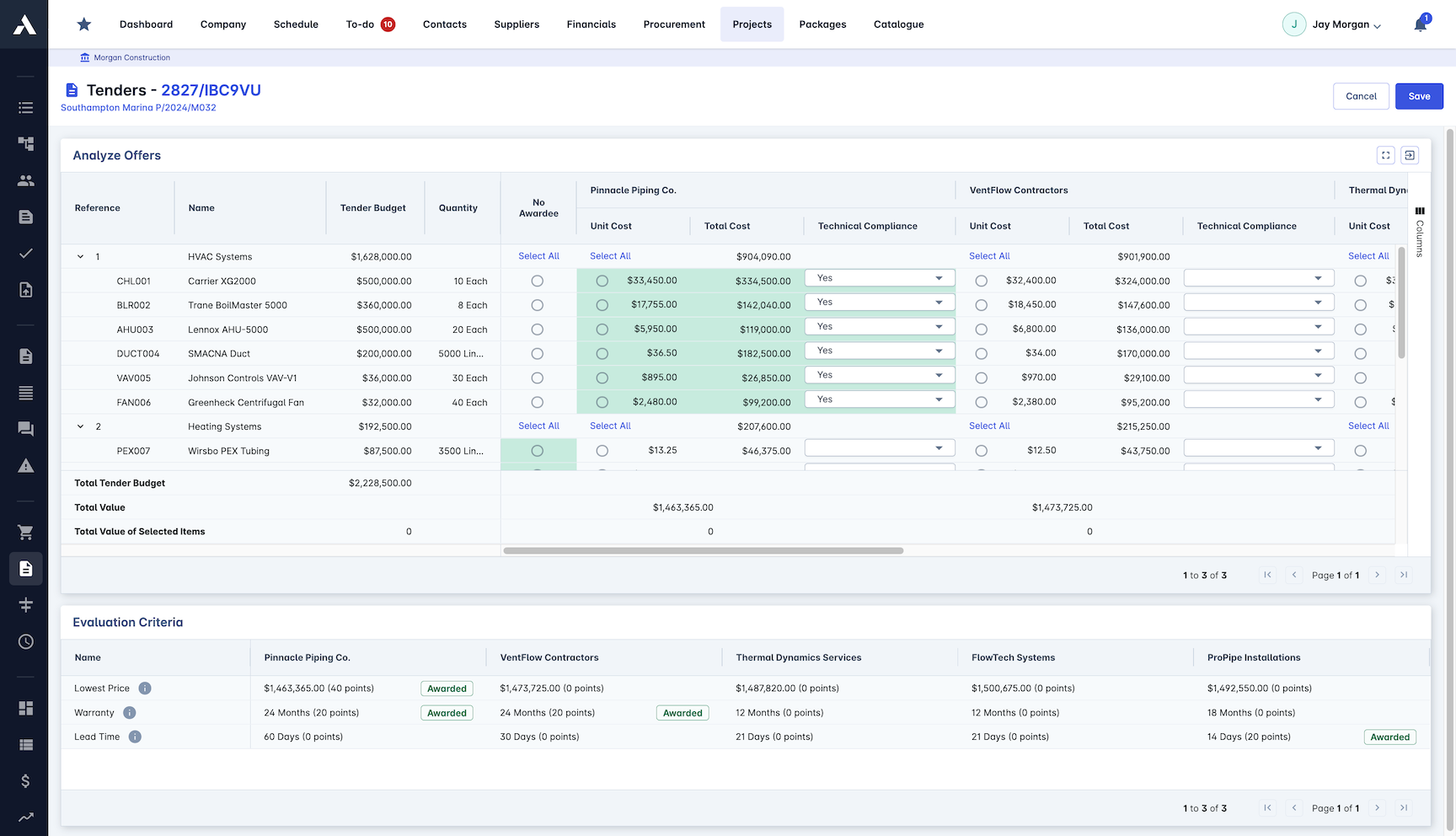
Bids and subcontracts. RFQ and RFP generation, side-by-side bid comparison and an evaluation matrix are listed. Subcontracts and supply contracts come from templates with payment milestones and variation control. A supplier database tracks accreditation, insurance and compliance.
Invoices. Three-way matching checks each invoice against the purchase order and the delivery receipt, flags discrepancies and breaks costs down by cost code.
Integrations. The page lists an accounting and ERP integration but names no systems, so ask which ones before you shortlist it.
What users report. 4.3 out of 5 on G2 from 21 reviews and 4.5 on Capterra from 51. Listings mention responsive support as a recurring positive. The review base is small.
Price. The quote comes from a short online wizard, based on either a fixed number of users or annual construction volume with unlimited users. All 30+ modules are included in one subscription.
- you want purchase orders to commit against a budget line the moment they are approved
- you manage subcontractors and need accreditation, insurance tracking and variation control in the same system
- you want a published price: the quote comes from a short wizard
- you need a named ERP connector: the procurement page lists an accounting and ERP integration but names no systems
- Users like
- Review-site listings mention support responsiveness as a recurring positive.
- Source: G2, 21 reviews
- Starting price
- Quote only: fixed users or unlimited users priced on annual construction volume, all 30+ modules included
- Modules
- 30+ in one subscription
- PO commitment
- Commits to the budget line at approval
- Invoice matching
- Three-way match with discrepancy flags
- Positioning
- Companies of 5 to 250+ employees
Planyard
Planyard is a construction cost-control tool whose Professional plan adds purchase orders and committed cost tracking and whose Ultimate plan adds automated subcontractor and vendor quoting.
Planyard fits a small or mid-sized contractor that wants committed cost and purchase orders per project at a published per-user price.
Fit. Planyard is a cost-control tool, and purchasing is part of it. The Essential plan adds budget tracking and purchase invoice management. Purchase orders and committed cost tracking start on Professional. Ultimate adds automated subcontractor and vendor quoting, subcontract tracking, change orders and payment applications.
Seats. The project manager seat is the price shown. Supporting staff such as site engineers, clients, estimators or auditors get a lower-cost seat with view and limited-task access, at $43 per month, and licences can change monthly for seasonal work.
Integrations. Invoices sync to Xero, QuickBooks and MYOB from the Essential plan.
What users report. 4.7 out of 5 on G2 from 13 reviews and 4.7 on Capterra from 18. Reviewers praise responsive support and simplicity. They mention missing tutorials and having to delete and re-enter data to amend an entry.
Price. Per user per month: Estimating $52, Essential $105, Professional $158, Ultimate $210, and Enterprise by quote. A 14-day trial with full access needs no credit card.
- you are a small or mid-sized contractor who wants committed cost per project and a published per-user price
- you want invoices to sync to Xero, QuickBooks or MYOB
- you need requisition approvals across many departments, which isn't described on the pricing page
- you need purchase orders on a cheaper plan: they start on Professional at $158 per user
- Users like
- G2 and Capterra reviewers praise responsive support and simplicity.
- Users dislike
- Reviewers mention missing tutorials and having to delete and re-enter data to amend an entry.
- Source: G2, 13 reviews

- Starting price
- Per user per month: Essential $105, Professional $158, Ultimate $210 (project manager seat); Estimating $52
- Trial
- 14 days, full access, no credit card
- Supporting staff seat
- $43 per month
- Invoice sync
- Xero, QuickBooks, MYOB from Essential
- Quoting
- Automated subcontractor and vendor quoting on Ultimate
ProcureDesk
Purchasing and AP automation for 50 to 250 employee companies, with published plans, more than 150 punchout catalogs and Slack approvals.
ProcureDesk fits a contractor whose crews buy supplies from catalog vendors and who wants requests tied to a job and approved before the order goes out.
Fit. Requesters build carts from approved vendor catalogs in the desktop or mobile app, and each request names the project and budget source. Approval rules auto-approve, deny or route a purchase to the project manager. Approved requests convert to purchase orders and go to the vendor automatically.
Job tracking. Purchases are tagged to a customer job or project, and spend reports compare project costs with budgets. Bank and credit card accounts can be synced to tag card expenses to jobs. The vendor's construction page doesn't mention cost codes by name.
Receiving. Purchasers verify deliveries, upload receipts and note wrong items, mismatched quantities or damage. Three-way matching links the invoice to the order and the receipt before AP pays.
Integrations. QuickBooks, Xero, NetSuite and Sage are named. Viewpoint and Foundation aren't mentioned, so confirm those directly if you run them.
What users report. 4.8 out of 5 on GetApp from 38 reviews. Reviewers like the approval workflow and its notifications. One reviewer re-entered data because there was no direct ERP integration.
Price. From $830 per month with 10 users included, plus a higher Growth plan at $1,250 per month.
- your requesters buy from Amazon, Staples, Grainger or Dell and you want one cart across vendors
- you run QuickBooks, Xero, NetSuite, Sage Intacct or Business Central and want a published price
- you have many requesters, because users beyond the included 10 or 20 cost $20 each per month
- you need SSO or 2FA on the entry plan: ProcureDesk's Startup tier leaves both to Growth at $1,250 a month
- Users like
- A straightforward approval workflow with notifications that keep requests from being missed.
- Users dislike
- One reviewer had no direct integration with their ERP and re-entered data; another found invoice matching and routing slow at times.
- Source: GetApp, 38 reviews

- Starting price
- From $830 per month billed annually, 10 users included
- Next tier
- Growth, $1,250 per month billed annually, 20 users
- Punchout
- More than 150 catalogs
Precoro
Procurement and AP automation for small and mid-sized companies, with published plan prices and per-approver amount thresholds.
Precoro fits a mid-sized contractor with several sites or entities that wants separate budgets and approval rules for each and a published price.
Fit. Budgets can be set per site or crew, and approval chains can depend on cost limit, site, department, project or requester, in sequence or in parallel. Requests link to the right project budget. Real-time budget tracking sits on the Automation plan, from $999 per month, and not on Core, so check which plan carries the budget control you need.
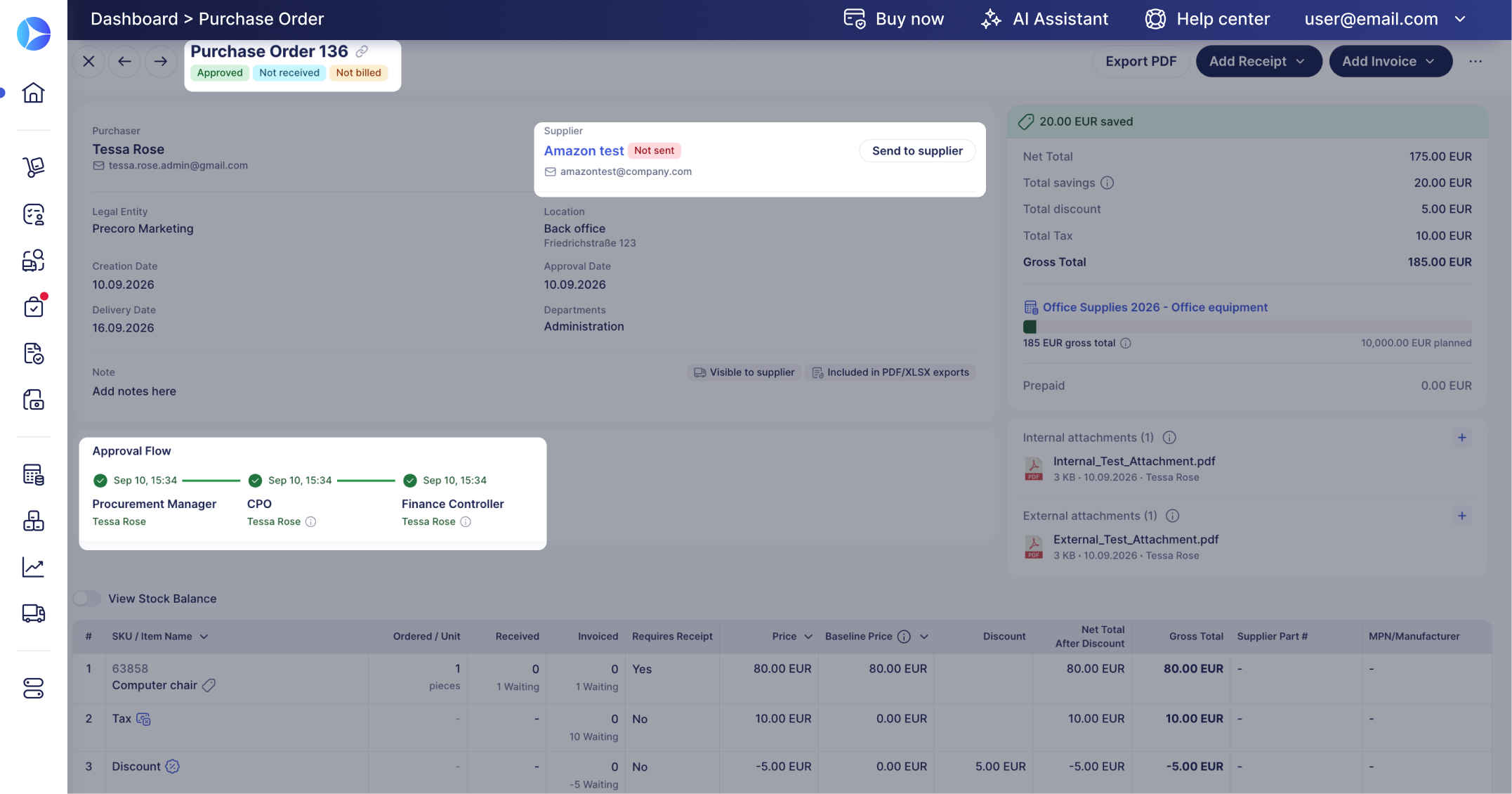
Materials. Teams order from catalogs of approved suppliers. PunchOut connections to Home Depot, Lowe's and Grainger let staff shop on the supplier site and send the cart back for approval. The mobile app approves requests and purchase orders, checks order status and submits receipt photos from the job site.
Invoices. Invoices are matched against the purchase order and the goods received note, with OCR and duplicate-invoice alerts. Stock levels and low-stock alerts are listed, but advanced inventory management isn't what the product is built for.
Integrations. QuickBooks Online, Xero, NetSuite, Sage Intacct and Business Central, plus an API.
What users report. 4.7 out of 5 on G2 from 222 reviews. Reviewer tags list ease of use, the approval process and support as positives, and a learning curve and missing features as negatives.
Price. Core starts at $499 per month billed annually.
- you want a published price and configurable approval steps without an enterprise suite
- approved requisitions should become POs without a second approval unless something changes
- you need stock control beyond Precoro's inventory module, which TrustRadius reviewers say lacks functionality
- your budget doesn't stretch to an annual plan starting at $499 a month
- Users like
- G2 reviewer tags list ease of use, the approval process, simplicity and support as top positives.
- Users dislike
- G2 reviewer tags list 'not intuitive', missing features, invoice problems and a learning curve as top negatives.
- Source: G2, 222 reviews
- Starting price
- From $499 per month, billed annually (Core)
- Next tier
- Automation, from $999 per month billed annually
- Accounting sync
- QuickBooks Online, Xero, NetSuite, Sage Intacct, Business Central
- Real-time budget tracking
- Automation plan ($999/mo) and above, not Core
- Savings dashboard
- Savings and overspend by month and supplier against a baseline price per PO line
- Overbudget step
- Fires only when a transaction exceeds budget and needs the Budget module
Procurify
Purchasing-led procurement platform with modular AP, Expense & Card and optional Guided Intake and Contracts. Buyers should verify paid Pro roles and renewal notice ownership.
Procurify fits a growing contractor whose finance team owns the accounting integration and who wants approvers to see committed spend before they approve.
Fit. Procurify is a general procurement platform. It isn't construction-specific, and the vendor's pages describe job costing, subcontract change orders and retainage nowhere. What it does offer is budgets by project, with budget categories by department, account code or both.
Approval. An approver sees what's already committed against the budget, what the request adds and what would be left. Rules can route a request by department, location, account code or amount. Reporting tracks committed, approved, purchased and billed amounts.
Integrations. QuickBooks, NetSuite, Sage Intacct, QuickBooks Desktop and Business Central are named, plus an API. GetApp's NetSuite integration rating is 2.7 from 3 ratings, against 4.5 for QuickBooks Online.
What users report. 4.6 out of 5 on GetApp from 208 reviews. Reviewers like the interface and the easier PO management and budget control. The occasional integration or customization limit is the recurring complaint.
Price. Sold by custom quote for Purchasing plus products, add-ons and Pro users. Implementation takes from a few weeks to a few months, depending on scope.
- you need approved purchasing requests, budget controls and audit trails across departments
- your finance team can own the accounting integration and implementation work
- you only need a simple PO form and cannot justify a tailored subscription
- you need a guaranteed public price before engaging sales
- Users like
- Reviewers cite easier PO management, order tracking and budget control; support is called responsive.
- Users dislike
- GetApp notes occasional integration or customization limits; its NetSuite integration rating is 2.7 from 3 ratings versus 4.5 for QuickBooks Online.
- Source: GetApp, 208 reviews
- Starting price
- Custom quote for Purchasing plus products, add-ons, Pro users and integrations
- Request types
- Order, Expense, Travel, Funds
- Accounting sync
- QuickBooks, NetSuite, Sage Intacct, Business Central
- Published subscription price
- No, quote only
- Basic requesters
- Unlimited
- Pro users
- Price determining user class
- Purchasing
- Required starting product
- Contracts
- Add-on
- Guided Intake
- Add-on
- Renewal notice
- 60 days under standard 2026-08-01 terms
- Budgets
- By department, account code or both, up to 60 months; pending requests count against the active budget
- Budget Overage
- Disabled: approvers cannot approve over-budget requests; enabled: a warning and approval allowed
- Bill payments
- ACH, wire or check in the US through the AP add-on, bulk approval of up to 100 payments
After the award: contract dates
An award ends the buying step, but the contract it creates has dates of its own. Software, equipment rental and supplier agreements often renew automatically, and the notice period sits in the contract, not in the procurement tool. Our guides to contract renewal notice periods and supplier management software cover the dates to capture and the records to keep.
None of the tools above tracks the renewal decision for a software or service contract your team signs, and that's the gap The Procurement Manager is built for.
Frequently asked questions
What is construction procurement software?
Construction procurement software manages a contractor's buying against project budgets. It collects and compares subcontractor bids, turns the award into a subcontract or purchase order, commits the cost to a budget line and matches deliveries and invoices to the order. Our guide to procurement software covers the general-purpose category.
What is a BoQ in procurement software?
A BoQ in procurement software is a bill of quantities, a list of the items, quantities and descriptions that make up a piece of work. Contractors send it to suppliers and subcontractors so every bid prices the same scope. Some tools price events line by line from a BoQ, and Archdesk lists RFQ generation with side-by-side bid comparison and an evaluation matrix.
Does Procore cost money?
Procore costs money: it sells an annual fee per product, based on your annual construction volume. Unlimited users, unlimited data and 24/7 support are included. The vendor publishes no dollar amounts, so you need a quote.
What is bid leveling?
Bid leveling is the process of adjusting subcontractor bids to the same scope so they can be compared fairly, because a low bid often leaves out part of the work. Procore and Archdesk both list side-by-side bid comparison, and Archdesk adds an evaluation matrix.
Do I need a standalone procurement tool or a construction suite?
A standalone tool is enough when your accounting system stays the system of record and you need requests, approvals and purchase orders in front of it. A construction suite fits when bids, budgets, subcontracts and documents already live in one system. If you run a construction ERP, check its own purchasing module before you add a tool.
Which accounting software do these tools connect to?
These tools connect to different accounting systems. Planyard syncs invoices to Xero, QuickBooks and MYOB. Precoro names QuickBooks Online, Xero, NetSuite, Sage Intacct and Business Central. ProcureDesk names QuickBooks, Xero, NetSuite and Sage. Procurify names QuickBooks, NetSuite, Sage Intacct and Business Central. Procore lists Sage and Unanet on its marketplace, and Archdesk names no systems on its procurement page.