Ramp pricing starts at $0 per user per month for Free, while Ramp Plus is listed at $15 per user per month plus a platform fee based on team size. Ramp advertises a 20% discount for annual Plus billing. Enterprise requires a custom quote. For procurement buyers, the critical distinction is that Ramp Procurement is a separate add-on to Plus or Enterprise, not a purchase-order suite included in the free card plan.
That headline isn't a complete purchase budget. What you'll actually pay depends on paid users, the undisclosed Plus platform fee, the Procurement add-on quote, payment methods, other add-ons, and the billing term. Ramp's own help center also documents Bill Pay transaction charges, subscription renewal rules, and the treatment of added or removed seats. This guide separates those published facts from illustrative calculations so you can request a proposal that Finance, IT, and the business owner can approve.
- Free: $0 per user per month, with cards, expenses, basic Bill Pay, and QuickBooks Online or Xero connections.
- Plus: $15 per user per month plus a team-size platform fee; Ramp advertises 20% savings with annual billing.
- Enterprise: custom annual pricing, with additional ERP, international card, and implementation capabilities.
- Procurement: separately priced add-on to Plus or Enterprise. Ask for a complete PO and renewal workflow quote.
- Bill Pay transaction fees and subscription seat changes can affect total spend even when the base plan is free.
How much does Ramp cost by plan?
Ramp publishes a three-tier US plan structure. The figures below are the vendor's public prices checked November 2, 2026, not a negotiated offer. The platform fee and Procurement add-on aren't quantified on the public pricing page, so a seat-only calculator can't produce your final invoice.
| Ramp plan or component | Published price (USD) | What the price covers | Procurement buyer's question |
|---|---|---|---|
| Free | $0 per user per month | Corporate cards, travel and expense, basic AP and accounting connections | Do we need formal purchase requests or POs? |
| Plus | $15 per user per month, plus platform fee | Compliance controls, advanced AP and accounting capabilities | Which users are billable and what's the platform fee? |
| Enterprise | Custom, billed annually | Expanded ERP, global issuing and implementation support | Which services and entity requirements are in the order form? |
| Procurement add-on | Custom price, not published | Intake, approvals, purchase orders, matching and vendor workflows | Is every required procurement module in the quote? |
| Accounts Receivable add-on | Price not displayed in the comparison | Features the plan comparison marks as requiring this add-on | Are we buying an unrelated module by accident? |
| Bill Pay | Transaction fees vary by rail | Payments made through Ramp Bill Pay | What payment mix and funding account will we use? |
- Free$0 / user / mo
- Unlimited corporate cards
- QuickBooks Online and Xero integrations
- Bill Pay with per-method transaction fees
- Plus$15 / user / mo + platform fee20% off with annual billing
- NetSuite and Sage Intacct integrations
- Multi-entity support, custom roles, audit log
- Batch payments and payment release approvals
- Procurement available as a separate add-on
- EnterpriseCustom annual billing
- Workday and Oracle Fusion Cloud integrations
- Local-currency card issuing in 30+ countries
- Dedicated account manager and implementation services
- Procurement available as a separate add-on
Source: ramp.com/pricing, checked November 2, 2026. The Plus platform fee and the Procurement add-on price aren't published.
The important procurement decision isn't simply Free versus Plus. It's whether your purchasing process requires approvals before spend is committed. A company that only needs employee cards and invoice approvals may stay on Free. A team requiring purchase-order issuance, intake questionnaires, and matching should evaluate the separate Procurement scope before comparing prices with a standalone purchasing tool.
What's included in Ramp Free?
Ramp Free includes unlimited corporate cards, issuing controls, expense workflows, receipt matching, basic vendor management, invoice extraction, and Bill Pay. The official plan comparison lists QuickBooks Online and Xero integrations. The subscription charge is zero, but payment transactions aren't universally free. A team paying vendors from an external bank account should model the fees later in this guide.
For a procurement manager, Free is useful when the control point is the card or invoice. It can route bill approvals, record vendor activity, and help the finance team reconcile spend. It shouldn't be described as a full purchase requisition and PO approval system merely because Ramp's broader platform sells those capabilities. Confirm the actual plan entitlement, not a feature shown in a general product demonstration.
Free can also be a sensible evaluation environment. Build a realistic vendor invoice, approve it, pay it using your preferred method, and verify the accounting export. Don't mistake a successful invoice workflow for a successful pre-purchase approval workflow. They control different moments in the spending process.
What does Ramp Plus add?
Ramp Plus adds automatic card locking for unmet compliance requirements, batch payments, payment release approvals, and more advanced accounting integrations. Ramp lists NetSuite and Sage Intacct support on Plus, alongside multi-entity capabilities, custom roles, and audit logs. The pricing page shows a per-user fee and a platform fee tied to team size.
That second component matters in a purchasing decision. If Finance approves a budget using only the published seat rate, the approved amount may be lower than the vendor's actual proposal. Request the platform fee as a distinct line with its billing frequency, whether it changes with headcount, and whether any annual discount applies to it. Ramp advertises an annual discount, but the public page doesn't establish that every additional fee receives the same reduction.
Plus is a more plausible fit for a company whose finance operations depend on ERP sync, more complex expense policies, or multiple entities. Yet it isn't proof that the Procurement add-on is already included. Ramp's pricing table explicitly labels Procurement as an add-on to Plus or Enterprise.
What's included in Ramp Enterprise?
Ramp Enterprise is custom-priced and shown as annually billed. The public feature comparison lists Workday and Oracle Fusion Cloud integrations, locally funded reimbursements, local-currency card issuing in more than 30 countries, dedicated account management, and implementation services. A global company should ask for a country-by-country issuing and reimbursement matrix rather than assuming one headline covers every subsidiary.
Enterprise doesn't remove uncertainty by itself, but it can reduce it around implementation ownership if the signed statement of work is specific. Require named deliverables for ERP mapping, permission design, approval policy configuration, training, testing, and acceptance. A feature might exist in Enterprise and still need a separately scoped integration or rollout project. Treat marketing feature availability and implementation commitments as different evidence.
Is Ramp Procurement included in Plus pricing?
No. Ramp's current pricing page calls Procurement an add-on to Plus or Enterprise. Its support documentation says the add-on is required for Procurement access. The published plan comparison describes custom intake, advanced workflows, vendor onboarding forms, purchase order management, card-to-PO matching, compliance reviews, and three-way matching. The price of that add-on isn't published in the observed US price table.
This distinction is particularly important because older articles may describe procurement as part of Plus. Ramp's own extended-access documentation says Procurement became a separate add-on on October 22, 2025, with transitional access for some existing customers. A legacy entitlement can therefore differ from what's quoted to a new customer. Ask the seller to list the exact entitlement rather than relying on a screenshot from an older account.
| Procurement requirement | Ramp feature to demonstrate | Contract evidence to request |
|---|---|---|
| Pre-purchase intake | Custom request form and routing | Procurement add-on entitlement |
| Business, Finance and IT review | Approval policy and conditional routing | Roles, workflow scope and implementation owner |
| Purchase commitment | PO creation after approval | PO issuance and change-order rights |
| Invoice control | PO-to-bill matching and receiving | Included matching capabilities and limitations |
| Vendor due diligence | Vendor forms and compliance review | Access, data retention and security responsibilities |
| Renewal management | Renewal workflows and reminders | Included renewal functions, ownership and data migration scope |
For procurement teams, a working demo should start with a real request from a business owner. Route it to Finance and IT, produce the PO, match a supplier invoice, then show how the evidence can be exported. If a vendor demonstrates only an attractive intake form, you still don't know whether the approval and accounting handoffs work.
Is there a free trial for Ramp Procurement?
Ramp's pricing FAQ advertises a 30-day trial of Plus for prospective Plus users. For Procurement itself, Ramp's help center currently tells accounts without the add-on to select Talk to sales or Request custom pricing, and it doesn't publish trial terms on that page. Ask your Ramp representative in writing whether a Procurement trial exists for your account, how long it runs, who's eligible and what happens to requests and POs created during it.
For a procurement proof of concept, write the success criteria before activating any trial: approval routing, PO change orders, matching, renewal reminders, and the actual export your finance team needs.
What extra fees should you budget for Ramp?
A common budgeting mistake is treating a free software subscription as free payment operations. Ramp's help center publishes transaction fees for several Bill Pay rails. The table below applies to the listed payment methods, not to every possible Ramp payment. Ramp says eligible fees for several rails are waived when the payment is funded from a Ramp Checking Account.
| Bill Pay method | Published fee (USD) | Procurement implication |
|---|---|---|
| Standard ACH | $0.59 per transaction | High-volume vendor payments accumulate small fees |
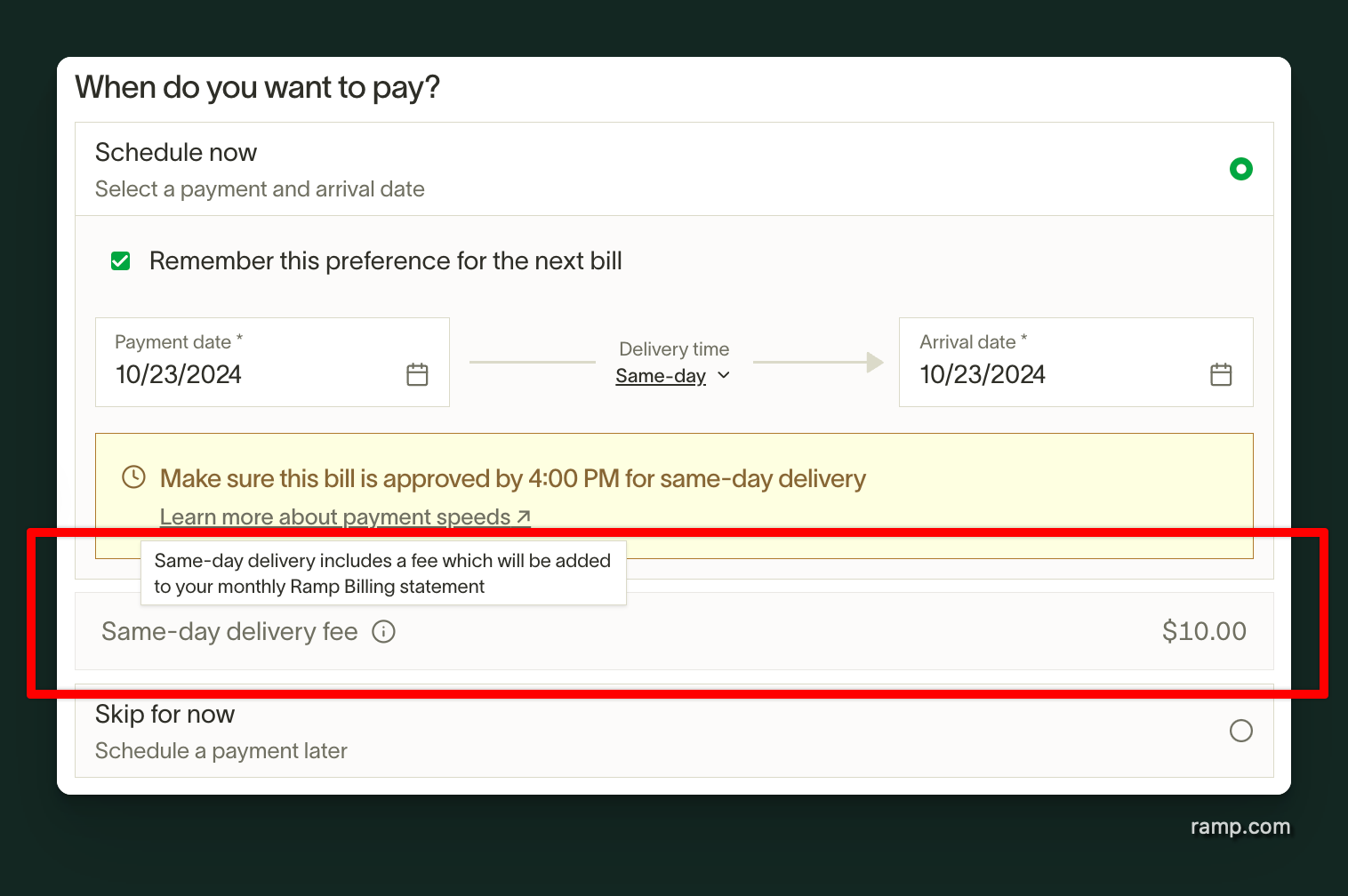
| Same-day ACH | $10 per transaction | Urgent payment policies need approval |
| Domestic wire | $15 per transaction | Supplier settlement method matters |
| International SWIFT USD wire | $20 per transaction | Global payables require rail-level budgeting |
| Standard check | $1.99 per transaction | Paper-heavy vendors can increase operating cost |
| Overnight check delivery | $20 per transaction | Expedited paper payments remain chargeable |
| Check attachment | $1 per page | Attachments create an additional cost |
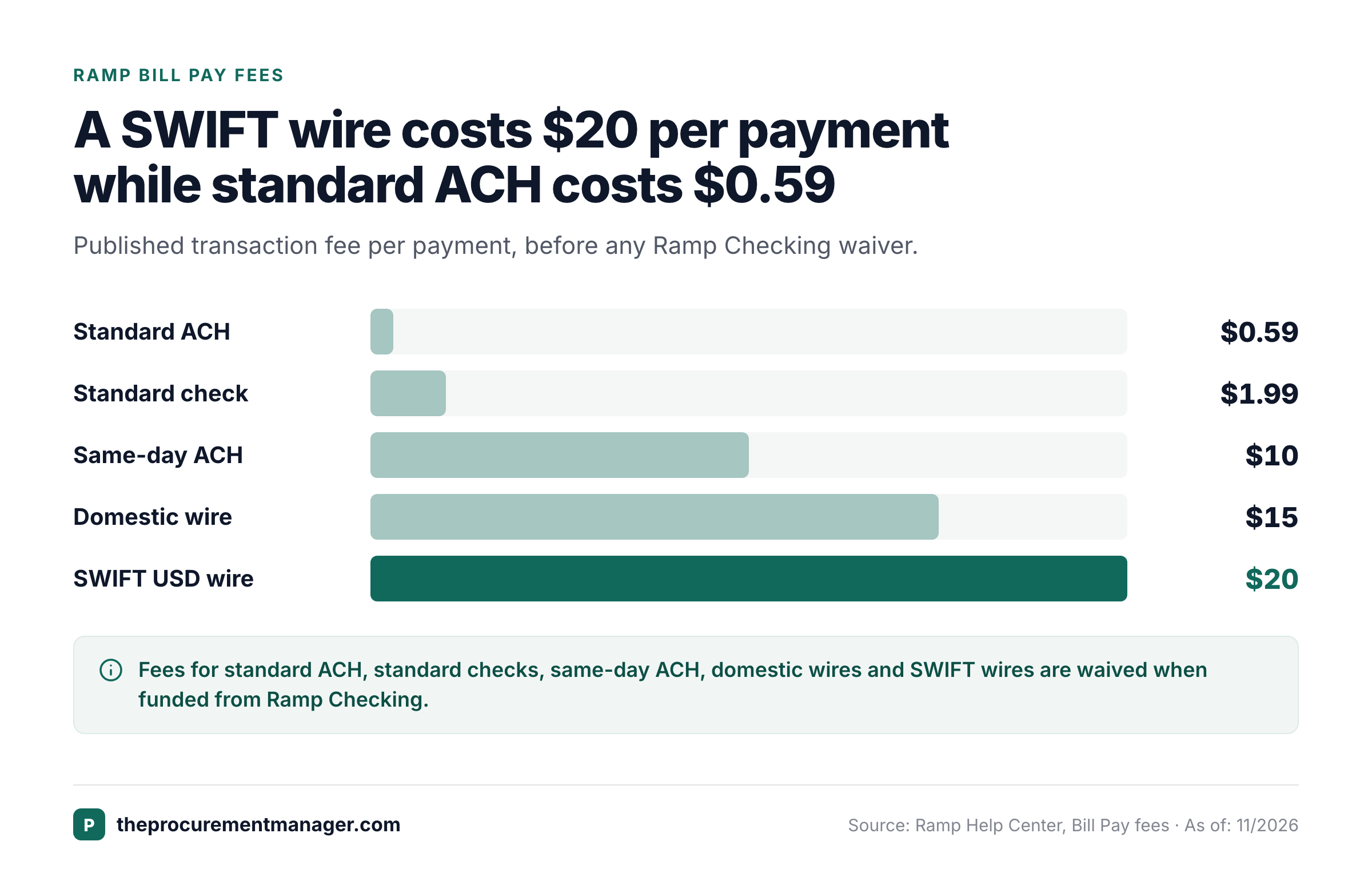
The ACH and standard-check fees took effect on June 1, 2026, subject to a grace period for qualifying earlier Bill Pay customers. Those historical transition terms shouldn't be used to assume a new buyer is exempt. Ramp's help center also says fees for standard ACH, standard checks, same-day ACH, domestic wires, and SWIFT USD wires are waived when funded from Ramp Checking. Overnight checks and attachments still carry their stated fees.
The fee schedule has an accounting consequence. Ramp says Bill Pay service charges are consolidated into a separate monthly statement rather than synced with the individual bill to the accounting provider. Controllers should plan a manual journal entry and reconciliation of the fee statement. Procurement should own payment-method policy, while Finance owns the booking and reconciliation process.
Do foreign transactions have additional costs?
Foreign transactions can carry extra costs. Ramp's foreign-transaction help article says an international card purchase converted between transaction and statement currencies can include a margin on the exchange rate, and that this margin won't exceed 3%. International bill payments and reimbursements may also include a foreign exchange margin, but the article states no cap for those. That isn't a universal fee on every foreign transaction, so request an example using the currencies and funding sources your company actually uses.
Ask the vendor to show the original amount, converted amount, network or issuer rate, applied margin, and resulting ledger record. A low headline subscription price won't help if Finance can't forecast the cost of frequent cross-border supplier payments.
Are Ramp credits the same as cashback?
No. Ramp Plus subscription credits and card cashback rewards have different rules. Ramp's Plus billing policy says subscription credits generally apply to eligible subscription and fee statements; they aren't transferable, can't be used for card statements, and have no cash value. Its rewards documentation says cashback can be used toward card statements, subscription fees, and other supported redemptions.
For procurement, treat credits as a commercial concession only after the order form specifies the amount, eligibility, expiration or application rules, and the statements against which they may be used. Don't subtract an advertised promotional credit from the recurring price unless you know it will apply to your actual billing account and term. Cashback isn't a guaranteed discount rate either; model it separately from the contracted software price.
How do you calculate the real cost of Ramp Plus?
Use the published seat rate as a floor for the seat component, not as the final subscription total. The annual billing promotion implies a $12 monthly-equivalent seat rate when a full 20% discount applies to the published $15 rate. The unknown platform fee, Procurement add-on, tax, and payment fees remain outside that calculation. Ask the seller to confirm the rate and seat definitions in the quote.
| Illustrative Plus seats | Monthly seat component at $15 (USD) | Annual seat component at $12 monthly equivalent (USD) | Missing from both figures |
|---|---|---|---|
| Ramp Plus, 10 seats | $150 | $1,440 | Platform fee, Procurement, payment fees, tax |
| Ramp Plus, 25 seats | $375 | $3,600 | Platform fee, Procurement, payment fees, tax |
| Ramp Plus, 50 seats | $750 | $7,200 | Platform fee, Procurement, payment fees, tax |
| Ramp Plus, 100 seats | $1,500 | $14,400 | Platform fee, Procurement, payment fees, tax |
Monthly seat component only. It excludes the platform fee, the Procurement add-on, Bill Pay fees and tax.
These are illustrative calculations, not vendor quotes. The annual column is a total for twelve months at a discounted monthly-equivalent seat rate. It doesn't mean Ramp offers a $12 month-to-month contract. The table assumes every listed person is a billable Plus user throughout the period, which may differ from your account's actual roles and changes.
Example: model Bill Pay separately from the subscription
Consider a fictional company sending 80 standard ACH payments, 10 standard checks, 2 domestic wires, and 1 same-day ACH payment each month, all funded from an external bank account. At Ramp's published rail fees, the modeled monthly payment fees are $107.10: 80 × $0.59 + 10 × $1.99 + 2 × $15 + 1 × $10. That equals $1,285.20 per year if the mix stays unchanged. It doesn't include FX, filing, taxes, or other fees.
If that company instead pays the same eligible rails from Ramp Checking, Ramp's published waiver could remove those particular transaction fees. Moving payables cash into a different account is an operational decision, however, and it isn't a costless mathematical switch. Treasury should review cash controls, access, bank reconciliation, and the implications of changing the funding source.
A buyer comparing Ramp with a procurement-only application should keep separate lines for software subscription, purchasing add-on, payments, implementation, and internal operating effort. Otherwise, the comparison will favor whichever vendor places more of its cost outside the visible license line.
Count billable roles
Export active Plus roles and separate billable users from guests, pending users, deactivated users, and accounting-firm users.
Request the full platform charge
Ask Ramp to identify the platform fee, pricing unit, annual discount scope, taxes, and any minimum commitment.
Price Procurement independently
Obtain the add-on entitlement, renewal workflow scope, PO capabilities, and implementation services as separate lines.
Forecast payment rail usage
Estimate ACH, check, wire, urgent payment, and FX volume by month and funding account.
Normalize the contract term
Compare total committed cost, renewal dates, seat adjustments, credits, exit assistance, and evidence export rights.
How do Ramp's billing and renewal terms work?
Ramp's Plus billing policy says users with the Auditor role are billed. Pending users, deactivated users, users with the Guest role, and Accounting Firm-assigned users aren't billed under that policy. A team shouldn't assume only cardholders or finance administrators count. Ask for a billable-role report and a sample statement before agreeing to a seat commitment.
The help center describes monthly plans renewing on their monthly billing anniversary and annual plans renewing on their yearly anniversary. Annual subscribers pay for the annual seat count upfront and may receive monthly statements for additions during the term. Added seats can be prorated, while removing a user doesn't create a refund or credit under the published policy. The policy also says Plus subscription fees are non-refundable.
Seat-based billing creates an important procurement control. Before the annual renewal, reconcile the actual active role count, compare it with the contracted seat base, and confirm the next term's price. During the term, require approval for role changes that increase billable seats. The owner should keep a dated copy of the account export and the vendor's billing statement, not just a purchase order total.
Can you cancel Ramp Plus at any time?
Ramp's billing policy says you can cancel Ramp Plus from within Ramp at any time, except when you have custom pricing. Monthly plans keep access until the end of the billing period, and Plus fees aren't refundable. Cancellation mechanics shouldn't be confused with a promise of a refund or a release from a separately negotiated commitment.
For any custom order, require Legal to review the controlling agreement and order form. Record the governing renewal date, notice channel, recipient, receipt requirement, price-change rights, and whether a new annual term begins automatically. Ask the vendor to confirm those details in writing.
What should procurement negotiate before signing?
A strong Ramp quote is an itemized operating commitment, not just a per-user rate. Use the following questions during the commercial review and attach the answers to the approval packet. They're especially important when an organization is buying the Procurement add-on because the intended outcome is an auditable purchase-to-pay process.
- Platform fee: What's the exact amount, billing cadence, headcount basis, and adjustment trigger?
- Billable users: Which roles count, how are seat additions prorated, and what happens when people leave?
- Procurement entitlement: Are custom intake, PO changes, renewal workflows, matching, and compliance reviews included in this quote?
- Implementation: Who configures approvals, roles, accounting mappings, and vendor master data, and how will acceptance be tested?
- Integrations: Which ERP connectors are included, which require Enterprise, and who fixes failed syncs?
- Payments: Which rails incur fees, what funding accounts qualify for waivers, and how are fee statements reconciled?
- Credits and rewards: Which credits apply to subscription invoices, and which rewards depend on card spending?
- Commercial term: What are the effective date, renewal date, notice mechanism, price adjustments, and non-refundability provisions?
- Data and exit: Can the team export vendors, approvals, POs, attachments, and audit evidence in a usable format?
- Ownership: Who in the business approves renewals, who in Finance approves payment, and who in IT reviews integrations and security?
Where does a contract renewal workflow fit?
Ramp Procurement has renewal-related features within its add-on, but purchasing software and renewal decision governance aren't identical. The business owner still needs to decide whether the vendor remains necessary. Finance must validate budget and actual invoices. IT needs to assess access, data export, and dependencies. Legal should confirm notice wording where applicable. Procurement coordinates the decision and preserves evidence.
A useful renewal packet names the executed agreement, effective dates, notice deadline, current spend, proposed price, usage evidence, owner, reviewer decisions, and notice proof. That process should survive a change in the purchasing tool. The contract renewal checklist and the guide to the contract renewal notice period show how to capture those dates. A workflow that creates a reminder but doesn't preserve the decision and its source evidence is incomplete for an audit or vendor dispute.
Is Ramp worth the price for a procurement team?
Ramp can be a compelling fit when a company wants corporate cards, expenses, accounts payable, and procurement to share a finance workflow. The Free tier lowers the cost of testing basic payment operations, while Plus adds stronger automation and accounting depth. The Procurement add-on is the key buying decision for teams that need request intake, PO approvals, matching, and vendor review.
It may be a weaker fit when the organization only needs a narrow contract-renewal decision process, doesn't want to change its finance stack, or can't justify the platform fee plus Procurement add-on. A standalone procurement tool might be easier to scope, but only a workflow-by-workflow comparison can establish that. The Zip Procurement pricing and Coupa pricing guides show how those quotes are structured. Don't compare Ramp Free with a paid purchasing suite and conclude that it's offering the same control surface for less money.
- Corporate cards, expense tracking and basic bill approvalsFree
- NetSuite or Sage Intacct sync, multi-entity support or custom rolesPlus
- Approvals before spend is committed, with purchase orders and invoice matchingPlus or Enterprise with the Procurement add-on
- Workday or Oracle Fusion Cloud, or local-currency cards in 30+ countriesEnterprise
The practical verdict is conditional: start with Free if cards and basic AP are the actual problem; request a complete Plus and Procurement quote if approvals must happen before a purchase; evaluate Enterprise only against specific global or ERP requirements. For every option, have Finance validate the full cost and have the business owner sign off on the workflow outcome.
Frequently asked questions about Ramp pricing
Is Ramp really free?
Ramp Free has a $0 per-user subscription price, with unlimited corporate cards and core expense and AP capabilities. Certain Bill Pay methods and other services can still incur fees.
How much is Ramp Plus per month?
Ramp lists Plus at $15 per user per month plus a platform fee based on team size. It advertises 20% savings with annual billing. The platform fee isn't quantified on the public pricing page.
How much does Ramp Procurement cost?
Ramp labels Procurement as an add-on to Plus or Enterprise and doesn't show a public add-on price in the observed US plan table. Request a written quote for the required features.
Does Ramp offer a free trial?
Ramp's pricing FAQ advertises a free 30-day trial of Plus. For Procurement, the help center points accounts without the add-on to sales, so ask in writing whether a Procurement trial applies to you.
Are Ramp Plus seats refundable if employees leave?
Ramp's published billing policy says removing a user doesn't generate a refund or credit. Review the specific order form and any custom terms.
What are Ramp's standard ACH and wire fees?
The published Bill Pay schedule lists $0.59 for standard ACH, $10 for same-day ACH, $15 for domestic wires, and $20 for SWIFT USD wires. Eligible fees are waived when paying from Ramp Checking.
Can cashback cover Ramp subscription fees?
Ramp's rewards documentation allows cashback to be applied toward subscription and fee statements. That's distinct from Ramp Plus subscription credits, which have narrower application rules.
Does Ramp Enterprise have public pricing?
No. Ramp labels Enterprise as custom annual pricing. Ask for a scoped proposal including integrations, implementation, entity requirements, and support.