Procurify is a strong shortlist candidate when purchase requests, approvals and receiving are scattered across email and spreadsheets. It's a purchasing-led platform. Employees request, approvers route, buyers issue purchase orders, receivers confirm delivery, and optional Accounts Payable and Expense & Card products extend the same record to invoices, payments and cards. It isn't a full sourcing or contract lifecycle suite, and it doesn't publish a price list.
This Procurify review covers what the product does, where reviewers are happy and unhappy, how pricing works, and which tests to run before you sign. It's built from Procurify's own product pages, current G2 data and the vendor's published terms. We haven't run a hands-on trial of Procurify, so anything about configuration or reliability is framed as something to test, not as something we saw.
- Best fit: finance and operations teams that want approved requests, budgets, purchase orders and receiving in one trail before invoices arrive.
- Strength: live budget impact during approval, mobile requesting and receiving, and named accounting sync for NetSuite, QuickBooks, Sage Intacct and Dynamics 365 Business Central.
- Trade-off: pricing is a custom quote, Guided Intake and Contracts are add-ons, and G2 reviewers mention missing features and a learning curve.
- Rating: 4.6 out of 5 across 414 G2 reviews at the time of checking.
- Our verdict: shortlist it for purchasing control, then prove approvals, receiving, invoice exceptions and your accounting sync with your own transactions.
What is Procurify, and what does it cover?
Procurify describes itself as a procurement and spend management platform for finance and operations teams. The core is Purchasing, the one product every customer starts with. It includes order requests, purchase orders, product catalogs and vendors. Accounts Payable adds bills and payments. Expense & Card adds spending cards and expense reimbursement. Platform features such as approval routing and Spend Insights come with every customer according to the pricing page.
Two optional add-ons sit on top: Guided Intake and Contracts. Contracts covers document upload, renewal alerts and spend tracked against contract value. Because they're priced separately, a demo that shows contract renewals doesn't prove your quote includes them.
The simplest way to read the product is as a spine, and that framing is genuinely helpful when you compare quotes. A request becomes an approval, the approval becomes a purchase order, the purchase order meets a receipt, and the receipt meets an invoice. Each handoff is where purchasing control usually breaks in smaller finance teams, and those are the handoffs Procurify is built around.
Requests and approvals
Employees create order requests from product catalogs, through PunchOut shopping, or by describing a noncatalog purchase, and they can follow the status as it moves. Procurify's feature page lists unlimited approval groups, live budget impact, delegation and mobile approvals. The mobile page also says the app can create requests from uploaded vendor quotes.
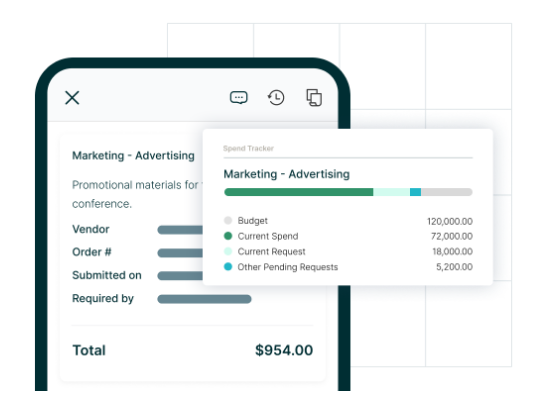
The budget impact is the feature worth testing first. Approvers see what a request does to the active budget before they say yes, so the decision doesn't depend on someone reconciling a spreadsheet afterward. The catch is that an approval flow that looks clean in a demo may not mirror your real policy. Bring a low-value departmental purchase, a cross-functional commitment and an urgent exception, and ask to see each one built.
Ask three specific things about rules: who can change an approval rule, whether a change leaves an audit trail, and what happens when an approver's absent. Delegation is on the feature list, yet the answer depends on how your thresholds are set up.
Budgets and purchase orders
Procurify builds budgets by department, account code or both, and its documentation describes periods of up to 60 months. Pending requests count against the active budget. A budget overage setting decides whether approvers can approve a request that would exceed the budget: with it disabled they can't, but with it enabled they see a warning and may still approve. That single setting changes how strict your control is, so confirm which one your quote and configuration use.
Approved requests turn into purchase orders, which Procurify's feature page says are tracked through receipt with an audit trail. Recurring and blanket spend are listed, and so are vendor import, document storage and preferred-supplier flags. If your purchases are mostly one-off, the PO side matters less than the approval side, but if you buy repeatedly from the same suppliers, test how a recurring order is copied and amended after approval.
Receiving, bills and payments
Receiving is where many purchasing tools stay thin, so it's clearly a good place to press hard. Procurify's mobile page describes marking items as received, notifying the requester and purchaser, photographing shipping receipts and packing slips, and uploading photos of damaged goods. Test partial deliveries and a service that needs acceptance rather than a physical delivery, and confirm the outstanding balance stays visible.
With the Accounts Payable product, invoices arrive in one inbox and become draft bills. Procurify lists two- and three-way matching and says only exceptions go to review. Payments can go out in bulk by ACH, wire or check in the US and by EFT in Canada, and they can be scheduled or released on approval. The homepage also cites international payments to more than 190 countries. These are vendor descriptions, and the edge cases decide the real value: a price variance, a quantity mismatch, a duplicate invoice and a charge with no purchase order.
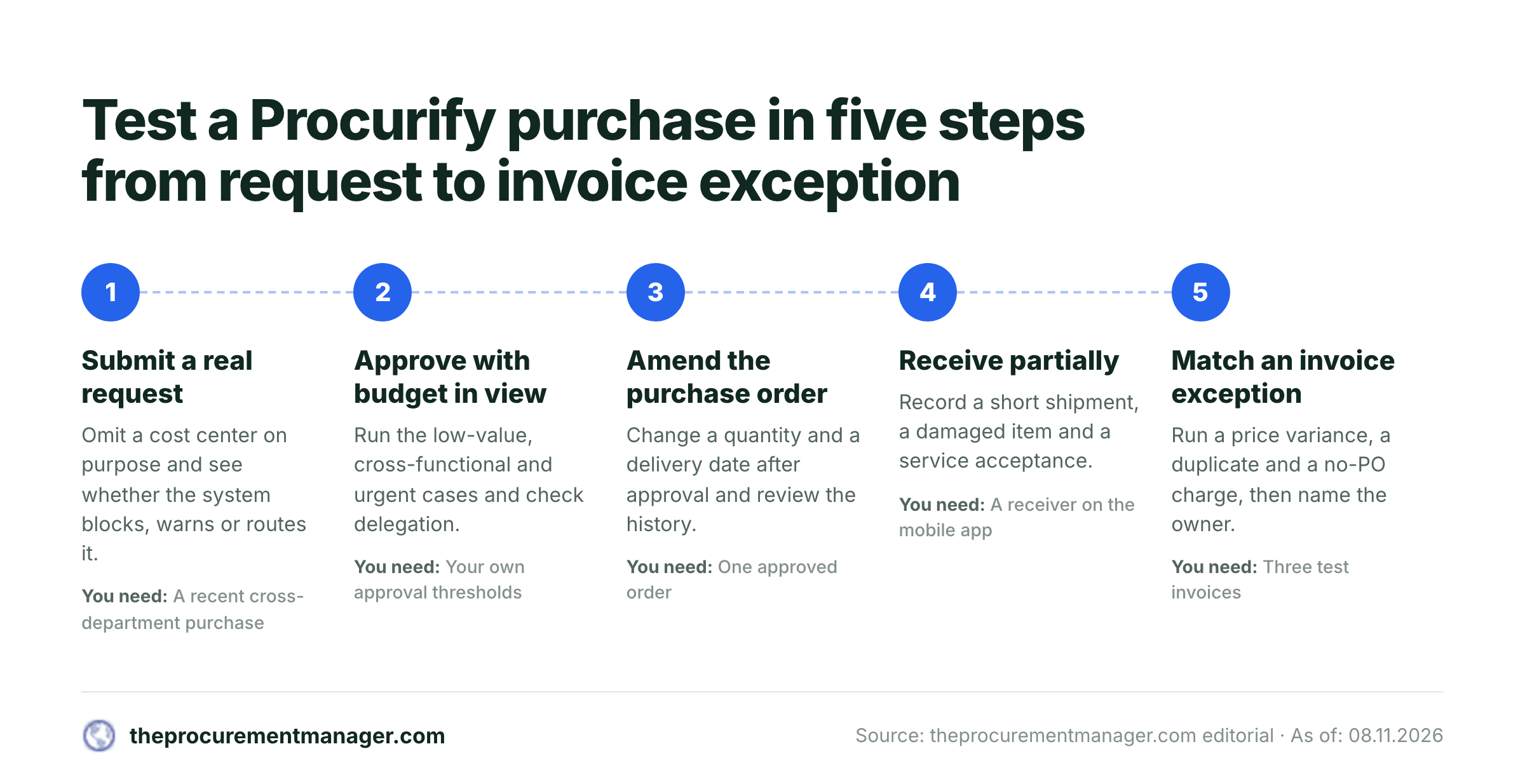
Submit a real request
Use a recent cross-department purchase. Omit a cost center on purpose and see whether the system blocks, warns or routes it.
Approve with budget in view
Run the low-value, cross-functional and urgent cases. Check delegation, a changed request after approval and the decision history.
Issue and amend the purchase order
Change a quantity and a delivery date after approval. Confirm who is notified and how the change is recorded.
Receive partially
Record a short shipment, a damaged item and a service acceptance. Confirm the open balance and the attached evidence.
Match an invoice exception
Run a price variance, a duplicate and a no-PO charge. Name the exception owner and check the accounting sync.
Cards, expenses and spend reporting
Expense & Card includes physical and virtual spending cards with limits and freeze controls, plus expense capture on mobile with receipt photos and reimbursement. If you're only buying Purchasing, you can skip this section when comparing quotes, but do ask whether card spend lands in the same budgets as purchase orders. A budget that sees only POs and misses card activity gives a partial picture, which defeats the point.
For reporting, Procurify offers Spend Insights dashboards with drill-down and scheduled reports, and Spend Analyst for natural-language questions over your own data. Judge the reporting on whether finance can rebuild a disputed transaction from request to payment without asking an administrator.
Integrations and the accounting boundary
Procurify names NetSuite, QuickBooks, Sage Intacct and Microsoft Dynamics 365 Business Central for accounting sync, with a REST API for other connections. PunchOut catalogs include Amazon Business, Staples and ZAGENO. The feature page describes the sync as two-way.
A named connector is the start of the question, not the answer. Ask for a field-level map for your edition: suppliers, account codes, tax treatment, cost centers, PO status, receipts and invoice references. Ask who owns a failed transfer and how retries work. Ratings may differ by system. When checked in late October, GetApp listed a NetSuite integration rating of 2.7 from only 3 ratings, against 4.5 for QuickBooks Online. That's a tiny sample, but it's a reason to test the connector you'll actually use.
What real users like and dislike
Procurify's holding 4.6 out of 5 across 414 G2 reviews, with 327 five-star and 78 four-star ratings. G2's summary of reviewer themes is consistent: ease of use is the most common positive, followed by time savings, with fast setup, centralized orders, automated approvals and real-time budget visibility mentioned often. Mobile-friendly workflows come up too.
The complaints are narrower. Reviewers tag missing features (11 mentions) and a learning curve (7 mentions), and G2's summary says several find searching for older orders or SKUs clumsy. One reviewer who rated the product five stars wished a requester could split a purchase request across several organizations or locations, which that reviewer said takes a workaround. These are individual accounts, not a verdict on every deployment, so you'll want to reproduce the scenarios that matter to you.
A rating doesn't answer fit. A 4.6 overall says little about a company that needs advanced sourcing events or supplier risk scoring.
Procurify pricing: what's public and what isn't
Procurify prices by custom quote. The pricing page says quotes account for products, add-ons, users and integrations, and it publishes no flat rate. Purchasing is required, Accounts Payable and Expense & Card are additional products, and Guided Intake and Contracts are priced separately. Basic users, who can request orders or receive items, are unlimited. Pricing follows Pro users, the roles with broader permissions, which is certainly worth understanding before the call.
Procurify's homepage describes standard implementation as about eight weeks, or 33 hours of your own team's time. Its standard terms effective 1 August 2026 describe a 12-month term and a 60-day renewal notice. G2's pricing page says there's no free trial, and Procurify's own page offers "Request pricing" and "Book a demo" instead.
For the full cost breakdown, including user roles, implementation scope and renewal terms, read our Procurify pricing guide.
Where Procurify fits, and where to look elsewhere
Procurify suits teams where the main problem is control before the money is committed. It works best when a finance owner can own the accounting integration and implementation, when requesters are many but occasional, and when mobile approvals and receiving matter.
Look elsewhere, or at least evaluate separately, if you'll need strategic sourcing events, supplier risk management or a full contract lifecycle suite. Skip the quote process if you only need a simple PO form and can't justify a tailored subscription. If you'd like to see how it compares head to head, read Procurify vs Precoro and our review of Coupa, a heavier enterprise option. For the wider category, see the best procure-to-pay software.
A buyer's demo and pilot checklist
Run the same scenarios with every shortlisted vendor, so a polished presentation can't shift the criteria. Score each capability as demonstrated, promised or excluded.
- Get a line-item quote listing Purchasing, each product, each add-on and the Pro user count.
- Confirm in writing the minimum role needed for each task in your roster.
- Watch a request with a missing cost center, a changed approval route and an absent approver.
- Check how the budget overage setting is configured for your policy.
- Amend a purchase order after approval and review the history.
- Record a partial receipt and a damaged item on the mobile app.
- Run a price variance, a duplicate invoice and a no-PO charge.
- Obtain a field-level map for your accounting system and edition.
- Ask who owns failed syncs and see a sample reconciliation report.
- Agree acceptance criteria, renewal notice and data export terms before signing.
Where renewal decisions fit
Procurify's Contracts add-on offers renewal alerts, but an alert isn't a decision. Someone still has to compare the contract's notice clause with the usage data, collect Finance and IT input, and record renew, renegotiate or cancel before the deadline. That's a separate job from purchasing control.
For the manual version of that process, use our contract renewal checklist.
Final verdict: is Procurify worth it?
Yes, as a shortlist candidate for purchasing control. The documented workflow covers the purchase lifecycle from request to payment, reviewers rate it highly for ease of use, and the accounting integrations are named rather than vague, . The vendor's headline outcomes, such as the 96% reduction in requisition time on its homepage, are its own claims, so don't treat them as a forecast for your company.
The cautions are practical. There's no public price, add-ons change what's in scope, integration quality may differ by system, and reviewers mention gaps and a learning curve. Decide after a pilot with your own requests, receipts, invoices and accounting data, and a complete written quote.
Frequently asked questions
What is Procurify used for?
Procurify is used to manage purchase requests, approvals, purchase orders and receiving. Optional Accounts Payable and Expense & Card products extend it to bills, payments, spending cards and expense reimbursement.
How much does Procurify cost?
Procurify doesn't publish a flat price. Its pricing page says quotes account for products, add-ons, users and integrations. Purchasing is required, and pricing follows Pro users. Request an itemized written quote.
Does Procurify have a free trial?
G2's pricing page says Procurify has no free trial, and Procurify's own pricing page offers a pricing request and a demo instead. Ask sales whether a pilot is possible.
Which accounting systems does Procurify integrate with?
Procurify names NetSuite, QuickBooks, Sage Intacct and Microsoft Dynamics 365 Business Central, plus a REST API. Verify the edition, field mappings and error handling for your own system.
Does Procurify have a mobile app?
Yes. The app is available for iOS and Android and covers requests, approvals, receiving, expenses and virtual spending cards, according to Procurify's mobile page.
What do Procurify users complain about?
On G2, reviewers mention missing features, a learning curve and clumsy search for older orders or SKUs. These are individual reports, so test the scenarios that matter to you.
Is Procurify good for small businesses?
Procurify can suit a small business if you need approval control and budgets and can justify a custom quote. If you only need a simple purchase order form, a lighter tool may be enough.