A contract renewal tracking spreadsheet should tell you when a decision must happen, not merely when an agreement expires. The useful version has one row per active agreement, an owner, the contractual notice rule, a calculated notice-by date, an internal decision kickoff date, and a link to evidence that the decision was executed. Here's a copy-ready register, working Excel and Google Sheets formulas, sample entries, and an operating routine for Procurement, Finance, and IT.
A calendar with renewal dates alone leaves a dangerous gap: the business might need to give notice well before the term ends. A date in a cell doesn't prove that the correct recipient received a compliant notice. Think of the spreadsheet as a decision queue and evidence index, not as a legal interpretation engine or a substitute for the signed agreement.
- Use one row per executed agreement or independently renewable order form.
- Capture the exact notice rule and delivery requirements from the signed document, not from an invoice or vendor portal.
- Calculate notice-by and decision-kickoff dates separately; prioritize the former.
- Assign a business owner and Finance approver, then add IT/Security where data or access is involved.
- Keep the renewal decision, its approval, the notice method and the proof of notice in distinct fields.
- Reconcile the register to contracts, purchase orders and card or AP spend on a recurring cadence.
Contract renewal tracking spreadsheet: copy these columns
Start with the following header row, which you'll paste once. Paste the tab-separated line into cell A1 of a blank Excel worksheet or Google Sheet. The tabs separate the headers into columns. Then enter each agreement on its own row; it's the one-row-per-agreement rule that keeps the formulas honest. You can use this register right away: paste it into a blank sheet, or take the optional Excel file below.
Contract ID Legal counterparty Agreement Business owner Finance approver Term end Auto-renews Notice quantity Notice unit Notice-by date Review lead days Decision kickoff Annualized spend (USD) Decision Decision status Notice method Signed agreement link Notice proof link Days to notice Notes UrgencyThe notice-by date in column J is the latest date calculated from the contractual rule. The decision kickoff in column L is an earlier internal target. The distinction matters, and here's why: starting a review on the last permissible notice date isn't a process; it's a gamble on whether every stakeholder can approve and send a notice immediately.
| Columns | What to enter | Why the field exists |
|---|---|---|
| A to C | Stable ID, legal counterparty, agreement or order-form name | Prevents two similarly named subscriptions from being mistaken for one contract. |
| D to E | Named business owner and Finance approver | Separates the person who's relying on the service from the person approving the spend. |
| F to I | Current term-end or renewal date, auto-renewal flag, notice quantity, notice unit | Records the facts that determine when action is required. |
| J to L | Calculated notice-by date, review lead days, calculated kickoff | Creates an internal work window ahead of the contractual deadline. |
| M to O | Annualized spend, proposed decision, decision status | Makes cost and approval state visible in the same queue. |
| P to R | Notice method, link to the signed agreement, link to proof of notice | Keeps the operational record traceable to its source and outcome. |
| S to U | Countdown, notes and exceptions, urgency | Supports weekly triage without replacing a human decision. |
Use a single currency for the annualized-spend field. If the signed agreement is billed in another currency, record the original currency and the exchange-rate assumption in Notes. Don't quietly add unlike currencies together. A monthly invoice isn't necessarily the full contractual commitment: minimum seats, committed usage, implementation fees, and non-cancelable terms belong in the source review.
A realistic sample row
Let's take a fictional analytics subscription called Northstar Analytics. Its current term ends on June 30, 2027, and its agreement requires 90 calendar days of advance notice. The calculated notice-by date is April 1, 2027. If the team wants 45 calendar days for internal review, the kickoff is February 15, 2027. They're illustrative inputs and date calculations, not terms attributed to a real supplier.
Contract renewal tracker
Grey values are a fictional example. The formulas for notice-by date, kickoff, days to notice and urgency are written out below; the Excel file has them filled in.
| Contract ID | Legal counterparty | Agreement | Business owner | Finance approver | Term end | Auto-renews | Notice quantity | Notice unit | Notice-by date | Review lead days | Decision kickoff | Annualized spend (USD) | Decision | Decision status | Notice method | Signed agreement link | Notice proof link | Days to notice | Notes | Urgency |
|---|---|---|---|---|---|---|---|---|---|---|---|---|---|---|---|---|---|---|---|---|
| EX-001 | Northstar Analytics (fictional) | Analytics subscription | Maya Chen | Finance lead | 2027-06-30 | Yes | 90 | Calendar days | 2027-04-01 | 45 | 2027-02-15 | 36,000 | Renegotiate | In review | Named legal contact, written notice per clause | Link to signed order form | Not sent yet | calculated | Fictional example row | calculated |
| EX-002 | Harbor Logistics Software (fictional) | Warehouse planning subscription | Tomas Weber | Finance lead | 2027-03-31 | Yes | 2 | Months | 2027-01-31 | 30 | 2027-01-01 | 18,000 | Renew | Approved | Written notice to the address in the order form | Link to signed order form | Not needed | calculated | Fictional example row | calculated |
A second fictional supplier (row EX-002 in the sample) requires notice two calendar months before a March 31 renewal, which gives January 31, 2027. That's a different rule from 60 calendar days. Don't convert months into a fixed day count just because the two results sometimes look similar. A third contract might require business days and exclude specified holidays. The signed clause, not a generic template default, decides what's right.
Add formulas for notice dates, kickoff dates and urgency
Use actual date values in column F. Format columns F, J and L as dates, and S as a number. Enter the formulas in row 2 and fill them down. You'll only do this once, and you'll want to test one row before trusting the rest. In the formulas below, the permitted values in column I are Calendar days, Business days, and Months.
J2: calculate the contractual notice-by date
=IF(OR(F2="",H2="",I2=""),"",IF(I2="Calendar days",F2-H2,IF(I2="Business days",WORKDAY(F2,-H2),IF(I2="Months",EDATE(F2,-H2),""))))This formula subtracts calendar days directly, uses WORKDAY for Monday-to-Friday working days, and uses EDATE for whole calendar months. WORKDAY can also accept a holiday range. If the contract defines business days using a particular jurisdiction or holiday calendar, supply that calendar rather than assuming weekends are the only exclusions.
For example, after creating a Holidays tab containing recognized dates in A2:A50, replace the business-day branch with WORKDAY(F2,-H2,Holidays!$A$2:$A$50). If the agreement counts the renewal day, has a special receipt cut-off, says “at least” a specified number of days, or requires notice before rather than on a certain day, the formula is only a candidate. Confirm the actual deadline against the clause and your legal team's interpretation.
Important: EDATE takes whole months, not an approximation based on 30 days. The Google Sheets documentation describes EDATE(start_date, months) as moving by calendar months, while WORKDAY counts working days and can account for holidays. If a term says “one month,” don't silently type 30 into a day-based field.
L2: calculate the internal review kickoff
=IF(OR(J2="",K2=""),"",J2-K2)Column K is a policy choice, not a term from the contract. A procurement team might choose a longer runway for strategic suppliers, security-sensitive software, or agreements that require competitive bidding. The kickoff shouldn't be squeezed; it should leave time for business confirmation, utilization review, Finance approval, legal review, vendor negotiation, and notice preparation. Adjust the policy to your team's real decision cycle.
S2: show days remaining until the notice deadline
=IF(J2="","",J2-TODAY())TODAY() returns the current date as the spreadsheet recalculates. The countdown's useful for triage, but it isn't a notification service. Someone's still got to open the sheet or maintain a calendar or automated reminder. Check the workbook's locale and time-zone settings when people in different regions share it, because they'll otherwise see different dates.
U2: flag records for attention
=IF(J2="","VERIFY TERMS",IF(O2="Closed","CLOSED",IF(S2<0,"ESCALATE",IF(S2<=14,"URGENT",IF(S2<=45,"REVIEW","PLANNED")))))The 14 and 45 thresholds are suggested operating rules, not legal deadlines; change them to fit your own review lead days. Use conditional formatting to make ESCALATE red, URGENT orange, REVIEW yellow, and VERIFY TERMS purple. Don't let a formula change a contract's status to “renewed” or “terminated.” A missed deadline needs investigation; it doesn't, by itself, prove what legal outcome occurred.
> Spreadsheet setup tip: Protect formula columns J, L, S and U from accidental edits, add dropdowns for Auto-renews, Notice unit, Decision and Decision status (with values such as In review, Approved and Closed), and freeze the header. Require a link to the signed agreement before treating a row as verified. Excel and Google Sheets may use different list separators or localized function names, so test one row after import.
Turn the spreadsheet into a renewal decision workflow
A tracker becomes useful when each row produces a decision that another person can verify, and that's a different goal from storing dates. A renewal can be worth keeping and still be commercially poor. Conversely, an unused tool might carry termination costs or data-export obligations. The spreadsheet should prompt the right review, not prejudge the outcome.
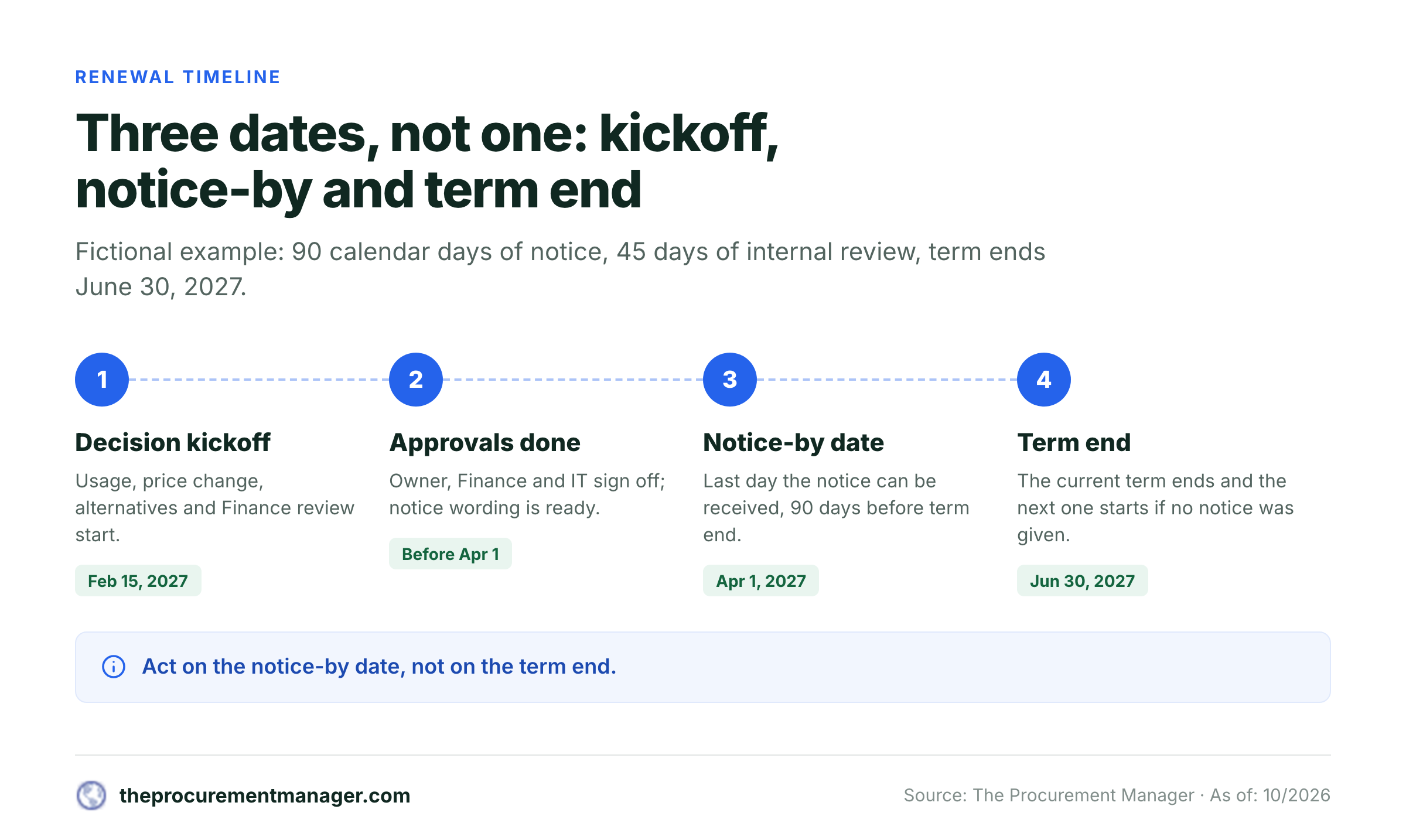
Verify the executed terms
Procurement finds the signed order form, master agreement, amendments and renewal clause. Record the controlling version and the actual notice method.
Nominate the decision owner
The business owner confirms whether the service is still needed and who uses it. Finance reviews commitment, budget and invoice history. IT or Security reviews access, data and exit implications where relevant.
Open the decision before the notice deadline
At the kickoff date, gather usage, service performance, pricing changes, replacement options and switching costs. Decide whether to renew, renegotiate, consolidate or terminate.
Record approval and execute the action
Capture who approved the decision, on what evidence, and when. If notice is required, use the contract's specified recipient, channel and timing.
Preserve proof and reset the record
Link the sent notice, receipt or acknowledgement, signed amendment or renewal order. Only then update the current term and calculate the next notice cycle.
Who owns each part?
| Role | Decision responsibility | Evidence to leave behind |
|---|---|---|
| Business owner | Need, adoption, alternatives, service outcomes | Usage summary and renewal recommendation |
| Procurement | Contract terms, vendor negotiation, notice mechanics | Clause reference, quote comparison, communication log |
| Finance | Budget, commitment, billing and forecast | Approval or exception with cost basis |
| IT / Security | Access, integrations, data handling and exit risks | Review outcome and required remediation |
| Legal, when needed | Ambiguous clauses, unusual liability or notice terms | Interpretation or approved notice wording |
The owner in the tracker is the person accountable for moving the decision forward, not necessarily the person authorized to sign a renewal. Record signature authority separately in the approval packet when your organization requires it. Avoid using a shared mailbox as the only owner: it can receive reminders that nobody's accepted responsibility for.
A decision packet that fits in one screen
For every contract marked In review, keep a short companion note with: the controlling agreement link and clause excerpt; current term and proposed next term; annualized and total committed cost; service owner recommendation; alternatives and exit impact; Finance approval; IT/Security sign-off if applicable; notice recipient, channel and deadline; and a final evidence link. The packet should explain why the organization acted, not merely that a date was filled in.
If the vendor changes the proposed price or term, retain both the old and new versions. If an amendment overrides the notice clause, update the source link and have another reviewer verify the recalculated deadline. A stale formula applied to the wrong contract version is more dangerous than a missing formula because it looks authoritative. That's why the source link sits in the same row as the date it supports.
Build a weekly renewal review that catches real exceptions
Sort by notice-by date; then look at records without a verified notice rule. Don't sort only by term-end date. A contract ending later may require earlier notice than one ending sooner.
A practical weekly agenda's simple: check VERIFY TERMS first; review overdue or urgent notices with Legal; confirm upcoming decisions and named owners; check Finance and IT dependencies; inspect proof for notices supposedly sent; and reconcile newly signed agreements or amendments. Record the review date and owner in a small change log. A colleague who picks up the queue can then see what's been checked. A monthly budget meeting's useful for forecast planning, but an approaching notice deadline shouldn't wait for the next monthly meeting.
The best exception queue has specific causes, and they're rarely the same from week to week. “Missing signed document” means Procurement must locate the controlling agreement. “Owner left company” means the department head must assign a replacement. “Vendor quote pending” means a buyer must chase the vendor. “Notice recipient unclear” requires contract interpretation. “Notice sent, no receipt” calls for evidence follow-up. They're different problems and shouldn't all be hidden behind a generic At risk status.
Reconcile the register with purchasing and payment data
An elegant register's still incomplete if a team can sign a contract without adding it. Periodically compare it with purchase orders, accounts payable, corporate-card charges, the software inventory and departmental vendor lists. Flag unmatched recurring payments, since they're the first sign of a contract nobody registered, duplicate vendor names, and agreements with no current business owner. Where the legal entity differs from the product brand, keep the signed counterparty in the register and use a separate alias in Notes.
Don't assume an invoice's due date is a renewal date. An invoice may cover usage, arrears, an installment or a period that doesn't match the legal term. Likewise, a purchase order expiration may reflect an internal budget cycle rather than the agreement's termination rights. Resolve discrepancies against executed terms before recalculating notice dates. If it's not in the signed document, it doesn't belong in the notice-by column.
Handle notice clauses that a simple formula can't resolve
The template's intentionally conservative. A formula can subtract dates, but it can't and shouldn't decide what a particular clause legally means. The exceptions below are the ones a formula can't settle on its own.
- Calendar days and business days count differently, so use the rule actually written in the contract and the applicable holiday calendar.
- Months and days aren't interchangeable:
EDATEhandles calendar-month offsets, but a flat day subtraction may not. - Delivery and receipt can differ, because the contract may require receipt by a date rather than merely sending an email that day.
- Named recipients and channels matter, since an account manager's informal email address may not satisfy a notice clause naming a legal entity or postal address.
- Amendments and order forms can change the rules, because the governing notice term may be modified in a later document.
- Multiple renewal lines need care, because a master agreement and several independently renewable orders may need separate rows.
- Evergreen terms work differently, since a continuously renewing arrangement may have a rolling termination right rather than one annual renewal date.
- Already passed dates need confirmation of the next term, any cure or negotiated exit, and the consequences of missed notice before you change the row.
For perspective, U.S. federal contracting has its own option-exercise rules. The standard option clause at FAR 52.217-9 leaves blanks for the exercise period and the length of the preliminary written notice, and FAR 17.207 directs contracting officers to give notice within the period specified in the contract. They concern covered federal procurement, not a default notice period for ordinary private SaaS agreements. They show why a generic 30-, 60- or 90-day assumption is unsafe.
How to use the tracker with Excel, Google Sheets or a shared drive
Excel: Save the workbook in a controlled shared location rather than emailing versions back and forth. Set data validation for the status and notice-unit fields, format the date columns, protect formulas, and use conditional formatting on Urgency. If you've got a holiday table, keep it in the same workbook and identify the jurisdiction it represents.
Google Sheets: Share edit rights with the people maintaining contract facts, and consider limiting formula and source-evidence columns to designated editors. Set the spreadsheet's locale and time zone deliberately. Google documents that these settings affect date and number formatting; it also documents that TODAY() is recalculated rather than frozen at initial entry. Make a small test record, and don't skip the step of verifying the date arithmetic before importing the full register.
Shared ownership: A spreadsheet can be a workable starting point, but it isn't an approval system. The sheet can say Approved without capturing who approved it or what they reviewed. Store the approval record in the decision packet, then link it from the row. Restrict access to confidential contract documents according to your organization's policies. Not everyone who can see the tracker should see every contract, and you shouldn't assume they can.
If the tracker becomes unreliable because multiple departments change it, owner handoffs go unnoticed, or decisions require several approvals, move the workflow into a system that records assignments and evidence. Export the register first. Stable IDs, source links and explicit notice rules are what'll make a later migration far cleaner than a calendar full of free-text reminders.
When should you replace the spreadsheet?
Keep the sheet when one person can maintain the source records, you've got a handful of agreements per owner, the organization can reliably review the deadline queue, and the approval trail lives in a clearly linked place. It's inexpensive and easy to inspect, which makes it useful during an initial contract-inventory cleanup.
Consider a dedicated renewal workflow when the problem's no longer finding a date but getting a defensible decision before it. Warning signs include owners ignoring reminders, Finance learning about commitments after renewal, IT reviewing vendors too late, notices sent without delivery evidence, or contract amendments never reaching the register. The useful upgrade isn't another dashboard. It's an accountable chain from agreement evidence to owner, approvals, notice, and proof.
A procurement-specific renewal routing tool should be evaluated on whether it can route a contract renewal to the business owner, Finance and IT, show the controlling dates and source evidence, and produce one decision packet. Don't assume it also reads contracts, sends notices, manages all spend or replaces a contract lifecycle management platform. Ask the provider to show you where the boundary is, and don't accept a slide in place of a demo.
Frequently asked questions
What columns should a contract renewal tracking spreadsheet have?
Include a contract ID, legal counterparty, agreement name, owner, term end, auto-renewal flag, notice quantity and unit, calculated notice-by date, review kickoff, annualized value, decision, decision status, notice method, signed-agreement link and proof-of-notice link. Keep the contract's exact terms as the source of truth.
How do I calculate a contract renewal notice date in Excel?
For a calendar-day rule, subtract the notice days from the term-end date. For business days, use WORKDAY with the relevant holiday calendar. For calendar months, use EDATE. Check the clause for receipt requirements and any special counting rules.
Can I use this contract renewal template in Google Sheets?
Yes. Paste the tab-separated header into a blank sheet, then copy the formulas into their specified columns. Set date formats, validation lists, locale and time zone. Test a contract you know well against its signed notice clause before you rely on the calculations; if it doesn't match, the formula's wrong or the clause is unusual.
Should I track the contract end date or the notice deadline?
Track both. The end date describes the current term, while the notice deadline determines when the team may need to act to avoid or change a renewal. Sort the weekly action queue by the verified notice deadline.
Does the spreadsheet automatically send cancellation notices?
No. The formulas calculate dates and flags; they don't deliver notices, obtain approvals or prove receipt. A person must execute the contractually required process and attach evidence.
What if a contract has already passed its notice deadline?
Flag it for immediate Procurement and Legal review. Check the controlling documents, whether the contract actually renewed, and whether any alternative termination or negotiated exit's available. Don't assume the formula alone determines the legal result.